Download Clip Studio Paint EX 5 (x64) for free, the full, permanent version, perfect for drawing cartoons, manga, illustrations, coloring, creating multi-page comics, and animations. Includes tools for drawing lines, vectors, 3D, and installation instructions.
What is Clip Studio Paint EX?
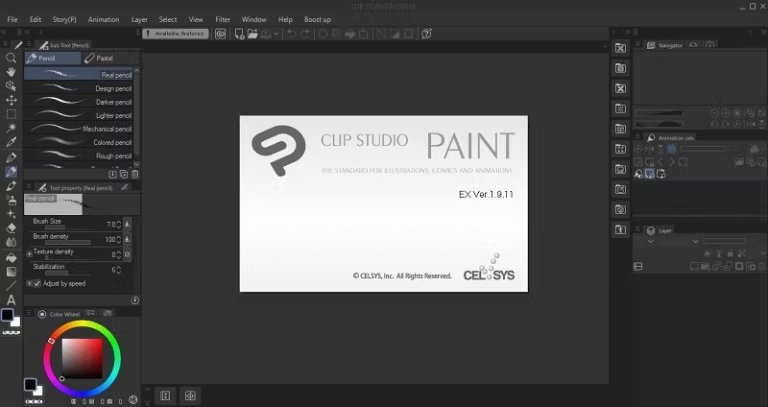
Clip Studio Paint EX This is a drawing and cartooning program designed specifically for manga, comics, illustrations, and animation. Its key feature is precise and natural line control via the Brush Engine, which allows adjustment of pressure, thickness, shape, brush tip, and color distribution to suit various styles. It supports both raster and vector layers, making it easy to draw, outline, adjust thickness, and modify shapes afterwards. The Perspective, Symmetry, and Special Ruler tools help maintain image perspective and structure. The Material system includes brushes, backgrounds, screentones, 3D models, and pre-made elements to speed up repetitive tasks.
The EX version is ideal for multi-page and large projects, as it features a Story Management system for combining comic or manga pages into a single project. It includes tools for creating panel frames, speech balloons, speed lines, and effect lines for organized page layout. Coloring support includes masks, clipping, blending modes, gradient maps, and various selection tools, as well as 3D drawing figures for posing and camera angles before sketching. For animation, it offers a timeline, onion skin, light table, and frame-by-frame cell arrangement, allowing for the creation of both still images and motion graphics within a single program.
Tasks requiring file exchange with other tools can import and export PSDs and other standard image formats, and offer options for print and digital publishing. If you need another free drawing tool, you can use... Krita Studio It's a great option for digital painting and illustration. Integrating drawing tools, 3D layout, materials, and animation into a single workflow reduces the need to switch programs, making it ideal for artists who want control from sketching and coloring to layout and file preparation for export.
Key Features
- Brush Engine - Finely adjust pressure, shape, brush tip, and line behavior for sketching, outlining, and coloring.
- Vector Layers - Draw vector lines and then adjust their thickness, shape, intersections, and alignment later without having to redraw them all.
- Perspective & Special Rulers – Includes perspective, symmetry rulers, and special modes for controlling viewpoint and lines.
- Comic Frames & Balloons - Systematically create speech bubbles, frame structures, and background elements for comics or manga.
- Screentone & Materials – Using Screentone backgrounds, brushes, models, and pre-made materials helps reduce the need to redraw elements.
- 3D Drawing Figures - Arrange the pose, camera angle, and proportions using a 3D model to use as a reference before sketching the lines.
- Multiple-Page Story - Manage multiple comic or manga pages within a single project. Suitable for print publications and projects requiring consistency in formatting.
- Animation Timeline – Arrange cells and frames on the timeline for creating frame-by-frame animation.
- Onion Skin – Displays the previous and next frames stacked on top of each other to help control the position and continuity of motion.
- Light Table – Use reference images or frames during drawing to easily compare shapes, positions, and movements.
- Layer & Mask Workflow - Supports Mask, Clipping, Blending Mode, and layer management for coloring and editing images without affecting other parts.
- Import & Export - Supports PSD and standard image formats for exchanging work with other graphic programs and preparing files for publication.
What's new?
What's new in Clip Studio Paint Ver. 5.1.1 (released July 31, 2026)
The following updates have been made.

All Grades
-(Windows / macOS / iPad / iPhone) Fixed an issue where the app would crash when using Create New from Clipboard when there is no canvas open.
-(Windows) Fixed an issue where running Quick Effects would cause the app to become unresponsive in systems with monitors with a high refresh rate.
-(Android) Fixed an issue where the app would crash when using Create new from app clipboard when there is no canvas open.
EX
-(iPad / iPhone / Android) Fixed an issue where animation cels would not export from File menu > Export animation > Export animation cels.
System Requirements
- Operating System: Windows 10 / 11 (64-bit)
- Processor: Intel or AMD supporting SSE2, or an Arm system supporting x64 operation.
- Memory: Minimum 2 GB RAM, 8 GB or more recommended.
- Graphics: Supports OpenGL 3.3
- Storage space: At least 3 GB free.
- Screen resolution: Minimum XGA (1024 × 768), WXGA (1280 × 768) or higher recommended.
- Note: Some functions and authentication require an internet connection.
File Information
- Operating System: Windows 11 / 10 (64-bit only)
- Risk Level: 🟡 Low Risk
- Developer: CELSYS, Inc.
- Language: Multilingual
- Size: 499.72 MB
- File type: *.rar
- Password: mawto
- Installation Method: Available
- Updated: 12/09/2026
- Required Reading: Download Guide