Download the full version of LightBurn, a laser design and control software for cutting and engraving. It supports Ruida, GRBL, Trocen, Galvo, cameras, material libraries, and provides a preview before actual firing. It can be used with vector and image files.
What is LightBurn?
LightBurn It's a program for designing and controlling laser machines from a single window. You can draw lines, create text, arrange objects, edit nodes, or place images to prepare for cutting and engraving without having to keep a separate program open all the time. Importable files include SVG, DXF, AI, PDF, PNG, JPG, and many other graphic formats. If vector work becomes more complex, you'll need to prepare the original in... Adobe Illustrator Then you can send it to LightBurn, and then adjust the layer and laser settings to match the actual material being used.
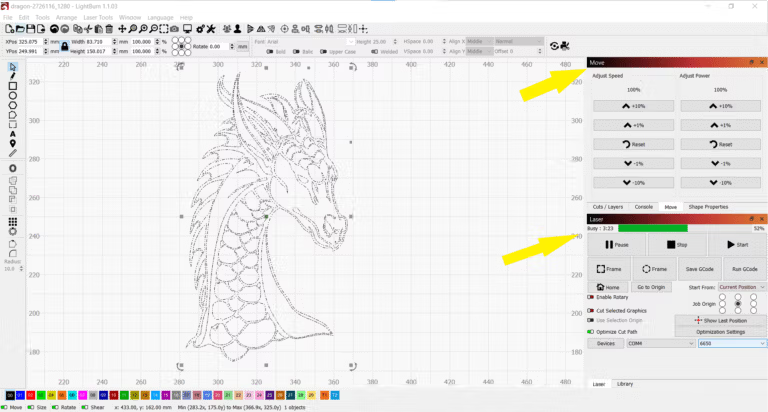
During preparation for firing, the program allows you to set the speed, power, number of passes, and work order separately for each layer. A preview of the laser path is provided before the actual firing begins, allowing you to see where the laser will travel and approximately how long it will take. The Material Library allows you to store frequently used settings for wood, acrylic, leather, or other materials and recall them later, eliminating the need to memorize every single setting. Version 2.1 adds Quick Nest for more efficient use of sheet space when arranging objects, improves the camera system to support multiple cameras and network cameras, and includes an Undo History for easier review of edits.
On the machine side, LightBurn supports multiple controller families, including Ruida, Trocen, GRBL, Smoothieware, Marlin, and Galvo, as well as some systems using EZCad. The supported specifications vary depending on the controller and machine model. Connectivity includes both USB and network options for compatible devices. Once a device is added, origin position, work area size, rotary settings, and laser-related parameters can be managed from the machine profile. Newer models also feature an improved Cut Planner for faster calculation of complex tasks, reducing waiting time for calculations on the screen for repetitive cutting.
Key Features
- You can draw lines, shapes, text, and edit nodes in vector graphics within the program.
- Import SVG, DXF, AI, PDF, and various image file formats for cutting or engraving applications.
- Adjust the image for engraving using Trace, Dithering, Contrast, and image manipulation tools.
- Speed, Power, Passes, and execution order can be defined separately for each layer.
- Preview the laser path and operating time before the actual firing begins.
- The Material Library stores the values of frequently used materials, which can then be retrieved and reused in new projects.
- Quick Nest helps organize multiple objects to make better use of the space on the material sheet.
- Supports multiple cameras and network cameras to assist in real-time positioning.
- Undo History displays the edit sequence and makes it easier to revert to the desired step.
- Compatible with various Ruida, Trocen, GRBL, Smoothieware, and Marlin controllers.
- Supports some Galvo systems using EZCad, including laser and field settings.
- Set up Rotary and use Cut Planner to quickly adjust and calculate complex job paths.
Laser cutting machines that are supported
The LightBurn program supports a wide range of laser cutting machines and brands, covering both professional-grade and home-use laser machines. The supported machines can be categorized based on the controllers used for machine operation as follows:
1. Laser machine using Ruida controller
- This is a popular controller for medium and large CO₂ laser machines.
- Supported machine brands include Thunder Laser, OMTech, Red/Black Lasers, and various models of laser machines from China.
2. Laser machine using Trocen / AWC controller
- This type of controller is commonly used in medium to large CO₂ laser machines.
- Supported models include Trocen AWC708C, AWC608, and devices using controllers from this family.
3. Laser Engraving Machine Using a GRBL Controller
- An open-type controller commonly used in small laser machines and laser CNC machines.
- Supported machine brands include Ortur, NEJE, Eleksmaker, Atomstack, and other DIY laser machines that use GRBL firmware.
4. Laser machine using Smoothieware controller
- Smoothieware is open-source firmware used in small and medium-sized laser and CNC machines.
- Machines that use Smoothieboard and similar boards are compatible with LightBurn.
5. Laser Engraving Machine Using Marlin Controller
- Marlin controllers are commonly used in 3D printers, but some models also support use with lasers.
- DIY laser machine with Marlin controller can be used with LightBurn
6. Galvo Laser Machines (Fiber Laser and UV Laser)
- Supports certain models of Galvo laser machines that use EZCad2 and EZCad3 controllers for high-speed engraving applications, such as fiber lasers and UV lasers.
7. Other laser devices
- Can support other laser machines that use specific firmware or controllers, allowing users to customize settings according to their needs.
If you have a laser machine and are unsure whether it is compatible, please check the controller model and refer to the details on the LightBurn website. Alternatively, contact support for assistance to ensure compatibility.
What's new?
LightBurn 2.1.04 — 2026-08-11 - Fixed open-shape reversal in the optimizer. - Limited Focus Test laser selection to dual-tube devices. - Corrected the effective clock value used with EZCad3. - Fixed CSV refresh when Variable Text reaches the final row. - Resolved several memory leaks. - Fixed a zero-jump issue in rotary slicing on BSL devices. - Corrected red-light always-on behavior for BSL. - Fixed oscillator delays when Always Open MO is enabled. - Restored additional controls in the external-axis dialog. - Fixed a crash while backing up or importing preferences. - Restored layer-name behavior affected by the 2.1.03 change. - Removed the Spacebar Heating option. - Fixed an Art Library status-related crash. - Improved the Galvo correction solver.
File Information
- Operating System: Windows 11 / 10 / 8.1 (x64)
- Risk Level: 🔴High Risk
- Developer: LightBurn Software
- License: Shareware
- Version: 2.1.04
- Language: English / multilingual
- Size: 166.12 MB
- File type: *.rar
- Password: mawto
- Updated: 1/9/2026
- Required Reading: Download Guide