

Download OpenAI ChatGPT Desktop (With Codex) 2026 for free. It includes Thai language support. Install ChatGPT on your computer and use it on your latest Windows PC.
What is ChatGPT Desktop?
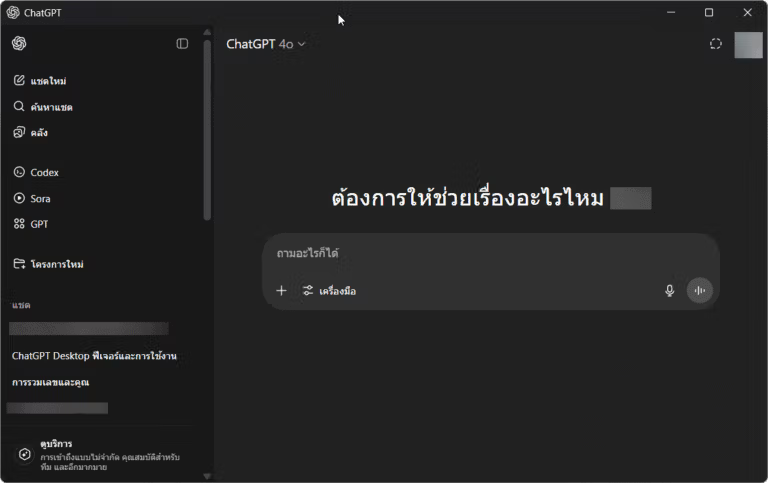
ChatGPT Desktop ChatGPT is a desktop application designed for direct installation and use on computers running both Windows and macOS. It provides users with more convenient access to AI without needing to constantly open it through a web browser. Basic functionality remains the same as the familiar ChatGPT, such as asking questions, searching for information, summarizing content, translating languages, assisting with article writing, analyzing images, or reading various documents. However, the advantage of the desktop version is its closer integration with existing computer components and the ability to quickly access ChatGPT while performing other tasks.
Beyond general chat, ChatGPT Desktop offers tools for more complex tasks, such as Work, which helps manage multi-stage tasks from research and data analysis to creating spreadsheets and presentations. It also includes Codex, designed specifically for programming, which can help read code, debug, and work on local projects. Furthermore, it supports file attachments, voice commands, and in some systems, integration with programs like VS Code, Terminal, and other applications, eliminating the need to frequently copy data between multiple programs.
The highlight of ChatGPT Desktop is not just bringing the web-based ChatGPT into a program, but bringing AI closer to becoming a personal computer assistant. Users can open ChatGPT and ask questions while working, analyze files they are using, help debug code, search for information, or continue working on projects all from a single location. It's suitable for both general use and real-world tasks such as writing documents, developing websites, programming, data analysis, or handling multitasking. For those who use ChatGPT regularly, the desktop version reduces the need to switch windows and makes interacting with AI more seamless and natural.
Key features of ChatGPT Desktop
ChatGPT Desktop offers key features that make it more convenient to use than the web version, especially for those working with files, writing code, or multitasking. Some of the notable features include:
- ChatIt can be used for general question-and-answer tasks, similar to ChatGPT on the web, including finding information, summarizing messages, analyzing files, assisting with writing, analyzing images, or generating ideas.
- WorkSuitable for tasks involving multiple steps, such as data gathering, data analysis, report writing, document creation, spreadsheet creation, or presentations, allowing for seamless workflow as a single project.
- CodexSuitable for programmers; it can help read, edit, and write code, work with project folders, repositories, and developer tools.
- Can work with files on the local machine.ChatGPT can be allowed to read files from the computer to use as supporting information for work. We will be the ones to authorize which files it has access to.
- It has a built-in browser.You can open websites directly within ChatGPT, allowing you to search for information, open multiple pages, or work with various websites without frequently switching between ChatGPT and Chrome.
- Can be controlled by voice commands.:
ChatGPT allows you to communicate with or give commands to it using voice, ideal for quickly asking questions or asking for help with tasks without typing. - Compatible with Projects.Projects created in ChatGPT can be opened and continued working on the desktop, keeping related data, files, and conversations together.
- Sync usage across devices.Some tasks and conversations can be continued on Desktop, Web, and Mobile devices, making it easy to switch between devices.
- ChatGPT can be launched quickly.On Windows, you can use a keyboard shortcut to instantly open the ChatGPT window. This is useful when you need to ask a short question without having to open the program every time.
For macOS, there's also a Work with Apps feature that allows ChatGPT to work with certain programs such as VS Code, Cursor, Xcode, Terminal, Apple Notes, or Notion, making it easier to view the code or text you're currently working on and continue editing it.
If you're someone who develops websites, writes PHP or JavaScript, uses WordPress, or frequently modifies code, the most useful features would be the built-in Work, Codex, and Browser, as they significantly reduce the need to copy and paste data between multiple programs.
File Information
- Operating System: Windows 11 / 10 (x64)
- License: Freeware
- Developer: OpenAI
- Language: English / Thai
- Size: 796 KB
- File type: *.exe
- Updated: 5/9/2026
- Required Reading: Download Guide
==== Installation via .exe file (Online Installer) ====
==== Installation from the Microsoft Store ====





