Download the Automatic Mouse and Keyboard (AutoMouseKey) program for free and permanently. This program helps automatically press the mouse and keyboard. It is the latest version and easy to install.
About Automatic Mouse and Keyboard
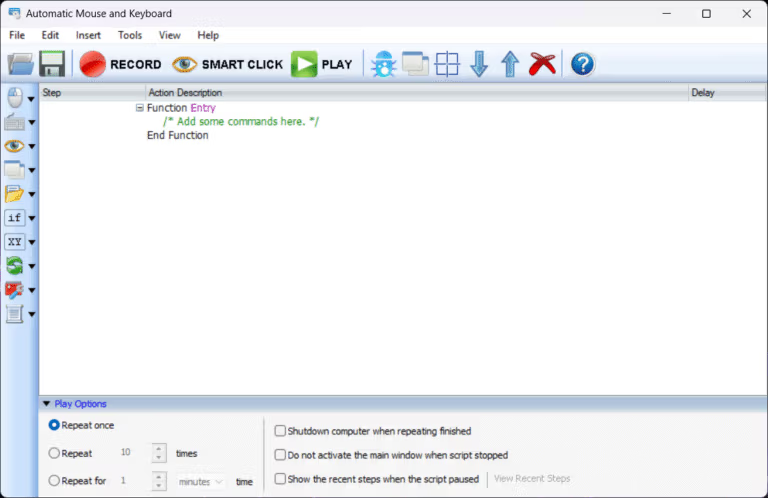
Automatic Mouse and Keyboard This is a program for recording and simulating automatic mouse clicks and keyboard keystrokes. It can be configured to repeat specific actions as defined, such as clicking on screen locations, launching programs, entering data, or performing complex, step-by-step tasks. This program is ideal for individuals looking to reduce repetitive tasks, such as entering large amounts of data. Software testing, gaming, or running commands that require significant time and effort if done manually
The standout feature of Auto Mouse and Keyboard is its ability to record macros and flexibly customize scripts. You can set conditions, timing, and operation patterns to precisely match your needs, such as scheduling tasks to run on a schedule or writing scripts to check the screen status before clicking or typing further. Additionally, advanced features such as image recognition and pixel detection can be used to analyze images and colors on the screen before executing specified actions. This makes the program suitable for both general users and technical users who require high-level automation.
Core Competencies
- Simulate mouse and keyboard operations Supports all actions such as clicking, typing, dragging, etc.
- Record & Repeat Every user action is accurately recorded, with the ability to adjust the speed or make corrections.
- Driver Command Level Make work orders more stable and accurate.
- Search for positions on the screen from small images (Image Recognition) Supports the use of transparent pixels to locate desired positions, regardless of where the image appears on the screen.
- Background Operation without disturbing the user
- Supports advanced scripts. For example: If-Else, Switch Case, Loop, Exception Handling, Clipboard Monitor, Registry Operation, Database/Excel Operation, JSON Data Handling, Multi-threading, Windows API, DLL, OLE/COM, and Console Commands.
- Create UI and additional functions. For example: Custom Windows, Animated GIF, Scheduled Tasks, Screen Capture
- Export as an EXE file. (Compile script to EXE) Supports adding icons, copyright, and custom information.
- Built-in supplementary tools Such as Auto Hotkey, Mouse Clicker, Key Presser, as well as frequently used utility functions.
File Information
- Operating System: Windows 11 / 10 / 8.1 / 7
- Risk Level: Medium
- Developer: RobotSoft
- Language: English
- Size: 15 MB
- File type: *rar
- Password: mawto
- Updated on: 8/9/2025
- Required Reading: Download Guide
You can still download FastKeys Free