Download XnConvert for free. This batch image conversion and resizing program for Windows x64 supports over 500 file formats, works offline, and includes tools for cropping, rotating, adding watermarks, and editing multiple images at once.
What is XnConvert?
XnConvert XnSoft's batch image management program helps convert, resize, and edit large numbers of images in a single step. It supports over 500 image file formats, including JPEG, PNG, TIFF, GIF, WebP, AVIF, HEIC, PSD, JPEG XL, PDF, and Camera RAW files, with export capabilities in approximately 70 formats. This makes it ideal for preparing images for websites, documents, image libraries, or personal storage.
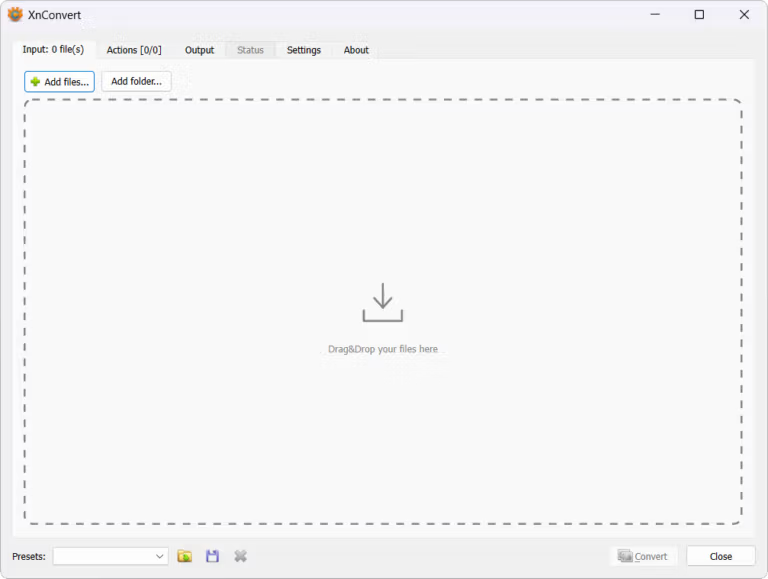
The workspace is divided into Input, Actions, and Output tabs, allowing you to drag files or entire folders in and systematically define commands to apply to all images. You can crop, rotate, flip, resize, adjust brightness, contrast, color, and sharpness, as well as add filters, masks, text, or watermarks. Then, select the quality, output format, and file name before starting processing. This is useful for converting multiple media types besides images. Format Factory It's another option for converting video, audio, and documents.
XnConvert runs locally without needing to upload images to online services, making it ideal for personal photos, work files, and camera images that need to be stored on your computer. In addition to processing multiple files, it can save command sets as presets for reuse, allows for preserving or deleting EXIF, IPTC, and XMP data, and supports multiple languages, enabling consistent management of repetitive image tasks. The program is available for Windows, macOS, and Linux. Commercial use within a company requires checking license terms with the developer.
Key Features
- Convert multiple images at once by dragging files or folders into the Input tab.
- It supports over 500 image file formats and can export in approximately 70 formats.
- Resize the image based on its width, height, percentage, or longest side.
- Crop, rotate, flip, and manage lossless JPEGs in a single task.
- Adjust the brightness, contrast, gamma, saturation, and color levels of the image.
- Apply filters such as Blur, Sharpen, Emboss, and effects in the specified order.
- Add text or image watermarks, and specify their position and transparency.
- You can edit, copy, delete, or preserve EXIF, IPTC, and XMP data.
- Name the destination file using a counter, date, or metadata in the specified format.
- Monitor the folder and apply the same commands to newly added images.
- Save the settings as a preset for reuse in the next set of tasks.
- Process offline on Windows, macOS, and Linux without uploading files.
What's new?
- Add file size information to the Convert section for easier viewing of file details.
- Add a Ratio pad option for managing blank spaces according to the image aspect ratio.
- Updated JPEG XL support to version 0.70.
- Update the LibHEIF library to version 1.13.0.
- Add the ability to position image watermarks in the Paint tool.
- Add a Blurred frame effect to create a blurred image frame in your conversion project.
- Add a color definition to the canvas area of the image resizing.
- Fixes the issue of incorrectly applying ratings to images.
- Fixes the "Load default values" button issue in the Resize settings.
- Adjust the Filter dialog window to display correctly.
- Resolve the issue of the "Remove alpha channel" option being constantly enabled.
- Fix the Language settings window issue.
- Solve the problem of lossless JPEG rotation when dealing with long filenames.
- Adjust the selection of the most frequently used format when saving files.
- Resolving lossless playback issues with HEIC files.
- Solve the lossless processing problems of JPEG XL.
- Resolves issues loading JXL and AVIF files located within the archive.
- Adjust the margins in the Write settings dialog window.
- Resolve file naming issues when using the Capture command.
- Fixes issues with using the mouse wheel to scroll to the previous or next file on macOS.
- Resolves the issue of not creating lossless backup files for JPEGs.
- Resolve grid and subdivision spacing issues.
- Resolve program crashes when cleaning embedded comments.
- Resolve the scaling using the longest side, shortest side, and percentage.
File Information
- Operating System: Windows 7 / 8 / 10 / 11 (x64)
- Risk Level: 🟢 Safe
- Developer: XnSoft
- Language: Multilingual
- Size: 26.99 MB
- File type: *.rar
- Password: mawto
- Installation Method: Available
- Updated: 28/8/2026
- Required Reading: Download Guide