Download VSO ConvertXtoDVD 7 Free Full Permanent Version, the latest version. A comprehensive video converter for all formats to burn videos to DVD, featuring built-in menu creation and subtitle insertion before burning.
What is ConvertXtoDVD?
ConvertXtoDVD is a program designed to convert general video files into DVDs playable on standard DVD players. Developed by VSO Software, this program was created to solve a simple problem: most downloaded or recorded video files are in formats like MP4, AVI, MKV, or WMV, which older DVD players cannot open. ConvertXtoDVD converts those files into the DVD-Video standard and burns them to a disc, ready for TV viewing without the user needing any knowledge of video encoding.
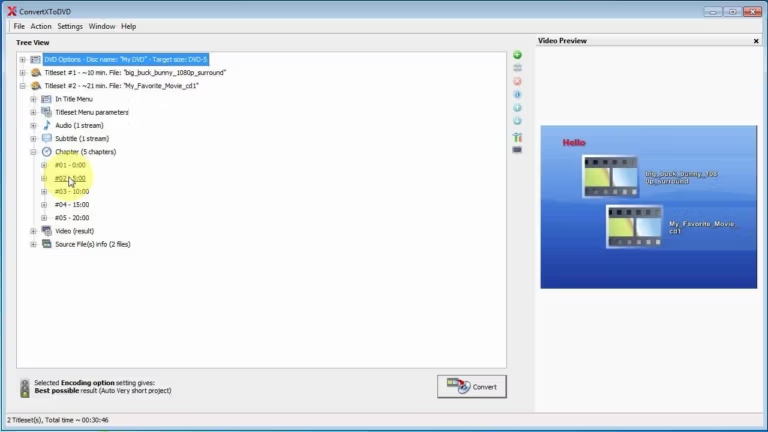
To use it, start by dragging the desired video files into the program. You can add a single file or combine multiple files onto one disc. The program automatically converts the video and audio into DVD-supported formats while adjusting the image size and aspect ratio to fit the TV screen. Users can add subtitles in multiple languages, select multiple audio tracks, and divide the video into chapters to easily skip to specific scenes, just like commercial DVDs.
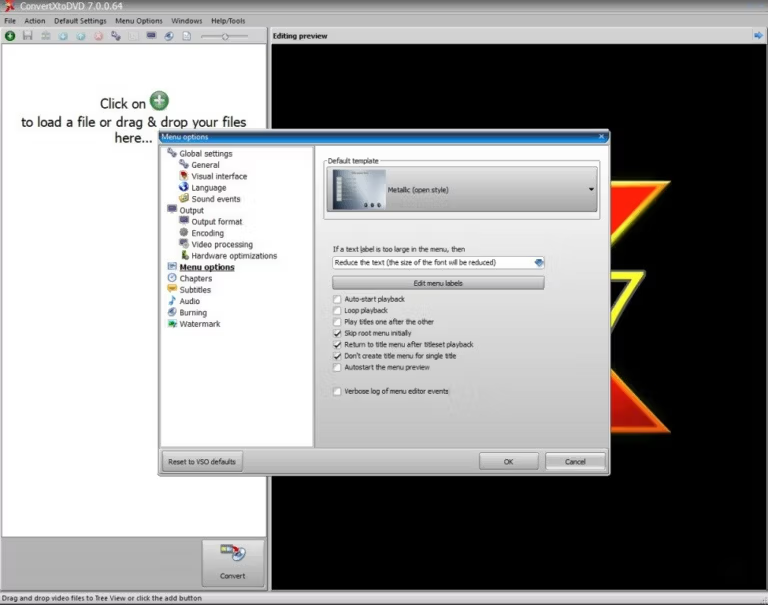
Another highlight is the disc menu. The program offers various ready-made menu templates to choose from, allowing you to add background images, titles, and arrange buttons as desired. For those who want a professional-looking disc, simply select a template and make minor text edits without designing from scratch. For those who prefer full control, colors, fonts, and menu positions can be customized in detail.
In addition to burning to physical DVDs, ConvertXtoDVD can save projects as ISO files or VIDEO_TS folders for backup or later burning. The program supports dual-layer burning, allowing for longer movies or multiple episodes on a single disc, and includes a post-burn quality check system to reduce the chance of disc errors. It also covers general disc burning tasks that don't focus on video conversion. Ashampoo Burning Studio It is quite comprehensive.
ConvertXtoDVD is ideal for people who want to keep their favorite videos in DVD format, watch them on a home TV, or create discs for family and friends without dealing with complex technical steps. Open the program, add files, choose a menu, and click convert—the program handles everything else until you have a disc ready to watch.
Features:
- Supports AVI, Mpeg, Mpeg4, DivX, Xvid, MOV, WMV, WMV HD, DV, MKV, DVD formats.
- Supports video stream extraction from camcorders, TV/Sat, and video capture cards.
- Supports up to 4 hours of continuous video content.
- Supports AC3, DTS, PCM, OGG, MP3, and other audio formats.
- Create titles and subtitles with support for SRT, .SUB, IDX, and .SSA formats.
- NTSC and PAL conversion.
- Select recording options.
- Preview in the embedded player.
- Burn completed projects to DVD.
- Supports CD-R/RW, DVD-R/RW, DVD+R/RW, DVD-RAM, DVD+R DL, DVD-R DL, BD-R, BD-RE discs and drives.
- Supports Double Layer and HD-Burn technology.
- Create colorful menus.
- Built-in wizard for more convenient and easier operation.
- High speed.
- High-quality results.
- Pleasant and user-friendly interface.
- Cut unwanted parts from video before conversion.
- Add chapters automatically or manually.
- Add watermarks and copyright text to videos.
- Merge multiple video files into a single title.
- Rotate video and adjust brightness and contrast.
- Add an open video before starting the main story.
- 2 pass encrypted for better quality
- Use Hardware Decoding to help convert files faster.
- Sync images, sounds and narrations to match.
- You can create an ISO file on your device or save it to USB.
- Supports multi-core processors for faster conversions.
- There is a helper to adjust the image quality and quality guides before starting the conversion.
- Automatic shutdown when converting files are finished.
What's new
Version 7.5.0.164
- Fixed an issue where the ISO file was selected in the working folder and the Wright did not start automatically.
- Solve the problem of the Wright window not closing after Wright is finished.
- Fixed an issue where the sound does not match the image in some source files with low framerates.
- Fixed the issue of importing the Video_TS folder back to use again.
- Solve the Convert button to relocate after you start converting files and press cancel.
- Fixed an issue where the program stopped working when using 4 subtitle files at the same time.
- Fixed an issue where the conversion was stuck when setting up some burn speeds.
- Solve the problem of flashing subtitles in the converted video.
file information
- Operating System: Windows 11 / 10 / 8.1 / 7 / Vista / XP
- Risk Level: Medium
- Developer: VSO Software
- License: Shareware
- Language: Multilingual
- Size : 78.59 MB
- File type: *rar
- Password : mawto
- Updated on: 29/10/2026
- Need to read: Download Guide