Download Freemake Video Converter Gold 2026 Full Version (Permanent) for free. This video and audio file conversion program is easy to install, supports multiple formats, and includes clip management tools and installation instructions.
What is Freemake Video Converter?
Freemake Video Converter คือโปรแกรมแปลงไฟล์วิดีโอบน Windows ที่แก้ปัญหาไฟล์เล่นไม่ได้หรือไม่ตรงกับอุปกรณ์ปลายทาง ไฟล์จากกล้องที่หนักเกินกว่าจะแชร์ต่อ คลิปที่โหลดมาแล้วมือถือเปิดไม่ออก หรือหนังที่อยากเก็บลงแผ่น ตัวนี้รองรับต้นฉบับหลากหลาย ทั้งไฟล์วิดีโอทั่วไปอย่าง MP4, AVI, MKV, WMV, MOV แผ่น DVD ลิงก์วิดีโอออนไลน์ ไฟล์เสียง และภาพนิ่ง แล้วเปลี่ยนเป็นรูปแบบที่ต้องการ ไม่ว่าจะเป็น MP4 สำหรับพกพา MP3 ไว้ฟังอย่างเดียว หรือไฟล์พร้อมไรต์ ทุกขั้นตอนทำจากหน้าต่างเดียว ไม่ต้องเปิดหลายเครื่องมือสลับไปมา
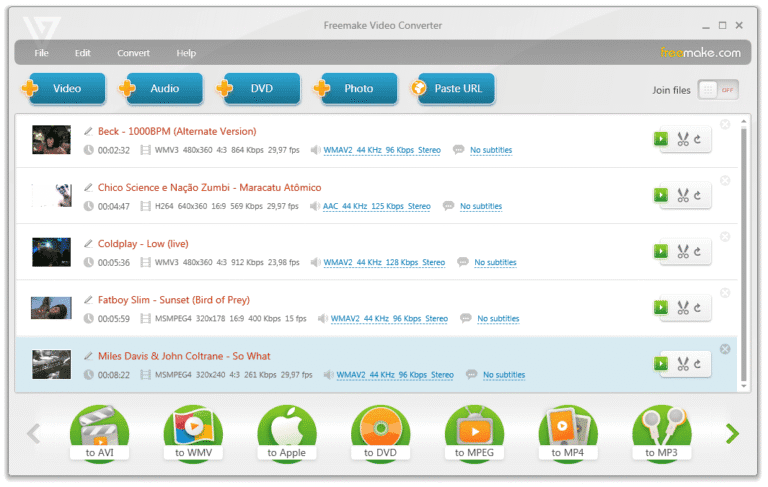
วิธีใช้งานแบ่งเป็นสามจังหวะ เราเพิ่มไฟล์ด้วยการลากวางหรือเลือกจากเครื่อง เลือกรูปแบบปลายทางจากปุ่มด้านล่างที่มีทั้งนามสกุลไฟล์และพรีเซ็ตของอุปกรณ์อย่าง iPhone, Android, PSP, Xbox แล้วกดแปลง จุดที่ต่างจากตัวแปลงทั่วไปคือเครื่องมือตัดต่อเบื้องต้นที่แถมมาให้ในตัว เราตัดช่วงที่ไม่ต้องการ หมุนภาพที่ถ่ายมาเอียง ต่อหลายคลิปเข้าด้วยกัน ลบแถบดำออก หรือล็อกขนาดไฟล์ปลายทางไม่ให้เกินโควตาก่อนเริ่มงานได้เลย ใครอยากได้การตั้งค่าเฉพาะทางก็เปิดตัวแก้ไขพรีเซ็ต ปรับตัวเข้ารหัส ขนาดเฟรม และบิตเรตเอง แล้วบันทึกไว้ใช้ซ้ำ ส่วนเครื่องที่มีการ์ดจอรองรับ โปรแกรมจะเรียก CUDA หรือ DXVA มาช่วยเร่งให้งานแปลงเสร็จไวขึ้น
Freemake Video Converter เหมาะกับคนที่ต้องเตรียมไฟล์วิดีโอเป็นประจำแต่ไม่อยากจำคำสั่งซับซ้อน ไม่ว่าจะเป็นครูที่ต้องแปลงคลิปสอนให้เล่นได้บนเครื่องของนักเรียน หรือคนทำคอนเทนต์ที่อยากดึงเสียงจากคลิปมาเก็บเป็น MP3 และส่งงานขึ้น YouTube ตรงจากตัวโปรแกรม คนสะสมหนังก็ใช้ไรต์ลง DVD เก็บไว้ดูยาวๆ ได้เช่นกัน ของแถมที่เหลือก็มีทำสไลด์โชว์จากภาพนิ่งกับเพลง ฝังคำบรรยาย SRT, ASS, SSA พร้อมปรับขนาดและฟอนต์ได้ รวมถึงเข้ารหัสวิดีโอเป็น HTML5 พร้อมโค้ดสำหรับแปะลงเว็บไซต์ ถ้างานของใครเริ่มใหญ่ขึ้นจนต้องแปลงหลายไฟล์เป็นชุดหรือคุมคิวงานจริงจัง สามารถดู Adobe Media Encoder 2026 More can be added.
Gold Pack ต่างจากตัวฟรีตรงไหน
บทความนี้เป็นตัว Gold แบบถาวร ความต่างจากตัวฟรีที่ผู้พัฒนาระบุไว้มีสองเรื่อง เรื่องแรกคือวิดีโอที่ยาวเกิน 5 นาทีจะไม่มีเฟรมโลโก้ Freemake ต่อท้ายเมื่อแปลงเสร็จ เรื่องที่สองคือฟีเจอร์ดาวน์โหลดวิดีโอจากเว็บเป็นของที่อยู่ในแพ็กเชิงพาณิชย์ ไม่ได้เปิดให้ใช้ในตัวฟรี ใครแปลงไฟล์สั้นๆ ไว้ดูเองอาจไม่รู้สึกถึงความต่าง แต่ถ้าต้องส่งงานให้คนอื่นดูหรือดึงคลิปจากเว็บมาใช้บ่อยๆ ตัว Gold จะตัดเรื่องกวนใจพวกนี้ออกไปจากงานประจำวัน
Key Features
- Convert video files to HTML5 format.
- You can add captions to the video.
- Supports reading files in Unicode and UTF-8 formats.
- Can convert various files to over 100 different portable device models.
- Convert video files to MP3 audio files online.
- Supports high-quality file conversion, Full HD, 4K
- Supports workflows utilizing CUDA and DXVA for graphics card processing
- Supports a wide range of popular video file formats, including AVI, MP4, MKV, WMV, 3GP, SWF, FLV, and more.
- Convert multiple files simultaneously and select the end device profile.
- Cut, rotate, crop, merge clips, and create slideshows from photos and music.
File Information
- Operating System: Windows XP/ Vista / 7 / Windows 8.1 / Windows 11/10
- Risk Level: 🟡 Low Risk
- Developer: Freemake
- License: Full
- Language: English / Thai
- ขนาด : 122.45 MB
- File type: *.rar
- Password: mawto
- Updated: 1/10/2026
- Required Reading: Download Guide