Download VideoProc Converter AI 8 Full version for free. This is the latest AI-powered video file converter, enlarger, and editor. It supports 4K HDR files, offers fast conversion via GPU, and is easy to install.
About VideoProc Converter AI
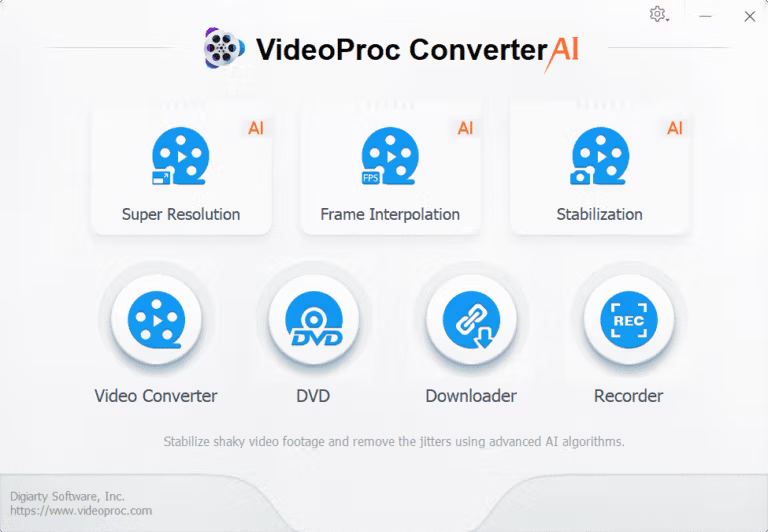
VideoProc Converter AI Digiarty Software is a comprehensive multimedia file management software that integrates many tasks typically required by multiple programs into a single application. These include video and audio conversion, DVD backup, large file compression, video downloading from websites, and screen recording. What sets it apart from typical file conversion programs is its built-in AI tools, including 4K video upscaling, image stabilization, vocal separation, and image restoration for older photos. Anyone with a large library of video files or who wants to improve the quality of mobile phone footage without needing to learn advanced video editing software will find this software a perfect solution.
Behind its speed lies a Level-3 hardware acceleration system that fully utilizes the power of Intel, NVIDIA, and AMD graphics cards, allowing for 4K or 8K file conversion dozens of times faster than using only the CPU. Furthermore, it consumes minimal system resources during processing, allowing for simultaneous use of other programs. AI models like Gen Detail and Real Smooth restore blurry or noisy images, making them sharp and natural-looking. Frame Interpolation adds frames for smoother video playback or allows for slow-motion footage at up to several hundred frames per second without stuttering. All processing occurs on your computer; there's no need to upload files to the internet, eliminating the risk of data loss.
The groups that will benefit most are creators who need to prepare files for multiple platforms, people who have old movie DVDs and want to convert them into digital files, and those who download clips from the internet and want to do basic editing in one place. In addition to video, it also includes tools for managing audio and still images, such as removing noise from interview clips, separating vocals for karaoke, or upscaling old photos for better printing. If you want to compare it with other video conversion programs before making a decision, try reading... HitPaw Video Converter You can add another one.
Features:
- Convert files to over 420 formats. Supports over 370 import file formats, including MP4, HEVC, AVI, MKV, MOV, and files from GoPro 5.3K cameras or DJI HDR 10-bit. Presets are available for iPhone, iPad, Android, TVs, and game consoles for instant conversion.
- Back up the entire DVD in 5 minutes. Convert DVDs to multi-track MP4, HEVC, or MKV. Supports DVD 99 titles. Copy to ISO or 1:1 folder with original disc quality.
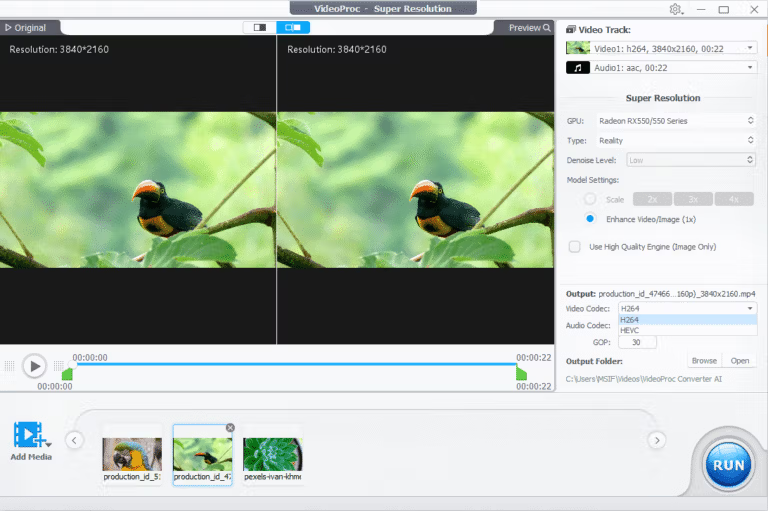
- Upscale video to 4K using AI. The Super Resolution model, with its 400% scaling capability, removes blur, noise, and compression marks from real or AI-generated footage while preserving original colors.
- Fix shaky footage and create slow motion. Stabilize shaky footage from your GoPro, drone, or smartphone and use Frame Interpolation to add extra frames for smooth video at up to 480 frames per second, or achieve 20x slow motion without stuttering.
- Separate vocals and remove noise. Audio AI can separate vocals from music in a single click, or remove background noise from songs, podcasts, and interview clips without distortion.
- Restore and upscale photographs. Image AI can scale images up to 4K, 8K, or 10K, fill in blurry details, repair faces in old photos, and bring black and white images back to life with color.
- Compress 4K files to a smaller size than 90%. The compressor tool helps compress large video files to a set target size. You can adjust the slider to balance file size and quality.
- 29 quick editing tools. Cut, split, merge, crop, rotate images, add 16 effects, add subtitles, correct fisheye lens distortion, adjust color, sound, speed, and add watermarks—all in one place.
- Download from over 1000 websites. Download videos, music, subtitles, and live streams from over 2000 popular and specialized websites. Supports batch downloads and saving playlists for entire channels.
- Record screen with sound. Record your screen or webcam in HD to 4K resolution, capturing both system audio and speech simultaneously. Features include picture-in-picture and green screen modes for creating tutorials or gaming videos.
What's new?
Version 8.12
- Compatible with the latest iPhone 18 models. The iPhone 18 Pro, iPhone 18 Pro Max, and iPhone Duo on Windows and Mac can convert videos and DVDs into files suitable for iPhone playback, while compressing large files to save storage space.
- The installation file is almost 40% smaller. The Windows version installer, reduced from approximately 460 MB to 290 MB, offers faster download speeds and uses less data, ideal for those who frequently install programs or on multiple computers.
- Supports NVIDIA RTX 50 Series. Added AI runtime for RTX 5070, 5080, and 5090 graphics cards. Download the optimization patch in the background without interfering with current operations.
- The downloader is more stable. Upgrade Python to 3.11 and update core components to keep up with the ever-changing technology of online platforms, reducing problems caused by outdated components.
- Supports macOS 27 and includes bug fixes. Mac users can now use macOS 27 Golden Gate, which includes several known bug fixes and overall stability improvements for both platforms.
File Information
- Operating System: Windows 11 / Windows 10 / 8.1 (x64)
- Risk Level: Medium
- Developer: Digiarty Software
- License: Full
- Size: 315.58 MB
- File type: *.rar
- Password: mawto
- Installation Method: Available
- Updated: 27/9/2569
- Required Reading: Download Guide