
Download WinSCP 6 for free in Thai. This popular FTP client program is for securely managing and transferring files between computers and servers. It supports SFTP, FTP, and SCP with all the latest functions.
What is WinSCP?
WinSCP This is a file transfer and management program for IT professionals, web developers, and server administrators who require convenience coupled with a high level of security. The program acts as a bridge between your computer and the remote server, whether it's web hosting, cloud computing, or an on-premises Linux system. It supports a full range of standard protocols, including SFTP, SCP, traditional FTP, as well as WebDAV and Amazon S3, allowing you to view, copy, move, and edit files on the remote server as if you were working in the folder on your own computer.
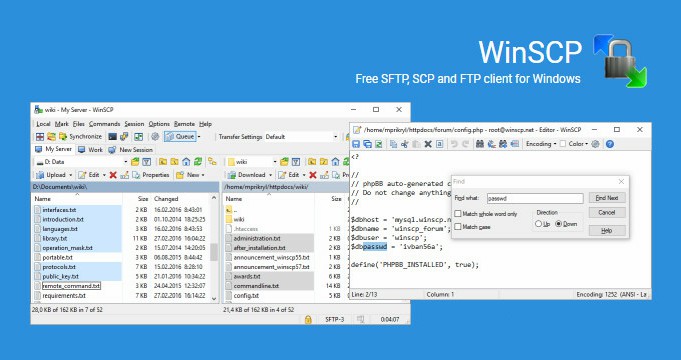
The program's standout feature is its user interface, offering two styles: a dual-window design similar to Norton Commander, allowing for convenient drag-and-drop file sharing, and a single-window, familiar Explorer-style interface. It includes a built-in text editor, enabling immediate editing of HTML configuration code or scripts on the server without needing to download external files. Furthermore, it integrates with Pageant to automatically retrieve SSH keys for authentication, providing quick access without repeatedly entering passwords.
For those who regularly manage multiple systems, this program also helps store connection session data, manage file permissions in detail via the chmod command, and features directory synchronization to compare local and host files for precise updates only of changes. This is useful when switching to servers that require high speeds or use specialized protocols. FileZilla Pro It's another popular option on MAWTOLOAD, making daily file management smoother and more efficient.
Features of WinSCP
- graphical user interface
- Translate into multiple languages
- Integration with Windows (drag and drop, URLs, shortcut icons)
- Supports U3.
- All common operations with files.
- Supports SFTP and SCP protocols via SSH-1 and SSH-2.
- Writing batch scripts and using the command-line interface.
- Directory synchronization using semi-automatic or automatic methods.
- Built-in text editor
- Supports SSH password, interactive keyboard, public key, and Kerberos (GSS) authentication.
- Integrates with Pageant (PuTTY authentication agent) to fully support public key authentication.
- An interface similar to Windows Explorer and Norton Commander.
- Choose to save session data.
- It is possible to choose to support standalone operation using configuration files instead of registry entries, which is suitable for working from removable media.
- Operating System: Windows XP / Vista / 7 / 8.1 / Windows 11 / 10
- Developer: WinSCP Team
- License: Freeware
- Language: Multilingual
- Size: 11 MB
- File type: *.exe
- Updated: 9/9/2026
- Required Reading: Download Guide