
Download FileZilla Pro 3 x86/x64 Full version for free. This full, permanent version is an FTP client program for managing files on web servers and web hosting. It supports FTP, FTPS, SFTP, and cloud services from a single, systematic window. This is the latest version.
What is FileZilla?
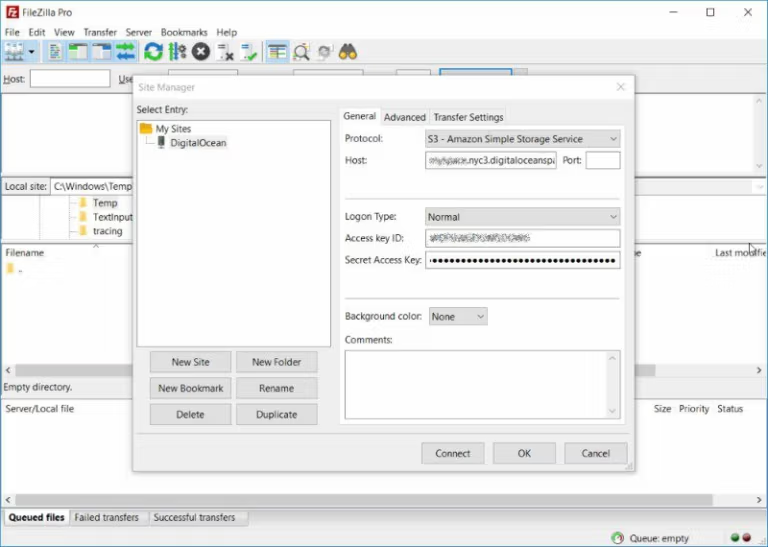
FileZilla Pro FileZilla Pro is an FTP client program for connecting to servers and transferring files between computers and web servers. It's ideal for website administrators, developers, and users who frequently upload files to hosting. Its user-friendly interface includes a site manager, transfer queue, and systematic folder browsing, making uploading and downloading large numbers of files easier than with basic tools. Usage begins by saving server information in the Site Manager, then selecting the source and destination folders to begin the transfer. Files currently being worked on are displayed in a queue with their status, making it easy to track completed tasks or recurring items. The program supports pausing and resuming large files, as well as speed limiting to prevent uploads from consuming excessive bandwidth. Users managing multiple websites can clearly separate bookmarks and settings for each server. FileZilla Pro also allows for inspecting remote folders, searching for files, and opening files for editing, sending the edited files back to the server upon saving. This is suitable for website and cloud file management requiring a systematic approach. Folder comparison allows for visualizing different files between the local machine and the server, while filename filtering allows for selecting only the desired items. Support for IPv6 and multiple proxies enables connections to various networks, and logging helps monitor events and track issues when connection problems occur.
The connection supports FTP, FTP over SSL/TLS or FTPS, and SSH File Transfer Protocol or SFTP, as well as various cloud services such as Amazon S3, Dropbox, Google Drive, OneDrive, SharePoint, WebDAV, and other storage supported by the Pro version. This allows you to open, search, edit, and upload remote files to the server from a single window. Folder comparison helps identify differences between local and destination files, while file name filtering and logging enable faster workflow for fixing problems when working with multiple servers. WinSCP This is another program with a similar concept for remote file management.
Key Features
- FTP and FTPSConnecting to general servers and connections encrypted with SSL/TLS.
- SFTPTransfer files via SSH and manage files remotely.
- Supports IPv6Connect to a server that uses a next-generation network.
- Transfer large files.Pause and resume working on files larger than 4 GB.
- Tabbed InterfaceOpen multiple servers in a single window tab.
- Site ManagerSave and retrieve connection settings for each website.
- Transfer QueuePrioritize tasks and track transfer status.
- Drag and dropFiles can be transferred directly between the computer and the server.
- Speed limitSpecify the bandwidth used for uploading or downloading.
- Filter filenamesShow only files that match the search criteria.
- Compare foldersCheck for differences between files on your local machine and at the destination.
- Edit remote filesOpen the file from the server and return it when saved.
- Search for remote files.Search for filenames in folders on the server.
- Supports proxy.Works via HTTP/1.1, SOCKS5, and FTP Proxy.
What's new?
- FileZilla Pro 3.71.1 Adjusted how to handle language request windows on macOS 27 to avoid Locale-related crashes.
- SFTP The heuristic for detecting keyboard-interactive prompts has been adjusted to work more efficiently with the server.
- When the remote path is left blank in FTP(S) or SFTP, the program will return to the server's default folder.
- Resolve permission reading issues for chmod windows on servers that send duplicate permission information in MLSD results.
- The fzssh update supports additional algorithms and key file formats, and improves compatibility with DOS server paths.
File Information
- Operating System: Windows 11 / 10 / 8.1 / 7
- Risk Level: Medium
- Developer: Tim Kosse (FileZilla Project)
- License: Freeware / Shareware
- Language: Multilingual
- Size: 38.14 MB
- File type: *.rar
- Password: mawto
- Updated: 27/8/2026
- Required Reading: Download Guide
==== FileZilla Pro 3.71.1 (32/64-bit) ====