Download EmEditor Pro 26 (x64) for free, the full, permanent version. This professional text editor is great for writing code and opening large files quickly without slowing down your computer. Latest version available, with installation instructions included.
About EmEditor
EmEditor is a text editor for Windows developed by the Japanese company Emurasoft. It's designed to be a lightweight, fast-opening, and powerful text editor, supporting tasks ranging from simple note-taking to managing multi-gigabyte text files that standard programs can't handle.
In terms of character encoding, EmEditor fully supports Unicode, including UTF-8, UTF-16, and character codes of various languages worldwide. It automatically detects encoding when opening files and facilitates easy character conversion between them, making it ideal for working with text files from multiple sources with mixed encodings.
For software developers, it offers syntax highlighting support for numerous languages including C, C++, C#, Java, Python, JavaScript, PHP, HTML, CSS, and SQL. Customizable colors and language definitions are available. The search and replace system supports Regular Expressions, and the Find in Files feature allows for quick searching of code or text within entire folders. A comparable alternative is... Notepad++
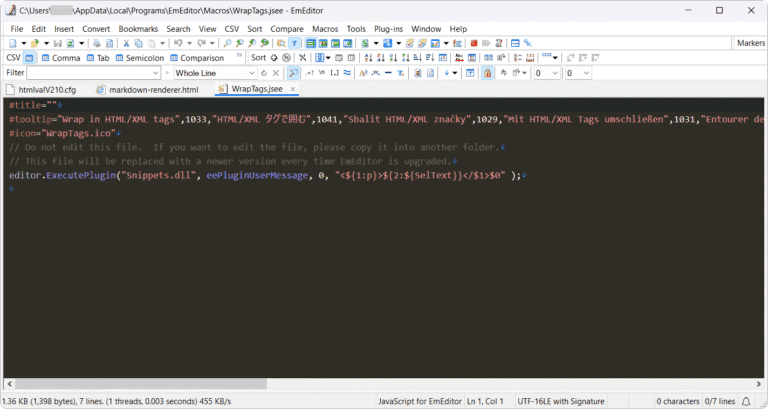
Another highlight is automation via Macros, which record repetitive steps and allow for instant playback. It supports macro writing using JavaScript and VBScript, enabling routine text processing tasks such as formatting data or converting file formats with a single click. Furthermore, a plugin system allows for installing add-ons to extend capabilities as needed.
EmEditor has a dedicated CSV mode, allowing you to edit CSV and TSV files as if you were working with tables. It features clear column separation, the ability to select entire columns, and sort data by column, making it ideal for managing data files exported from databases or spreadsheets. The file comparison feature displays the differences between two files side-by-side, useful for checking changes to code or configuration files.
The program comes in two versions: EmEditor Free, which offers basic functions for free, and EmEditor Professional, a paid version that unlocks all advanced features. The program is small, uses minimal resources, has a portable mode that runs from a USB drive without installation, and supports a dark mode.
EmEditor is a text editor that meets the needs of everyone from general users to professionals, especially programmers, data analysts, and system administrators who frequently open large files, search with regular expressions, or process massive amounts of text. Its strengths lie in speed, stability with large files, and flexible customization.
Key Features
- High efficiency. It offers the speed and efficiency to open and edit large and complex text files.
- Customizability. The program can be customized to suit the needs of the text editor.
- Programming Language Support. It features syntax highlighting for multiple programming languages, and a system for customizing colors and content style.
- Working with Large Data Sets. It can open and edit large text files without limitations.
- Message Management Capability. It features advanced search and replace functions, including the use of regular expressions to find and replace complex text.
- Spelling Check. It features a real-time spell check function that allows users to correct errors instantly while typing.
- Working with Databases. It can connect to a database and retrieve data to display in text format.
- Unicode Support. It can display and edit text in Unicode formats, including Unicode Big Endian and Unicode Little Endian, as well as supporting UTF-8, UTF-16, and UTF-32 encodings.
- Creating and Recording a Macro. Support is provided for creating and recording user actions, allowing the creation of customized macros tailored to user needs.
- CSV management tool. Open, edit, sort, filter, merge files, and create pivot tables from CSV files directly within the device.
- Compare the documents. Open two files and compare them line by line, scrolling and syncing the screens on both sides.
- Edit multiple points simultaneously. Place the cursor in multiple positions and type, delete, or edit simultaneously.
What's new
Version 26.4.0
- Fast View now supports file editing. Previously, large files were opened as read-only. Now, you can type, paste, Undo/Redo, use Replace All, utilize multi-selection, and execute Insert, Convert, and Sort commands without loading the entire file into RAM. The original file remains unchanged until you click save.
- When saving, you can choose to: Save and merge Merge edits into the original file or save only the changes as a diff file, leaving the original file untouched. Upon the next opening, the program will load the diff file and allow you to continue editing immediately. Includes a new Fast View page in Customize and a FAST indicator on the status bar.
- Program startup is significantly faster; the main window is ready for use 1.93 times quicker. For a 48 GB file in Fast View mode, Replace All is approximately 5 times faster and saving is approximately 13 times faster, according to developer test results.
- Total program file size has been reduced by 31%, with EmEditor.exe reduced by 57% and plugins reduced by approximately 50-75%. Smaller files load faster, contributing to the accelerated startup speed.
- Fast View mode now supports CSV commands for document editing, including cell editing, splitting/combining columns, hiding columns, and text alignment (left, center, right). Documents in this mode, including unsaved work, can now be saved to the workspace, and folder synchronization is faster and more reliable.
- New command-line options available. /fast with /tail The first option forces a file to open in Fast View mode even if it is smaller than the set threshold. The second option opens the file and jumps to the end immediately, ideal for viewing the tail end of large log files.
- Security update: Node.js, bundled with the Language Server Protocol feature, has been updated to version 26.12.1 to resolve issues related to the eMudhra Intermediate CA.
file information
- Operating System: Windows 11 / 10 / 8.1 / 7
- Risk Level :🟡Low Risk (Low Risk)
- Developer: Emurasoft
- License: Full
- Language: English
- Size: 91.58 MB
- File type : *.rar
- Password: mawto
- Installation method: Yes
- Updated on: 29/10/2026
- Need to read: Download Guide