Download IDM UltraEdit 2026 (Full) free, permanent full version, text editor, text document editor, automatic installation, smooth handling of large files, supports multi-language code and search tools.
About UltraEdit
UltraEdit is a text and code editor from IDM Computer Solutions that has long been trusted by software developers, data analysts, and professionals who work with large volumes of text files. It is designed to handle heavy workloads, going beyond basic note-taking apps meant for small files. It can open files of hundreds of megabytes without slowing down or freezing, supporting Windows, macOS, and Linux so you can use the same workflow across different machines.
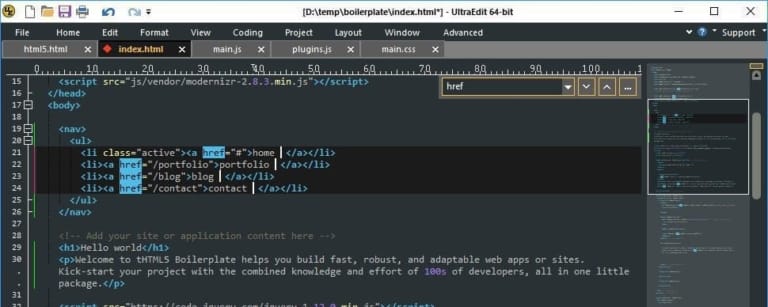
The first standout feature of UltraEdit is its extensive programming language support, including Python, Java, C, C++, JavaScript, HTML, CSS, PHP, SQL, and dozens of others. Code syntax is color-coded, making long scripts easier to read, with clear distinction of brackets, commands, and variables. It includes code folding to temporarily hide unneeded sections and auto-completion for basic code, significantly reducing typing time and human errors.
Another aspect that sets UltraEdit apart is its advanced text editing tools. Users can search and replace text using Regular Expressions, perform column-based editing across multiple lines simultaneously, place multi-cursors for simultaneous typing, and instantly compare two files to spot differences. Tasks like fixing large log files, data organization, bulk text formatting, or editing system configuration files become much faster and more accurate than editing line by line.
UltraEdit also includes practical auxiliary tools such as FTP, SFTP, and SSH integration to edit files directly on servers from within the application, macro recording for automated repetitive tasks, JavaScript or Python scripting for complex operations, and support for multiple text encodings including UTF-8 and legacy system files. Users can customize the interface, shortcuts, and toolbars to fit their preferences, making it an essential workstation for everyday coders and text managers. For those looking for a lightweight, free text editor for general use, Notepad++ is another great matching choice.
Key Features of UltraEdit
- Code Folding. Collapse and expand code blocks to easily read and navigate through large files.
- Large file support. Smoothly open and edit text files larger than 4GB using minimal memory.
- Unicode support. Display and edit multilingual text with UTF-8 and international standard encoding support.
- Multi-Caret Editing. Place multiple cursors simultaneously to type, copy, or edit repetitive text all at once.
- Column Mode. Column block editing, accurately deleting or inserting data vertically.
- Advanced Find and Replace. Support for Regular Expressions and cross-file searching in folders (Find in Files).
- Syntax Highlighting. Syntax highlighting based on diverse language structures including C/C++, Java, Python, HTML, PHP, and SQL.
- Built-in FTP/SFTP client. Directly connect and edit files on remote servers via FTP, SFTP, and FTPS.
- SSH / Telnet Console. Built-in terminal connection window for issuing commands and monitoring systems directly from the program interface.
- Hex Editor. Built-in hex editor for viewing and editing binary files with an ASCII view.
- IntelliTips. Context-aware code and function name completion while typing to increase speed and reduce errors.
- Live Preview. Real-time preview of HTML and Markdown file outputs while editing.
- Project management system. Group files and workspaces (Project/Workspace) for instant access to important work files.
- Macro and scripting system. Record macros for repetitive tasks and write automation scripts using JavaScript.
What's new
Version 33.1.0.27. – 2026-10-29
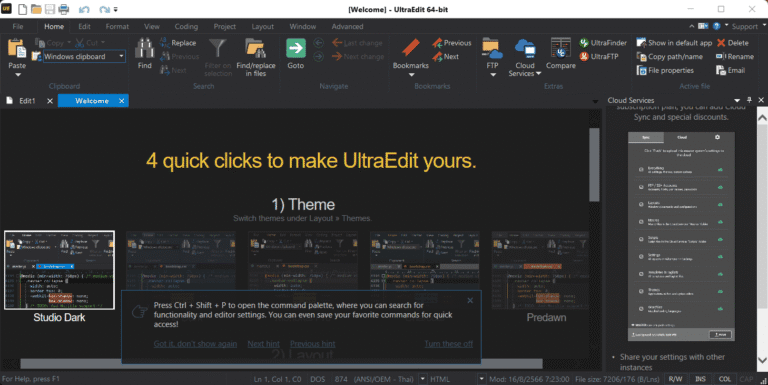
- Visual Studio 2026 style. Added Visual Studio 2026 app appearance in both light and dark modes, along with Windows 11 light and dark mode themes.
- Custom Theme Generator. Create custom themes using just two foreground and background colors via the Welcome page or Theme Manager.
- Hex Encoding Preview. New panel displaying selected bytes decoded according to various Windows-supported encodings, helping to read unfamiliar byte values more quickly.
- Adjust the number of bytes per line in hex mode directly from within the editor without needing to restart the program.
- Disabled automatic Git repository scanning upon program startup and added manual scanning when needed, along with the ability to cancel scans and Git logs without closing the program.
- Support for newer SSH/SFTP algorithms as well as legacy servers requiring older algorithms.
- Added support for Cerner Command Language (CCL), Algol 60, and Algol 68 languages with syntax highlighting, Function List, and bracket matching.
- Find in Files performs smoother searches on large files, the Output window no longer flickers open and closed during searches, and the editor remains responsive throughout the search process.
file information
- Operating System: Windows 11 / 10 / 8.1 (x64)
- Risk Level :🟡Low Risk (Low Risk)
- Developer: IDM Computer Solutions, Inc
- License: Full
- Size : 438.94 MB
- File type : *.rar
- Password: mawto
- Installation method: Yes
- Updated on : 8/11/2026
- Need to read: Download Guide
Latest Download (64-bit)
Download v31.0.0.44 (32-bit / 64-bit)