
Download Voicemod Pro 2 free permanent full version, instantly transform your speaking voice while chatting, gaming, or streaming, featuring Soundboard and Voice Lab, highly customizable sound effects, latest version.
What is Voicemod Pro?
Voicemod Pro is a real-time voice changer software that instantly transforms your voice while you are speaking, without needing to record audio beforehand for later editing. The program takes your actual microphone input, converts the sound based on your selected effect, and outputs it through its own virtual microphone. This allows it to be used directly with Discord, Zoom, OBS Studio, Twitch, and online games like Fortnite, Valorant, or GTA V. Your interlocutors will hear the modified voice from your very first word, making it ideal for gamers, streamers, YouTubers, and anyone who wants to chat online in a role other than their real voice.
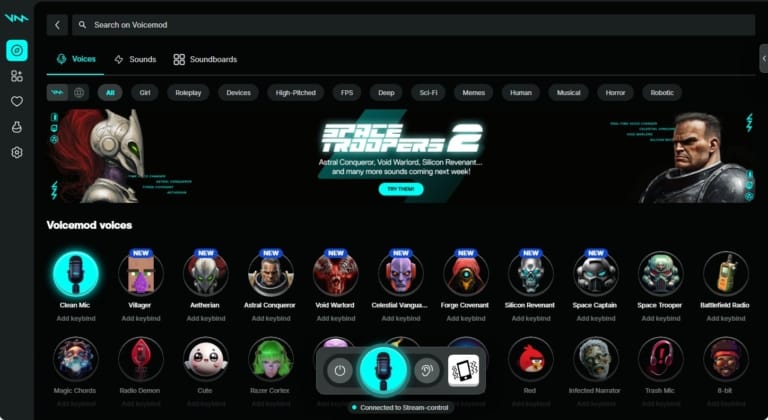
Voicemod's standout feature is its extensive voice library with countless options, including robotic voices, demonic voices, children's voices, cartoon voices, alien voices, voice actor styles, and characters from famous games and anime. Each voice can be customized in detail beyond simple selection thanks to the Voice Lab mode, which allows you to mix effects layer by layer—whether adjusting pitch, adding reverb, echo, distortion, vocoder robotic effects, or walkie-talkie effects. Once you achieve your desired voice, you can save it for reuse and switch voices mid-conversation using hotkeys.
Another feature that sets it apart from typical voice changers is the Soundboard, a sound effect panel that lets you instantly play audio clips while chatting or streaming, such as applause, drum rolls, laughter, air horns, and popular meme sounds. The program comes with hundreds of pre-made sounds and allows you to upload your own audio files to set as hotkeys. Setup is easy as the program automatically detects your microphone and speakers, requiring you to select your devices just once to be ready, and runs lightweight without causing audio lag.
Voicemod Pro is therefore the ultimate tool for anyone looking to add flair to their voice online, whether changing their voice for fun, roleplaying with friends, concealing their real voice for privacy, or enhancing streams and content creation for a more unique identity. Everything happens live as you speak without requiring extra post-production, and you can switch back to your normal voice with a single click when finished.
Key Features
Voice Changes and Effects
- Live voice changing while speaking. Output audio is your new voice from the very first word spoken, with no need to pre-record and edit later.
- Over 70 pre-made voice effects including robots, demons, children, aliens, and cartoon characters ready for immediate use.
- Voice Lab allows you to layer effects to create custom voices, adjust pitch, add reverb, echo, or vocoder robotic effects, and save them for future use.
- Share your custom-created voices with friends in a single click, and the sound your friends receive will have the exact same settings you configured.
Soundboard
- Soundboard lets you instantly play sound effects while chatting or streaming, including applause, drum rolls, laughter, air horns, and popular meme sounds.
- Hundreds of ready-to-use pre-made sounds, with the ability to upload your own audio files to assign as hotkeys.
- Create multiple Soundboard profiles and switch between sound sets depending on the game or show you are running.
Compatibility with other programs
- Its own virtual microphone streams modified voice directly into Discord, Zoom, OBS Studio, Twitch, and online games without requiring additional plugins.
- Set hotkeys to instantly switch voices or play sound effects during conversation.
- Supports Stream Deck integration, allowing you to change voices or play sounds directly from the device buttons.
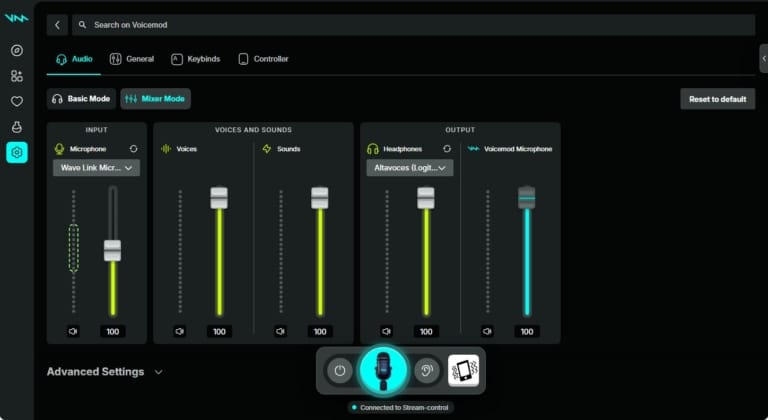
- Audio Wizard automatically detects your microphone and speakers; select your devices once and you are ready to go.
What's new
Version 2.6.0.7
- Added a new help icon on the top bar that links to Voicemod's social channels, videos, and latest update news.
- Fixed an issue where the application consumed abnormally high CPU.
- Restored missing Soundboard profiles from the previous update so they can be used again.
- Fixed an issue where custom-created sounds could not be renamed.
- Fixed an issue where exporting and importing sounds did not generate backup files as expected.
- Fixed various minor bugs.
file information
- Operating System: Windows 11 / 10 (64-bit)
- Risk Level :🟡Low Risk (Low Risk)
- License : Full
- Developer: Voicemod
- Language: Multilingual
- Size: 69.72 MB
- File type : *.rar
- Password : mawto
- Installation method: Yes
- Updated on : 19/11/2026
- Need to read: Download Guide
==== Voicemod Pro 2.6.0.7 ====