Download Audacity + Portable for free. This multi-track audio recording and editing software supports WAV, MP3, FLAC, FFmpeg, VST3, Nyquist, Spectrogram, Noise Reduction, and ASIO. Use it for recording audio, podcasts, and editing audio files.
What is Audacity?
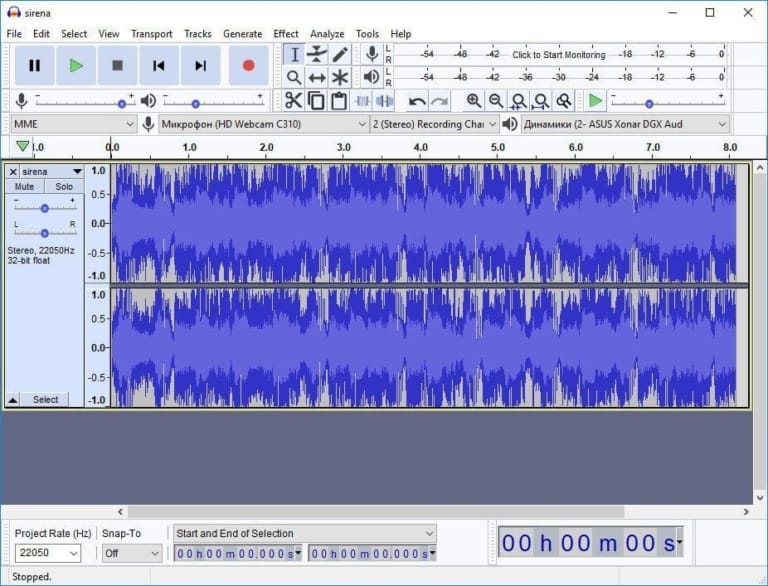
Audacity It's an open-source audio recording and editing program suitable for recording, podcasting, music production, and general audio file editing. The main window works in a multi-track format, allowing you to record from a microphone or audio interface and then cut, move, copy, paste, or mix multiple tracks together. It includes Waveform and Spectrogram displays for viewing detailed audio signal analysis, as well as tools for Normalize, Compressor, Equalization, Noise Reduction, and commonly used basic effects without needing to open other programs.
Import and export support WAV, AIFF, FLAC, MP3, OGG, and other formats via FFmpeg, along with VST3, LV2, Nyquist, and Audio Unit plugins on compatible systems. If you need a lighter-looking audio editing program that focuses on editing files piece by piece, this might be a better option. OcenAudio It's another comparable option. Audacity excels in multi-track work, live recording, editing with Envelope, and using Label Tracks to mark important sections in long files such as interviews or podcasts.
The current version on Windows adds ASIO support in the official installation, allowing for more precise selection of playback and recording devices based on the host. It also supports the newer FFmpeg version for importing various media file types. Improvements include multi-step undo/redo, macros for repetitive tasks, loudness normalization, and frequency analysis tools. Project management has been improved to withstand disk fullness or drive removal after project closure, reducing the risk of file corruption in previously problematic situations.
Key Features
- Record multiple tracks from microphones, mixers, and audio interfaces.
- Cut, copy, paste, split, move clips, and mix audio on the Timeline.
- Supports WAV, AIFF, FLAC, MP3, OGG and additional media files via FFmpeg.
- Displays waveforms and spectrograms for detailed analysis of sound and frequency.
- It features built-in noise reduction, compressor, normalization, EQ, and basic effects.
- Supports VST3, LV2, and Nyquist plugins for adding effects and analysis tools.
- Use the Envelope Tool to adjust the volume gradually across different sections of the track.
- Label Track helps mark chapters, dialogue sections, or intersections in long audio files.
- Macros are used to combine multiple commands for tasks that need to be repeated across multiple files.
- Supports ASIO on Windows for compatible audio devices and drivers.
- There are multiple Undo/Redo steps, and in some cases, session recovery is possible after program or computer problems.
- Supports changing tempo, pitch, and speed, selecting the processing method best suited to the task.
What's new?
Audacity 4 features a redesigned look on Qt and changes how clips, recordings, effects, and projects are managed, while retaining the core workflow from Audacity 3 but moving or adjusting some controls.
- Select clips from the header. Select multiple clips at once, group them, and move, trim, or extend a series of clips.
- Clips can be moved more freely between mono and stereo tracks, with overlapping clips replacing the original overlapping portion.
- Added a dedicated Split tool with the commands Split Cut, Split Delete, Split at Silences, and Split to New Track.
- Drag and move the playhead to a new position during playback without stopping the sound.
- Start recording anywhere on the timeline and adjust the Punch and Roll, lead-in, latency compensation, and input monitoring.
- Audio Setup uses the system's default devices, refreshes the device list, and allows you to customize channel mapping.
- The official version of Windows supports ASIO for both playback and recording.
- Added playback and recording meters to the track header, and improved the consistency of effect presets.
- Supports VST3, Nyquist, and LV2 on Linux and Audio Units on macOS, with the ability to create alternative control pages when plugins don't have their own UI.
- The redesigned spectrogram features easier-to-read scales and asymptotes, and allows for faster rendering.
- Use the .aup4 project format and convert .aup3 files without modifying the source, and also import older .aup projects.
- Time Tracks, Note/MIDI tracks, Mixer, Macro Manager, scripting pipe, VAMP, LADSPA, and Play-at-speed are not included in this release. The old Sync-Lock and tool mode have been replaced with a new workflow.
File Information
- Operating System: Windows 11 / 10
- Developer: Audacity Team
- License: Freeware
- Version: 4.0.0
- Language: Multilingual
- Size: 20 MB
- File types: *.exe / *.msi / *.zip
- Updated: 7/9/2026
- Required Reading: Download Guide
==== Installation File v4 (.msi) ====
==== Installation file v3.7.9 (.exe) ====
==== Portable version v3.7.9 (.zip) ====