Download SpeedyFox 2.0.30.155, the latest version of the program to speed up Firefox | 732 KB
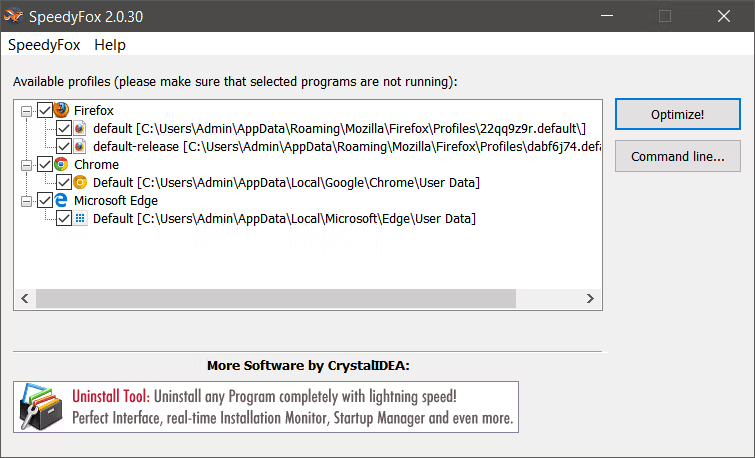
SpeedyFox 2020 is... Many users of browser speed-up programs complain that their browsers are very slow. After opening the program, they have to wait a while for it to load, even though their computers aren't old. This is because programs like Firefox, Thunderbird, or Windows, naturally slow down over time due to their constant data storage and deletion. Firefox and Thunderbird use SQLite databases to store user data, and these databases grow in size. While this reduces loading times and improves performance, excessive storage can unnecessarily consume resources, causing slowness rather than improvement. Therefore, removing unnecessary space restores speed. After installation, SpeedyFox automatically checks your Firefox default profile. If you have more than one profile, you can select the one you want to optimize from the drop-down menu. If you have a portable version of Firefox, manually select your profile by choosing “Custom…”. All you need to do is click the “Speed Up Firefox” button. The optimization process can take anywhere from 5 minutes to an hour, depending on the size of your database. The entire optimization process is safe as it doesn't affect your history, bookmarks, passwords, etc.
Supported programs
– Firefox – Chrome – Chromium – Skype – Thunderbird – Opera – Vivaldi – Yandex Browser – Epic Privacy Browser – Cyberfox – FossaMail – Viber for Windows – Slimjet Browser – Pale Moon – SeaMonkey
What's new?
Operating System: Windows XP/ Vista / 7 / Windows 8.1/ Windows 10 Developer: CrystalIdea Software. License: Shareware Language: Multilingual Size: 732 KB Password: None Status: Tested Updated: 11/10/2020
Required Reading: Download Guide



 Operating System: Windows XP/ Vista / 7 / Windows 8.1/ Windows 10 Developer: CrystalIdea Software. License: Shareware Language: Multilingual Size: 732 KB Password: None Status: Tested Updated: 11/10/2020
Required Reading: Download Guide
Operating System: Windows XP/ Vista / 7 / Windows 8.1/ Windows 10 Developer: CrystalIdea Software. License: Shareware Language: Multilingual Size: 732 KB Password: None Status: Tested Updated: 11/10/2020
Required Reading: Download Guide





