
What is Rufus?
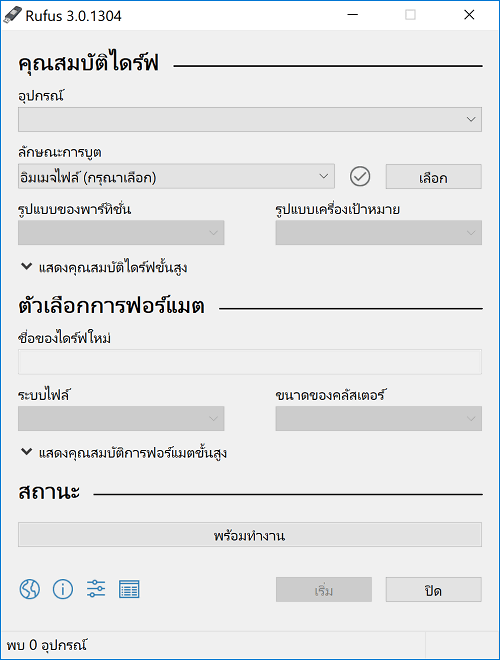
Rufus It's a small, free program used to create bootable USB drives. These drives can then be used to install operating systems such as Windows or Linux, or even run system recovery tools directly from the flash drive. Its key features include ease of use, small size, no installation required, and fast performance. It's ideal for users who want a convenient and efficient way to manage bootable flash drives.
It efficiently supports writing ISO image files to USB and offers a variety of configuration options, such as file system selection (FAT32, NTFS), partition scheme settings (MBR, GPT), and target system (BIOS or UEFI), making it suitable for both older and newer computers. Furthermore, it supports checking for bad blocks on the flash drive before use, ensuring the integrity of the data being written.
Besides creating bootable USBs, Rufus has gained popularity among IT professionals and system administrators because it can quickly create Windows installers and be configured to run in "Windows To Go" mode for those who need to conveniently carry their Windows system to other machines. Overall, Rufus is considered an essential tool for managing portable bootable media and installing operating systems in the modern era.
Features:
- Create a bootable USB drive from an ISO file quickly and efficiently.
- It supports Windows, Linux, and other operating systems.
- You can choose a file system that suits your needs, such as FAT32, NTFS, exFAT, UDF, and ReFS.
- Supports partition creation in MBR (suitable for BIOS/Legacy) and GPT (suitable for UEFI systems).
- You can pre-name the user in Windows where you will install the device.
- Bypass TPM 2.0 verification.
- You can disable the forced Microsoft account login during installation.
- You can cancel the questions asked during installation.
- It's a portable program, ready to use immediately without needing to install it on your computer.
- Supports multiple languages, including Thai.
- Free and open source.
What's new?
- Add RISC-V 64 support to UEFI:NTFS
- Improve the guards for using the “silent” Windows installation option
- Improve the ability to cancel during write retries
- Improve progress reporting for compressed image extraction
- Fix unrestricted XML entity expansion and integer overflow in ezxml parser (courtesy of @esadowski4) [GHSA-55r2-34wg-8mv9]
- Fix “silent” Windows installation failing at 75% in most cases [#2960]
- Fix a crash during boot when using UEFI:NTFS on Snapdragon#2934]
- Fix first WUE option always being checked by default [#2965]
- Fix an infinite loop when using Windows ISOs that contain multiple WIMs
- Fix “Enable runtime UEFI media validation” checkbox not always being properly enabled
- Other WUE improvements/fixes for OneDrive removal and username validation (with thanks to @christian8641) [#2984, #2991]
For instructions on how to use it, please see below.You can read it here. For those who prefer not to read, you can search for videos on YouTube. There are many to choose from.
File Information
- Operating System: Windows 11 / 10 / 8.1 / 7 / XP
- License: Freeware
- Language: Multilingual
- Size: 1 MB
- File type: *.exe
- Updated: 30/6/2026
- Required Reading: Download Guide
==== Installation Package ====
==== Portable Model ====