
Download GoodSync Enterprise 12 full version for free. This automatic file synchronization and backup program supports One-way/Two-way Sync, Cloud, NAS, SFTP, AES-256, Real-time Sync, and scheduled automatic backups without manual intervention.
What is GoodSync Enterprise?
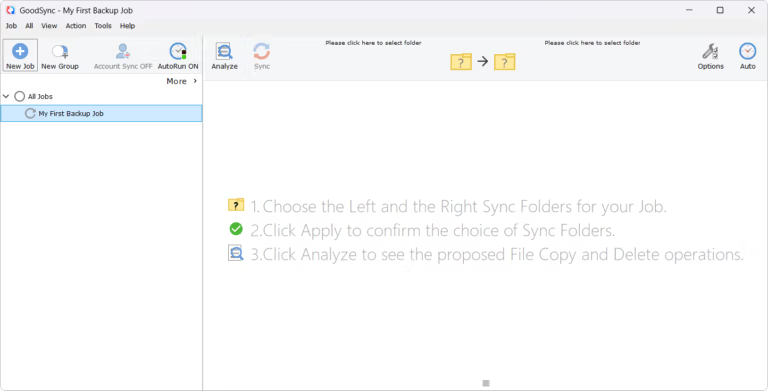
GoodSync Enterprise It's a file synchronization and backup program that manages data between multiple computers, servers, NAS, and cloud services in a single task. When creating a job, you can choose to back up one-way or synchronize two-way, and clearly define the source and destination folders. The program will analyze which files have been added, deleted, or modified, and then move only the necessary parts, eliminating the need to copy everything from scratch every time. This saves time and traffic compared to jobs with many files or those involving internet traffic, compared to simply dragging and dropping folders.
GoodSync can be set to run at specific times, such as when files change, or in real-time. For machines that need to be constantly running, the Unattended Service allows jobs to run in the background without manual syncing. Block-Level Data Transfer sends only the changed blocks of data in a file, instead of sending the entire file. Files currently in use are backed up using a system-based Copy Locked Files mechanism. For enterprise workloads requiring file access control, security attributes and ACLs can be passed to the destination, reducing the problem of access permissions becoming inconsistent after data migration.
Compatible destinations include Google Drive, OneDrive, Dropbox, Azure, Amazon S3, Backblaze, NAS, FTP, SFTP, WebDAV, and GoodSync Storage, as well as GoodSync Connect for connecting devices linked to the same account. For enhanced data security, end-to-end AES-256 encryption is supported, and version history is retained for reverting to previous versions after accidental file modifications or deletions. This is useful for backing up the entire system or creating a disk image rather than simply syncing files. Macrium Reflect It would be more suitable for that task. GoodSync excels at managing files across multiple destinations and allowing tasks to run automatically according to defined rules.
Key Features
- Create one-way backups and synchronize two-way backups.
- Set it to sync in real-time when files change.
- Schedule a job to run automatically according to a set date, time, or conditions.
- Block Level Data Transfer sends only the parts of the file that have been changed, reducing the amount of data that needs to be retransferred.
- Unattended Services allow tasks to run in the background without needing to keep the program window open.
- Copy Locked Files helps back up files that are currently being accessed.
- AES-256 end-to-end data encryption for applications requiring enhanced security.
- Keep version history to revert to previous file versions.
- Detect file movement and renaming to reduce unnecessary data transfer.
- Forward Security Attributes and ACLs to destinations for on-premises tasks.
- Connect to cloud, NAS, FTP, SFTP, WebDAV, and multiple file storage services.
- Use GoodSync Connect to synchronize and manage files between your configured devices.
What's new?
GoodSync 12.11.7 -- 2026-09-04 * sib-sendmail: Get back to using local nameserver to resolve SMTP hostname. * SibServerTreeNode::WaitAll: Do not Assert if not all threads finished, just exit. * Old File Cleanup: Added cleanup of older server-accounts-*.tic files. * User Interface: misc small fixes.
File Information
- Operating System: Windows 11 / 10
- Risk Level: 🟡 Low Risk
- License: Shareware
- Developer: GoodSync
- Language: Multilingual
- Size: 108.37 MB
- File type: *.rar
- Password: mawto
- Installation Method: Available
- Updated: 15/9/2026
- Required Reading: Download Guide