What is GeoGebra?
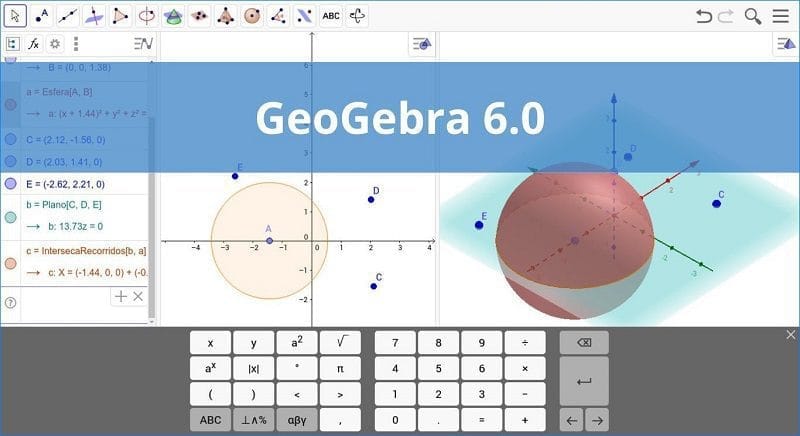
GeoGebra is...This program assists in mathematical tasks, especially in 2D and 3D geometry, and is highly efficient. A key advantage is that geometric data (such as coordinate information) can be used in other programs like Mathematica (though some data conversion may be required). Furthermore, 2D objects can be exported as LaTeX via the 'TikZ' package, and images can be saved in various file formats, which can then be used directly.
The images are not distorted, and graphing conic sections is just a click away, eliminating the need for complex functions. Furthermore, the equations of conic sections can be displayed in their general or standard form.
Ability
- User-friendly interface with clear options.
It has a clean interface that allows users to create mathematical objects using specific tools or commands. The application provides quick access to various drawing tools that can be easily inserted into the workspace.
It allows you to add points and vectors and perform calculations with them (for example, you can measure the length of a vector), as well as combine lines and axes, conic sections and arcs, curves, inequalities, moments, and functions.
- Utilize a variety of mathematical functions.
This app features numeric generation and allows you to use the constants π and Euler for expressions and calculations, as well as work with angles, Boolean variables, matrix operations (addition, subtraction, multiplication), and embedded text and images.
-Customize the properties of an object.
Inserted objects can be hidden or revealed in a graphic display that is filled with color and precisely positioned so they cannot be moved, repositioned, or deleted. Additionally, objects can be renamed, labeled with values, animated with numbers, angles, or points, and tracking mode can be enabled to view their location.
- Provides support for two scripting languages (GGBScript and Javascript), allowing you to create sequences of commands for designing or modifying objects. Furthermore, you can save the values of individual objects in a spreadsheet list, including numbers, points, and vectors.
The created project can be saved as a file (e.g., HTML, PNG, EPS, GIF), uploaded to the developer's website, or printed.
File Information
- Operating System: Windows XP/ Vista / 7 / 8 and 8.1 / Windows 10 / 11
- Language: Multilingual
- Size: 127 MB
- File type: *.exe
- Updated: 10/5/2026
- Required Reading: Download Guide