Download Topaz Video Pro / Topaz Video AI Pro 2026 Full version for free. This program expands videos to high resolutions up to 8K without image pixelation using AI. This is the latest version we're offering.
What is Topaz Video Pro?
Topaz Video Pro Topaz Labs' artificial intelligence-powered video enhancement software, originally known as Topaz Video AI, later rebranded and reset to version 1.0.0 as part of Topaz Studio. This tool is designed to solve problems with unusable footage, whether it's low-resolution video that needs enhancing, noise from low-light shooting, shaky video from handheld shooting, or incorrect frame rates. Instead of discarding that footage, you input it into this tool, and the AI model, having learned from millions of video clips, restores detail to a usable state.
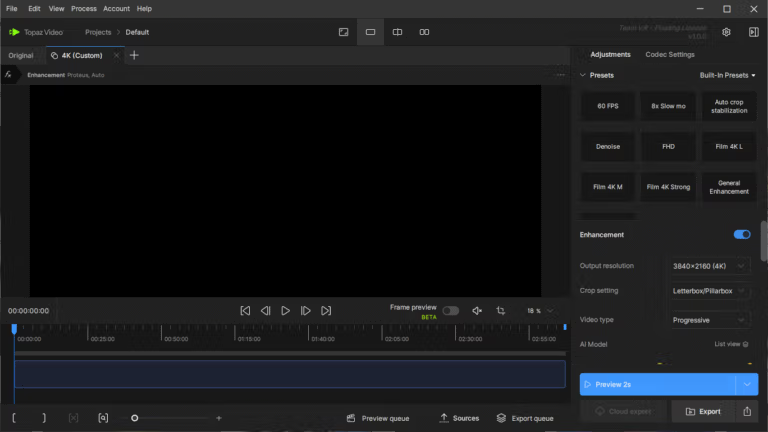
At its heart is a library of over 20 AI models, each with clearly defined functions. Image enhancement models like Proteus, Iris, Nyx, Rhea, and Artemis handle upscaling, noise reduction, and detail recovery. Motion models like Apollo, Chronos, and Themis manage frame interpolation, slow motion, and image stabilization. Genetic models like Starlight Precise and Starlight Mini can restore heavily damaged footage to near-record levels, and Hyperion 2.5 is available for converting SDR to HDR. We select a model, set presets, and see the results instantly with Live Frame Preview before rendering the entire file. More demanding tasks, like Starlight, are uploaded to the cloud to Topaz's servers for processing.
The people who benefit the most are video editors, cinematographers, creators, and teams restoring old footage, because these jobs constantly encounter footage of inconsistent quality. Anyone who uses... Adobe Premiere Pro 2026 It's even more convenient as a primary tool because the Topaz Panel allows you to drag clips from the timeline for editing without leaving the editing program. Older, perpetual licensed versions like Topaz Video AI will still work as normal, but they will no longer receive the new models and features of the Topaz Video lineup.
Features:
- Upscales images up to 8K. Precision models like Proteus and Iris upscale low-resolution video to a sharper level without the pixelation and blurring that occurs with typical upscaling.
- Restore video using a generated model. Starlight Precise and Starlight Mini rebuild missing details, making them ideal for older footage or heavily damaged files.
- Convert SDR to HDR. The Hyperion 2.5 model extends the color range and brightness of SDR video to prepare it for display on HDR displays while maintaining the original's integrity.
- Reduce noise. The Nyx model helps to remove noise from videos shot in low light or heavily compressed files while retaining important details.
- Video stabilization. Reduce camera shake from handheld shooting, resulting in smoother, more professional-looking footage. Ideal for footage shot with mobile phones or cameras without image stabilization.
- Insert frames and apply slow motion. The Apollo, Chronos, and Aion models create new frames between real frames, allowing for smooth frame rate changes or slow-motion effects.
- Facial restoration. The Iris model restores facial details in low-resolution video, making it ideal for footage of people that was originally blurry.
- Presets and batch processing. Save frequently used settings as presets and process multiple video files simultaneously in a single queue, helping to complete large projects faster.
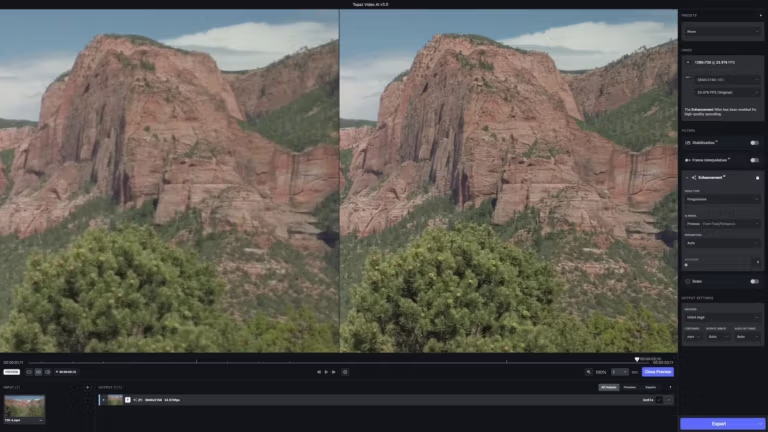
- View a preview before rendering. Live Frame Preview displays model settings instantly when scrolled to that frame, allowing for before and after image comparisons before deciding to process the entire file.
- Rendered on-premises or in the cloud. The machine can handle unlimited processing with its onboard GPU, while demanding models like Starlight can be uploaded to the cloud for Topaz to render.
- Works with Premiere Pro. Topaz Panel allows you to drag clips from the timeline directly to be edited with AI. The rendered files will automatically be returned to the project.
What's new?
Version 1.7.1
- The Hyperion 2.5 model converts SDR to HDR. The newest version of the model for converting SDR to HDR resolves the occasional ghosting/shadow-like issues while maintaining the integrity of the original. It supports AMD, NVIDIA, and Mac.
- Update Topaz Panel for Premiere to version 1.1.1. Improved batch processing from the timeline; fixed duplicate clip rendering, incorrect clip sequence placement, missing 1-2 frames, and rendered file resolution not matching the selected value.
- Neuroserver Model Manager. The new Model Manager, under the old Model Manager, includes a built-in hardware and version checker, allowing you to see the size of models that need to be kept locally and remove unused models.
- The Model Manager is displayed from the first time the program is launched. Upon opening the program for the first time, you will encounter a screen allowing you to choose to install or uninstall models, along with specifying the required area. This step can be skipped and returned to later.
- Option to disable image stabilization preview. You can disable image stabilization analysis manually in Preferences, under Advanced at the bottom. Remember to save if you want to keep your settings.
- More complete metadata. The project settings page displays more detailed source information, including file name, file path, length, audio, pixel format, file type, resolution, aspect ratio, and file size. Export information is also fully available.
- Add a watermark to the export file. Add the Topaz watermark to your rendered files. Enable it in Preferences, under Advanced. Remember to save if you want to continue using it.
- Hardware decoding option. You can choose to enable or disable hardware decoding yourself. This is useful for processing H.264, H.265, and AV1 files. Set this in Preferences, under Application, Processing.
- Fixed encoding and thumbnail bugs. Encoding and decoding errors occur with some 10-bit files, and thumbnails display unusual noise with .mov files.
- Fixed bugs in LUTs and Starlight Precise 2.6. LUT issues including colorspace error messages and unusually slow Starlight Precise 2.6 processing speeds for some users.
File Information
- Operating System: Windows 7, 8, 10, 11 (64-bit only)
- Risk Level: Medium
- Developer: Topaz
- License: Full
- Size: 321.42 MB
- File type: *.rar
- Password: mawto
- Installation Method: Available
- Link updated on: 27/9/2569
- Required Reading: Download Guide
==== Download Topaz Video Pro 1.7.1 (New) ====
==== Download Topaz Video Pro 1.6.1 Final (New) ====
==== Download Topaz Video AI Pro 7.1.6 ====