
Download XMedia Recode 3 (64-bit) for free. This all-in-one video and audio converter supports popular formats, processes files in batches, offers detailed quality adjustments, and provides GPU acceleration.
Overview of XMedia Recode
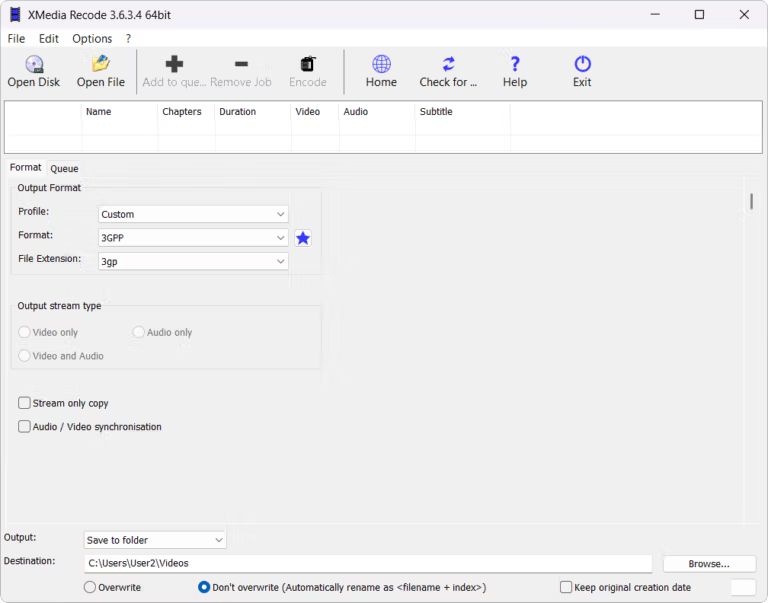
XMedia Recode This is a free, all-in-one video and audio file converter designed to solve the frustrating problem of downloaded movies or clips that won't play due to incompatible formats on your phone, tablet, or TV. Instead of needing separate apps for conversion, audio extraction, or basic editing, this one app handles it all. It converts almost every common file format you encounter in real life, from MP4, AVI, MKV, WMV, 3GP, and WebM, to extracting data from DVDs and Blu-rays to digital files for viewing on portable devices. Files that were previously unplayable due to incompatible codecs can now be used, and it also reduces file sizes while maintaining image quality. It's ideal for those with limited storage space.
Behind the scenes, it uses the FFmpeg engine working with a constantly updated encoder from the developers, keeping up with new codecs like AV1. What sets this apart from typical file conversion apps is that it doesn't just have a single convert button, but gives you deep control over encoding details down to image resolution, frame rate, bitrate, container type, and even allowing you to choose to keep or discard individual audio and subtitle tracks. Batch conversions are handled easily thanks to its job queuing system, and if your graphics card supports it, it can accelerate the conversion using GPU speeds from Intel Quick Sync, Nvidia NVENC, and AMD for both H.264 and H.265, significantly speeding up the conversion process for large files. Users who frequently experience long conversion times will notice the difference immediately. Anyone who regularly prepares footage for editing, or simply wants to watch movies on their phone while traveling, and wants a backup file converter to compare with others, should consider this app. HandBrake This one is worth trying, and it even comes with basic editing tools like cropping, rotating, resizing, and adjusting volume built-in, so you don't need to open any other apps.
Things to know before use.
One thing to know beforehand is that this program can only convert discs that do not have copy protection. If it's a locked, copyrighted DVD or Blu-ray movie, the program will not be able to read the data directly. However, general video files already on your computer or downloaded yourself will work normally without this limitation.
The capabilities of XMedia Recode.
- It can convert video and audio files in almost all popular formats, including MP4, AVI, MKV, WMV, 3GP, WebM, as well as audio files like MP3, AAC, and FLAC.
- It allows you to directly extract data from DVDs and Blu-rays and convert them into digital files.
- There are pre-defined profiles for popular devices; set them up once and they'll instantly adapt to your mobile or tablet.
- Built-in video editing tools allow you to trim unwanted sections, adjust color, rotate, crop, create fade-out effects, remove logos, and embed subtitles.
- Accelerate file conversion with GPU support. Supports Intel Quick Sync, Nvidia NVENC, and AMD for both H.264 and H.265, along with NVIDIA CUDA video decoder.
- Create and edit video scripts, and import subtitle files for collaborative use.
- Direct Stream Copy mode copies video or audio streams to the destination format without re-encoding, saving time and preserving quality.
- Extract audio tracks from video files, edit ID3 tags, and add album cover art.
- Process multiple files simultaneously using a job queuing system. Set it up and let it run continuously.
- Drag and drop files onto the program window to start working immediately, and adjust resolution, frame rate, and bitrate with precision.
What's new?
Version 3.6.4.1
- Update FFmpeg
- Update the AOM AV1 Codec to version 3.14.1.
- Update SVT AV1 to version 4.2.0.
- Fixed minor bugs.
The developers have not yet released a separate list of changes for version 3.6.4.1. The list above is based on information from the previous version.
File Information
- Operating System: Windows 7 / 8 / 8.1 / 10 / 11 (64-bit)
- Developer: Sebastian Dörfler
- License: Freeware
- Language: Multilingual
- File size: 21 MB / 30 MB
- File type: *.exe
- Version: 3.6.4.1
- Updated: September 28, 2026
- Required Reading: Download Guide
==== Installation Package (.exe) ====
==== Portable Version (.zip) ====