
Download HandBrake (32-bit / 64-bit) for free. This video file conversion program reduces video file sizes while maintaining the same clarity. It is available for both older and the latest versions.
What is HandBrake?
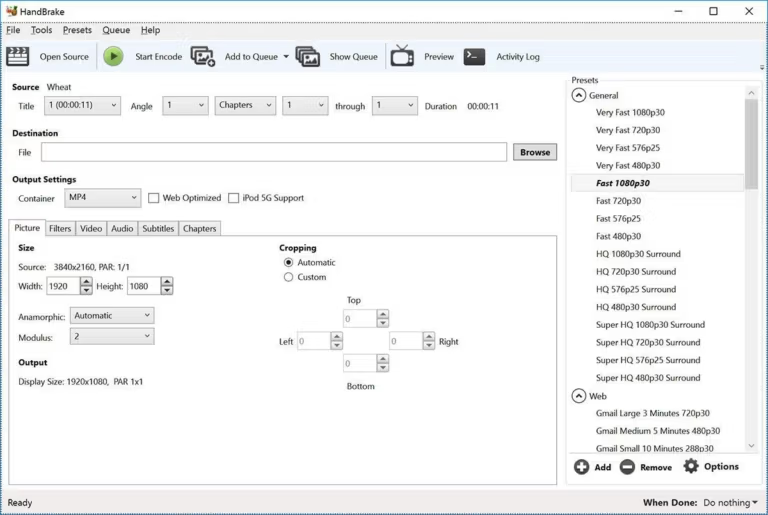
HandBrake is a highly popular program for converting video files from one format to another, particularly for converting DVD files into digital video formats. It is generally user-friendly and offers good quality in video file conversion, allowing users to easily create high-quality video files. The capabilities of HandBrake are not limited to DVD conversion alone. The program can also convert files from one format to another, including MKV, MP4, AVI, and more. Additionally, it offers video quality customization features such as resizing, brightness adjustment, contrast adjustment, and more, allowing you to perfectly tailor video files to your specific needs.
The usage is straightforward. Simply select the video file you want to convert, choose the desired output format, and click "Start Conversion." The file will be converted automatically without requiring any additional skills.
In addition to its video file conversion capabilities, this program offers other interesting features, such as adding subtitles to video files, video editing, adding effects to videos, and more, all of which help users fully customize their video files to meet their specific needs.
Features:
- Multi-platform support: Ready to use for Windows, macOS, and Linux operating systems, making it accessible across various platforms.
- A wide range of input and output formats: Supports nearly all input formats, including DVD, Blu-ray, and common video files. The program can export video files in popular formats such as MP4, MKV, and WebM.
- Customizable Video Settings: There are options to customize various video settings, such as resolution, aspect ratio, frame rate, and video quality, to achieve the desired results. This makes it suitable for both beginners and advanced users.
- Predefined settings for different devices and platforms: It comes with a collection of preset values for popular devices, such as smartphones, tablets, gaming consoles, and streaming platforms like YouTube and Vimeo. This makes it easier to select the appropriate settings for the target device or platform.
- Captions and audio tracks: HandBrake allows you to add, remove, or edit subtitles and audio tracks in the output video file. This feature is particularly useful when working with multilingual content.
- Video Preview: The software features an integrated video preview function that allows you to check the results of your settings before starting the encoding process.
Even more features!
- Title/Chapter and Range Selection
- Batch Scan and Queueing of encodes
- Chapter Markers
- Subtitles (VobSub, Closed Captions CEA-608, SSA, SRT)
- Constant Quality or Average Bitrate Video Encoding
- Support for VFR and CFR
- Video Filters: Deinterlacing, Decomb, Denoise, Detelecine, Deblock, Grayscale, Cropping, and Scaling
- Live Static and Video Preview
Outputs
- File Containers: .MP4(.M4V) and .MKV
- Video Encoders: H.265 (x265 and QuickSync), H.264(x264 and QuickSync), H.265 MPEG-4 and MPEG-2, VP8, VP9 and Theora
- Audio Encoders: AAC / HE-AAC, MP3, Flac, AC3, or Vorbis
- Audio Pass-thru: AC-3, E-AC3, DTS, DTS-HD, TrueHD, AAC, and MP3 tracks
Advantages of HandBrake
- Free and open source: It is completely free to use, and its source code is publicly available. This promotes a community-driven development process, leading to continuous improvements and updates.
- User-friendly interface: The interface is designed for ease of use, making it simple for beginners to navigate and use the software efficiently.
- Batch Processing: Supports batch processing, enabling the simultaneous conversion of multiple video files. This feature saves time and effort, especially when working with large video libraries.
- Regular updates and an active community. The HandBrake community is quite active, and the software is regularly updated to fix bugs, improve performance, and add new features.
- Agility and Flexibility: It is a versatile tool that can be used for various video encoding tasks, ranging from simple format conversions to advanced video editing and optimization.
What's new?
All platforms
Video
- Fixed a crash that occurred when performing a 2-pass lossless x265 encode.
- Fixed a memory leak that occurred when performing a 2-pass MPEG-4/MPEG-2/VP9/FFV1 encoding.
Audio
- Updated the list of supported dithers and encoders combinations
- Fixed the Core Audio AAC encoder 7.1 channel layout
Subtitles
- Fixed the VobSub palette creation in the MP4 container.
Build System
- Improved build system compatibility with older build tools
Third-party libraries
- Updated libraries
- FFmpeg 8.0.2 (decoding and filters)
- SVT-AV1 4.1.0 (AV1 video encoding)
Windows
- Improved handling of unsupported presets
- Improved queue low space pause behavior
- Fixed the automatic audio track name generation.
- Fixed the summary description of HDR video.
File Information
- Operating System: Windows XP / Vista / 7 / 8.1 / 10 / 11
- License: FreeWare
- Language: English
- Size: 24 MB
- File type: *.exe
- Version: 1.11.2
- Updated on: 8/6/2026
You can still download Wondershare UniConverter Latest and free
==== Download the latest version ====
==== Download Older Versions ====