

Download Windows Firewall Control for free. This program helps manage and configure your firewall more easily. Control incoming and outgoing connections, block suspicious apps, and switch filtering modes from the system tray. Latest version available.
What is Windows Firewall Control?
Windows Firewall Control This is a compact add-on program developed to enhance the basic firewall control of your system, making management easier and faster. It doesn't replace the existing security system, but acts as a central hub, providing instant access to deep-level firewall features via an icon in the system tray. Its key feature is transforming the complex system settings window into a simple process with just a few clicks. You can switch between four security filtering modes: High Filtering (blocking all connections), Medium Filtering (allowing only specified programs), Low Filtering (for general use), and No Filtering (temporarily disabling filtering). This allows for more efficient and confident management of system connections.
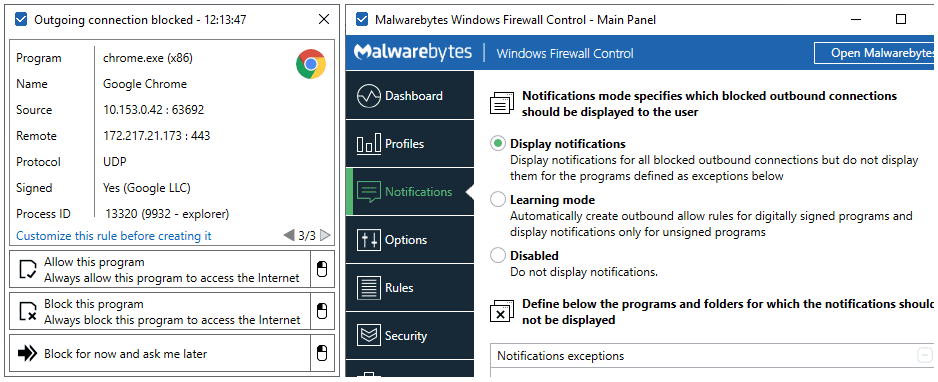
In addition to switching filtering modes, the program also includes a powerful security rule creation tool. We can right-click on any program file on the machine to immediately block or allow it access to the internet. It also features a pop-up notification system when an application is attempting to connect to an external network, allowing us to decide whether to allow or deny access promptly. If you are familiar with using network management programs like... NetLimiter Pro For monitoring bandwidth, this program serves as a perfect security partner, complementing traffic filtering. It also features a real-time connection log, detects duplicate rule settings, and allows for convenient export of backup rule sets for later use.
Key Features
- It works through the system tray, providing quick and convenient access to firewall settings.
- Switch between 4 levels of traffic filtering security with a single click.
- Right-click the program file to create rules to allow or block connections immediately.
- There is a notification system that alerts you when an application attempts to connect to the internet.
- Monitor and display real-time logs of incoming and outgoing connections for various programs.
- Find and help manage duplicate or unused firewall rules in the system.
- Import and export safety regulation sets for use with other equipment or as backups.
- Prevent unauthorized modification or deletion of firewall rules by setting a password.
- Supports setting keyboard shortcuts for accessing frequently used control windows and functions.
- It consumes very few system resources and works seamlessly with the system's main firewall.
What's new?
What's new in version 6.35.0.0 - (September 21, 2026) - Fixed: The service does not start on Windows Enterprise LTSB and LTSC versions due to how application packages list is read. - Improved: If packages list is empty "Application package" option remains hidden since it has no meaning. This is useful for older OS versions.
File Information
- Operating System: Windows 11 / 10 / 8.1 / 7
- Developer: binisoft
- License: Freeware
- Language: English
- Size: 3 MB
- File type: *.exe
- Updated: 21/9/2026
- Required Reading: Download Guide





