Download VectorCraft for free, the latest version of the open-source vector drawing software developed in Rust, delivering blazing-fast performance at 120 fps, supporting graphic work, Pen tools, Pathfinder, and opening .ai, SVG, and PDF files.
What is VectorCraft?
VectorCraft is an open-source vector design and drawing software from the team ArtCraft built entirely from scratch using the Rust language. Its standout feature is multithreaded SIMD processing separated from the UI thread, allowing it to draw and render 20,000 shapes in about 27 milliseconds while keeping the workspace fluid at 120 fps right from launch.
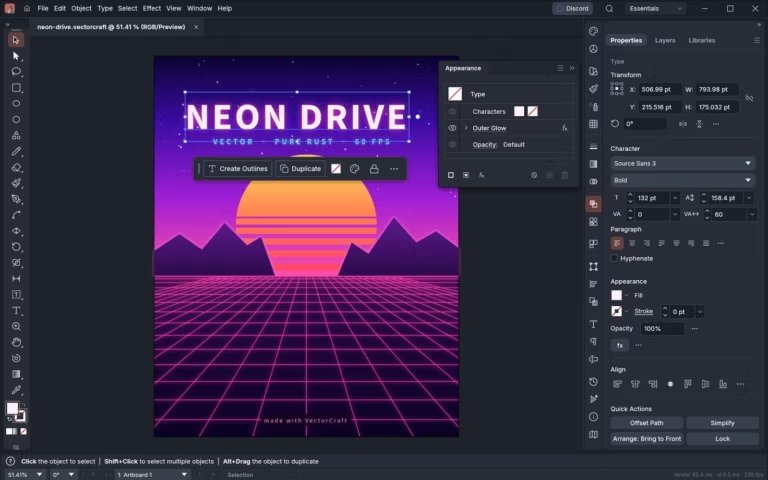
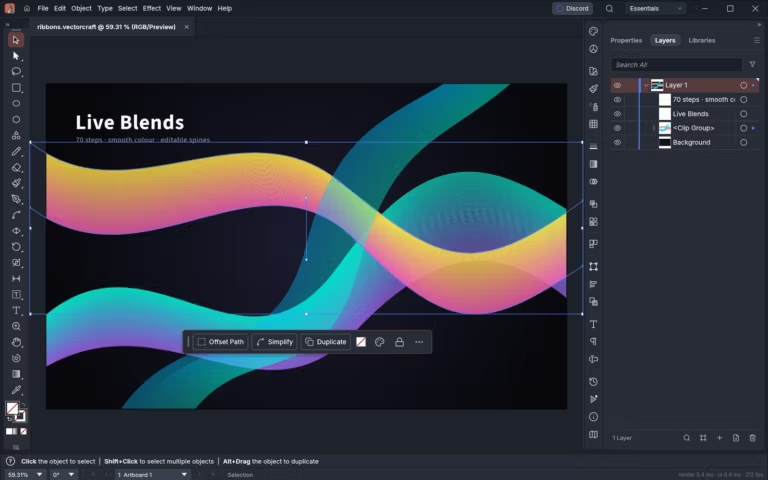
The layout of tools, control panels, keyboard shortcuts, and menus is designed to feel familiar to those who have used Adobe Illustrator before, including the Pen and Direct Selection tools for editing Bézier curves, as well as the Pathfinder shape-editing toolkit, Smart Guides, Appearance, Swatches, and Layers with clearly separated rows for each component. Adjust Glow, Gradient Mesh, Radial Repeat, Envelope Distort, or Live Blends in real time without having to convert objects first.
Regarding native file handling, the software saves work in its own .vectorcraft format using a JSON structure and supports opening or exporting SVG, PDF, and .ai files saved with PDF compatibility. It also exports raster images like PNG, JPEG, and WebP via the Export for Screens mode, and instantly opens SVGZ, GIF, TIFF, BMP, or template files. For large-scale printing, you can split pages to print posters or patterns across multiple sheets directly from the print window.
The software's shape calculation system uses precise curve management principles, eliminating merging or overlapping errors and failure warnings. This is complemented by an unlimited Undo system and a Dimension tool that automatically adjusts numbers according to object sizes. It also features a JavaScript script runner, plugin system, TCP JSON command channels, and an MCP server enabling automated systems or agents to directly create, edit, and export graphic work headlessly.
Key Features
- Multithreaded SIMD vector rendering outside the UI thread, handling over 20,000 shapes in approximately 27 milliseconds.
- Draw and precisely edit curves with Pen and Direct Selection tools featuring anchor points, Bézier handles, and context-aware toolbars.
- Combine, subtract, intersect, or divide shapes using the Pathfinder toolkit with precise curve calculation algorithms.
- Apply advanced gradients with Gradient Mesh, Conic Gradient, and the Appearance panel which supports multi-layered effects like Outer Glow.
- Create 3D shapes via the 3D Revolve command with direct control over rotation angles, surface caps, and lighting direction.
- Duplicate around a center point using Live Radial Repeat, create Live Blends that maintain editable master paths, and distort text with Envelope Distort.
- Perspective Grid assists in aligning objects to 3D perspective planes while keeping vector paths editable afterward.
- Dimension tool measures lengths, angles, and radii on blueprints, with figures updating automatically when scaling or dragging points.
- Supports working with multiple Artboards simultaneously in a single document in both dark and light color modes.
- Open and export SVG, PDF, PDF-compatible .ai, PNG, JPEG, and WebP files, as well as import SVGZ, GIF, TIFF, BMP.
- Print large posters or patterns split across multiple pages directly from within the program.
- Support JavaScript scripts, plugins, TCP JSON control channels, and MCP servers for headless drawing or exporting.
What's new
Version 0.24.1 – 2026-11-12
- Add built-in Energy Beams brush set.
- Improve the EPS and .ai file import system to handle Gradient Mesh color transitions more accurately, and validate string lengths and JPEG/TIFF headers.
- Move ruler guides to be stored as objects on document layers.
- Fix the Pen tool when dragging to close a path so it does not unintentionally create symmetrical handle arms on the starting point.
- Add Dynamic Text layout mode to adjust text size along a curve to fit boundary brackets, and add Paragraph Styles for adjusting indentation, spacing, hyphenation, and alignment.
- Update the Symbols panel to sort by name and toggle between Small or Large List views, along with Paste in Place / in Front / in Back commands that paste onto all selected artboards.
- Support saving PDF files with pages longer than 200 inches at full point scale, and fix Conic Gradient rendering around the center point.
file information
- Operating System: Windows 11 / 10 (64-bit)
- License : MIT / Apache-2.0 (Open Source)
- Developer: ArtCraft (Storytold)
- Language: English
- Size: 124 MB / 155 MB
- File type: *.msi, *.zip
- Updated on : November 17, 2026
- Need to read: Download Guide