
Download Resolume Arena 7.28.0 rev 24303 (x64) Full version for free, permanently. This software creates and controls visual, lighting, and sound effects for stage performances, concerts, and events, and is also suitable for VJ work. (Latest version.)
What is Resolume Arena?
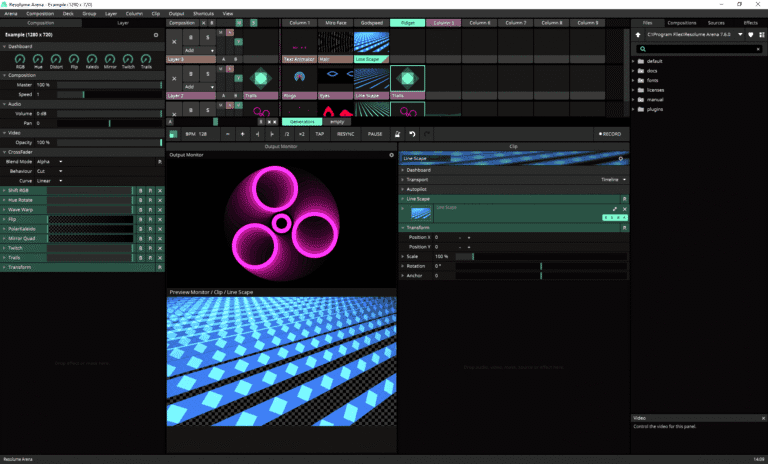
Resolume Arena Resolume Arena is software specifically designed for VJ work or live stage mixing. It's ideal for events requiring real-time visuals, lighting, and effects synchronized with music, such as concerts, music festivals, events, or parties. The common problem with these types of events is static, out-of-rhythm visuals. Resolume Arena solves this by allowing users to instantly mix video clips, still images, and audio files, change clips, add effects, and adjust visuals to the beat. Like musicians playing their instruments, everything on the screen comes to life and dances to the music throughout the show. This dynamic visual arrangement enhances the audience's sense of rhythm, transforming an ordinary event into a memorable experience.
Its operation begins with a deck of clips arranged in layers and columns. Pressing a trigger instantly displays the corresponding clip on the screen, complete with live-processed effects and transitions—no pre-rendering required. What sets Arena apart from its younger sibling, Avenue, is its media server capabilities. It can project images onto any surface using projection mapping, seamlessly blend multiple projectors into a single image using edge blending, receive live video signals from cameras and capture cards, control stage lighting via DMX, and synchronize everything perfectly with the DJ's SMPTE timecode. The loaded media files support Resolume's own DXV codec, designed for smooth and uninterrupted live performance.
This is why it's an essential tool for professional VJs, touring DJs, event teams, and artists creating art installations. The package also includes Wire, a node-based effect creation tool, and Alley, a media file conversion program ready for playback. It's perfect for projects where audio precedes visuals and you want the visuals to synchronize, or for music production professionals. Ableton Live These two can be played together perfectly.
Key Features
- Mix live video like playing a musical instrument: play, rewind, fast forward, scratch, and instantly adjust the video's tempo to match the beat of the music.
- The interface is easy to use, the layout can be customized to your style, and you can place as many clips and effects as the device can handle.
- From small clubs to the main stage of a festival, it can be projected onto any screen as long as the system recognizes that screen as the output.
- It can play both image and audio files. You can mix any video file with any audio file you like.
- Visual and sound effects can be used individually or combined to create unique new effects.
- Analyze sound to make the image dance to the rhythm; select any parameter to move in sync with the music.
- Projection mapping can project images onto any surface, from complex structures to entire buildings.
- Edge blending allows you to connect multiple projectors to create a seamless, single image, even wrapping 360 degrees.
- It can project onto anything from DJ booths and cars to pumpkins; no matter how big the mapping project is, we can handle it.
- Color the stage lights and send the color signals to control the DMX lighting, making the lights dance in sync with the projected images.
- Composite multi-layered images with live effects; no pre-rendering required.
- Plug in both video and audio plugins. Supports FFGL and a wide variety of audio plugins.
- Connect with other apps, allowing Ableton Live and MIDI/OSC devices to control the show together.
- Several people can work together to control the show, dividing the tasks so that each person has a control panel to manage.
- The lighting technician receives commands from the table, and the image changes according to the lighting sequence pressed by the technician.
- Synchronize the video with the SMPTE timecode to ensure perfect synchronization of image, sound, and lighting throughout the show.
- Connect to a Denon player via StageLinq to read music data and control the video.
- Send DMX signals to control lighting fixtures directly from within the software.
- Send the image out via a capture card; the image from Resolume can be used further in streaming or recording software.
- Group layers and control them all simultaneously. Change the effect on all layers in the group at once.
- Fine-tune the slices in Advanced Output, twist, stretch, and rotate the image to fit the projected surface.
What's new?
What's new in version 7.28.0 rev 24303?
- Background Removal. Separate people from the background using a person recognition model. Adjust the mask, flip, soften the edges, and smooth the edge details all in one tool.
- Depth Estimation. Creates a depth map from a regular 2D image; includes a cross-frame filtering system to reduce flickering.
- Depth Blur. Shallow depth of field allows you to choose which areas are in focus, while areas closer or further away will blur into bokeh. This works with any clip because it measures depth from the live image.
- Depth Field. The two-layer effect, Ghost, fades the image and blends it into the background, while Xray emphasizes brightness at the selected depth. The desired point can be moved.
- Depth Displace. Distort images with depth-based noise. Adjust the intensity and direction. Can be used to create water wave effects or dreamy, blurry images.
- Depth Pixelation. The image is created using pixels, where the block size changes with depth; distant objects appear in larger blocks, while objects closer to the subject are sharper.
- Depth Shift. By separating an image into layers based on depth and shifting each layer differently, a parallax 3D image is created from a flat 2D image.
- Depth blend mode. Blending two layers with a depth map instead of transparency creates a seamless overlay, making it appear as if they are in the same scene.
- This set of effects is created from... Wire All of them allow you to open the patch and customize the models and controls yourself, or create your own effects from the Human Segmentation and Depth Estimation nodes.
- Select. Group FFT It has been decided which group the FFT parameters of the clips and layers within a group will refer to the audio from.
- MIDI and OSC Monitor. You can select and copy the text, which is convenient when encountering long OSC addresses.
- In Wire Right-clicking on an inlet or parameter can restore the default settings, just like in Arena.


File Information
- Operating System: Windows 11 / Windows 10 / 8.1 (x64)
- Risk Level: 🔴 High Risk -> VirusTotal Report
- Developer: Resolume
- License: Full
- Size: 1.67 GB
- File type: *.rar
- Password: mawto
- Installation Method: Available
- Updated: 26/9/2026
- Required Reading: Download Guide
💡The KeyGen file is set to run in Sandbox to reduce risks.