
Download Reg Organizer 9 for free, the full, permanent version. This Registry management program helps you find, fix, back up, and clean up your Windows system, and includes tools for uninstalling programs and optimizing startup.
What is Reg Organizer?
Reg Organizer This is a program for managing and optimizing the Windows system. Its primary function is to clean and repair the Windows Registry to reduce errors and improve system performance. It also includes tools for safely searching, modifying, and deleting unnecessary data from the registry.
Over time, as Windows systems are used, registry entries, temporary files, and startup items can accumulate, making maintenance difficult. Reg Organizer combines tools for monitoring and managing these in a single window. It includes a Registry Editor for searching, editing, importing, and exporting values, as well as functions for backing up and reverting before modifications. This simplifies system maintenance and reduces the risk of incorrect registry changes.
Another highlight is its thorough uninstallation feature. The system can search for leftover files, folders, and Registry entries after uninstallation, and manage items started with Windows through the Startup Manager. It also includes tools for finding junk files, customizing hidden system settings, and monitoring changes made after program installation. This is ideal for system maintenance tasks that require a clear view of the impact before and after modifications.
Reg Organizer's functions are divided into sub-tasks that can be selected depending on the situation, such as checking the Registry before deleting unnecessary entries, creating snapshots before changing system settings, or analyzing startup programs to find what's causing slow boot times. For a comparison with other Registry management tools, please see... Wise Registry Cleaner Consider these factors when choosing a Windows maintenance method.
Features:
- Advanced Registry Editor for searching, editing, importing, and exporting Registry values.
- Registry Search and Replace helps find and replace values in multiple locations at once.
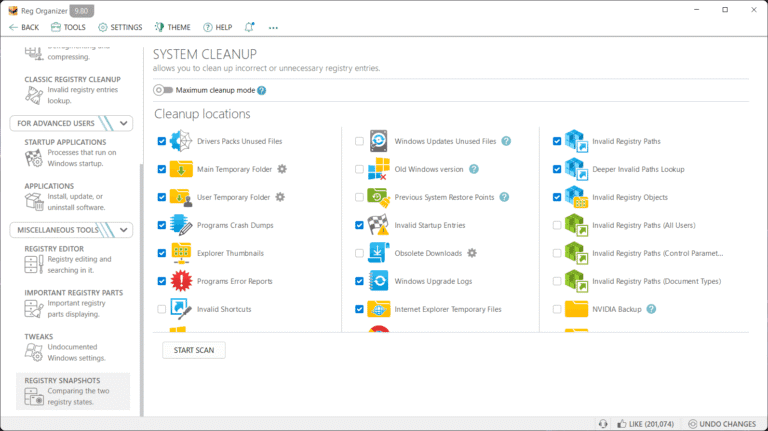
- Registry Cleanup detects unnecessary entries and displays them before proceeding.
- Registry Keys Tracker tracks changes resulting from program installation or operation.
- System Snapshot records the state for comparison and reverting when needed.
- Advanced Uninstaller finds leftover files and Registry values after program uninstallation.
- Startup Manager manages items that start with Windows and helps analyze their impact on boot time.
- Windows Cleanup finds temporary files and unnecessary data to free up space.
- Privacy Cleanup allows you to clear history and personal data from selected locations.
- System Tweaker opens Windows customization options hidden in the regular settings page.
- Disk Cleanup Tool helps manage junk files and unused links.
- The Backup and Restore menu helps you check for changes before modifying the Registry.
1. Uninstall Tool
The system includes a thorough uninstallation process, searching for any remaining evidence of the installation, such as files or registry values, to help keep the system clean and free from residual data.
2. Advanced Registry Management
- The Advanced Registry Editor offers a wider range of capabilities than standard Windows tools, supporting flexible import, export, copying, and editing of .reg files.
- The Search and Replace system helps to thoroughly find and replace unwanted values in the registry, ideal for cleaning up data from programs that have been uninstalled without leaving any uninstaller residue.
- There is a Registry File Editor and Viewer for viewing and editing .reg files and explicitly inspecting their contents before importing them in a tree structure.
- Registry Optimization features, such as compression and defragmentation, help reduce the size and improve the performance of the registry.
3. Cleaning and optimization.
- Windows Cleanup is designed to find and remove unnecessary files such as temporary files, outdated updates, junk files, etc., freeing up space and improving system performance.
- There is a Disk Cleanup Tool that helps manage junk files and unused links.
- Supports privacy cleanup, such as browsing history, recently opened files, and history in the Run menu, jump lists, etc.
4. Startup Manager
Reg Organizer includes an Advanced Startup Manager feature that gives you detailed control over which programs open when Windows starts, helping to reduce boot time and improve performance.
5. System Tweaker
You can customize settings that are not publicly available in Windows by default, such as increasing cache size, releasing unused libraries, and adjusting other performance settings to speed up the system.
6. Verification and Traceability (Snapshots & Tracking)
- It features a Registry Keys Tracker that meticulously tracks changes to the registry from various programs.
- Supports creating system snapshots and comparing before-and-after changes to identify modifications, enhancing security and preventing system impact.
What's new?
v. 9.94 8/11/26
- Updated the startup applications tool interface. Enhanced usability allows you to perform actions on items directly within the list rather than using a separate panel.
- Applications tool: List button design updated to match the Windows 11 style (when running on this OS).
- Winapp2 database from the Community Cleanup tool has been updated to version v260730.
- Added cleaning for MAX messenger (Private Data Cleanup tool).
- Fixed bugs:
- In the Startup Applications tool, fixed an issue where certain items (mostly system services) incorrectly displayed an “Uninstall <…>” button that launched the uninstaller for an unrelated application.
- Task Scheduler: Relative file paths could be incorrectly identified as invalid. The tool now correctly recognizes files outside the Windows and System32 folders if their paths are defined via system environment variables (PATH).
File Information
- Operating System: Windows 10 / 11 (64-bit)
- License: Full
- Developer: ChemTable Software
- language : Multilingual
- size : 25.95 MB
- File type: *.rar
- Password: mawto
- Installation instructions: There is.
- Updated on: 15/8/2026
- Required Reading: Download Guide