

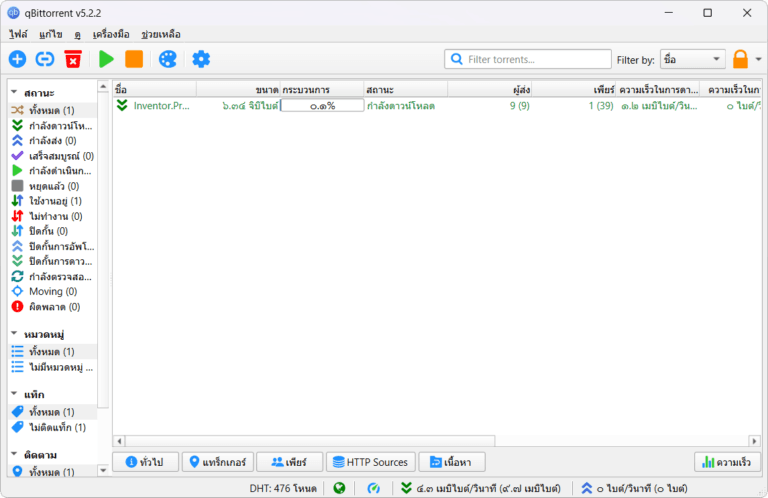
Download qBittorrent 5, a free, open-source BitTorrent downloader. It supports Thai language, is ad-free, stable, manages files excellently, and is extremely secure. It supports DHT, PeX, encryption, and µTP, and has a built-in search engine. This is the latest version.
What is qBittorrent?
qBittorrent BitTorrent is an open-source file download client developed in 2006 by Christophe Dumez. It's very popular today, with a user-friendly interface and operating system designed after the legendary BitTorrent download program many are familiar with. However, what makes it superior is its cleanliness, security, and the complete absence of annoying advertisements.
qBittorrent uses libtorrent-rasterbar as a backend to manage protocols and is written in C++ on the Qt Framework, making it lightweight and fast, consuming fewer resources than the external UI might suggest. It supports all the major BitTorrent features including DHT, PeX, Protocol Encryption, LSD, UPnP, NAT-PMP, and µTP (Micro Transport Protocol), which helps to make downloads smoother on networks with throttling traffic.
In addition to the standard download client, qBittorrent also features a WebUI for remote program control via a browser on another machine, an RSS feed that automatically downloads new files according to set rules, and a built-in search engine that searches for torrents from multiple websites simultaneously via an installable plugin. All of this is included in a free program with no usage restrictions.
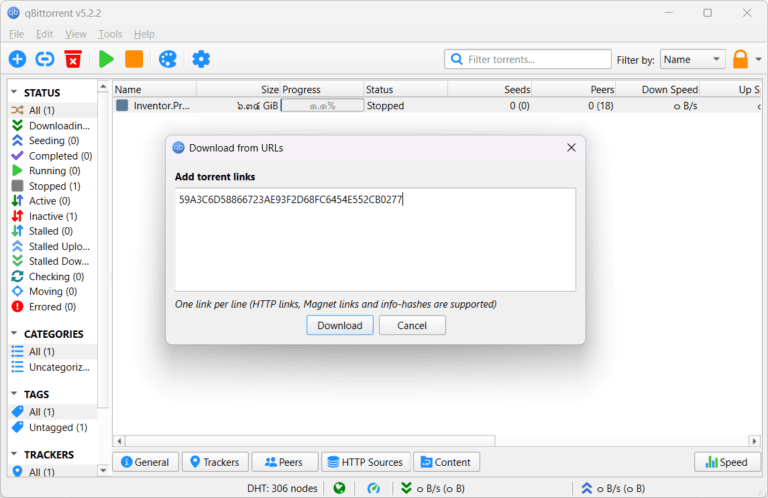
Features:
- Supports a full range of protocols: It supports DHT (Distributed Hash Table), PeX (Peer Exchange), Protocol Encryption, LSD (Local Service Discovery), UPnP, NAT-PMP, and µTP, enabling wide peer reach and smooth download speeds across all networks.
- Prioritize files within the torrent: You can choose which files to download first and which files to skip from the same download sequence. Supports sequential downloading for watching videos while downloading.
- RSS feed and automatic download: Track RSS feeds from torrent sites and set rules to automatically download new files that meet specific criteria. Supports both Regex and Simple String Filtering. Separate refresh intervals can be defined for each feed.
- IP Filtering: Block unwanted IPs via the PeerGuardian file or eMule. The dat file displays the country and hostname of all peers in the list.
- Torrent Creator: Create a .torrent file from a file or folder on your computer. Set the Tracker, Comment, Piece Size, and select a Private Torrent from within the program.
- WebUI for remote control: Access and manage qBittorrent from a browser on another machine on the network or from the internet. Supports password protection and HTTPS. Suitable for running on a NAS or server without a screen.
- Share Limit per Category: Set separate seeding ratio and maximum time limits for each category, instead of setting them for each torrent individually. This is ideal for separating seeding policies between different file types. This feature was recently added in version 5.2.
- Built-in search engine: Search for torrents from multiple sources simultaneously directly via the installed Python plugin, without needing to open your browser to search manually.
- Bandwidth Scheduler: Set maximum download and upload speeds according to desired times, for example, disable uploads during business hours and enable full speed at night.
- Subcategory and Free Disk Space: The Category system supports automatic subcategory hierarchy structure, and the Status Bar displays remaining disk space in real-time. These features were added in version 5.2.
- ARM64 Support: 5.2 Added a build for ARM64 for the first time, supporting devices using ARM64 chips on Windows and Linux.
What's new?
v5.2.3 changelog:
- BUGFIX: Fix MIME header encoding in email to require ASCII (quinot) #24382
- BUGFIX: Fix potential invalid migration procedure (Chocobo1) #24502
- BUGFIX: Resolve relative UI theme paths (TurboTheTurtle) #24514
- BUGFIX: Clear transfer filters when sections collapse (TurboTheTurtle) #24517
- BUGFIX: Fix potential deadlock when database transaction failed (Chocobo1) #24542
- BUGFIX: Fix wrong torrent tracker conversion (Chocobo1) #24546
- BUGFIX: Fix wrong encoding for Web Seeds (Chocobo1) #24593
- BUGFIX: Use stricter parsing for Peer Address inputs (Chocobo1) #24595
- BUGFIX: Revise regex expression for parsing HTML links (Chocobo1) #24597
- WEBUI: Correctly escape CSS query selector so the UI won't break (vafada) #24539
- RSS: Fix feeds not following the specified interval (vafada) #24553
- SEARCH: Fix plugin counting when updating (Chocobo1) #24544
- WINDOWS: Avoid using invalid file attributes when renaming files (Chocobo1) #24543
- Full changes
File Information
- Operating System: Windows 11 / 10 / 8.1 / 7 (x64)
- License : Open Source / Freeware (GPL-3.0)
- Developer: qBittorrent Team
- Language: Supports multiple languages / including Thai.
- Size: 41 MB
- File type: .exe
- Updated: 8/7/2026
- Required Reading: Download Guide





