
Download Nik Collection by DxO 9 (x64) for free, full and permanent. This image editing plugin suite for Photoshop, Lightroom Classic, and DxO PhotoLab includes Color Efex, Silver Efex, Analog Efex, Viveza, Dfine, Sharpener, and HDR Efex.
What is Nik Collection by DxO?
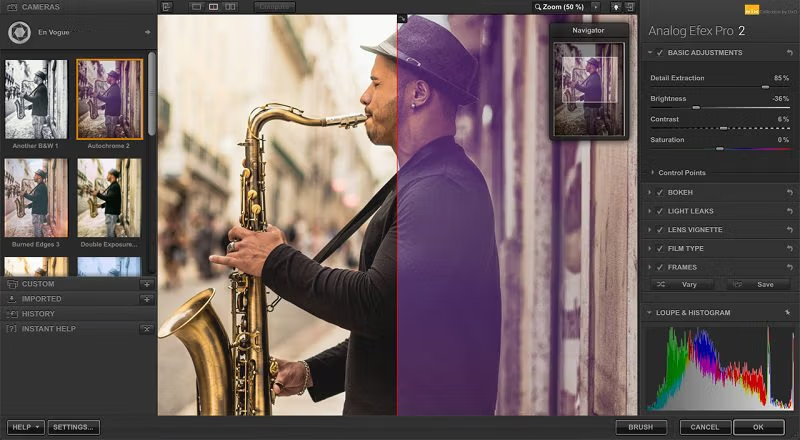
Nik Collection by DxO This is a suite of image editing plugins that combines various tools into a single package. It can be used for color, black and white, film effects, noise reduction, sharpening, selective adjustment, and HDR, without needing to install separate plugins from different developers. Key tools like Color Efex are for adjusting tone and layering filters, Silver Efex focuses on black and white images, Analog Efex creates a vintage camera and film look, and Viveza is for adjusting color and light specifically in areas without needing to create complex masks from scratch.
The heart of this suite is U Point, which allows you to place Control Points or Control Lines on the desired area and choose how broad the adjustment will be based on the color and brightness of that area. The new version adds more precise control over Luminance and Chrominance, and allows you to save Control Points as presets for reuse on other images. This eliminates the need to restart settings for frequently repetitive tasks on every image. Furthermore, you can categorize Presets and Filters, select your favorites, and layer multiple filters with their respective orders to experiment with different tones.
Nik Collection is available as a plugin for Photoshop, Lightroom Classic, and other supported host programs, with some tools also usable as standalone. Version 9 improves integration with Photoshop, including a built-in palette, converting layers to Smart Objects, and faster access to Photoshop presets. The Analog Efex suite includes Glass Effect and Chromatic Shift, while the Color Efex suite adds Halation and more flexible blending modes for effect mixing. A key advantage is that each tool has a clearly defined function; whether you want minor adjustments or extensive editing, you can simply enable the tools you need.
Key Features
- Color Efex allows you to layer filters, adjust color, brightness, contrast, and various effects in a single project.
- Silver Efex focuses on black and white photography, with control over grain and detail.
- Analog Efex simulates the look of analog cameras, film, lenses, and effects.
- Viveza allows for localized color and lighting adjustments using U Points, eliminating the need to create complex masks.
- Dfine reduces noise by analyzing the characteristics of image noise and adjusting specific areas.
- Sharpener Pro separates the sharpening tasks for capture and output images according to their destination.
- HDR Efex combines exposure and tone mapping adjustments for HDR imaging.
- U Point supports Control Point, Control Line, and more precise Luminance/Chrominance selection.
- Organize presets, filters, and favorites into a Library for quicker access to frequently used sets.
- Working with Photoshop through Smart Objects, Palettes, and calling presets from the host is now more convenient.
- Opened jointly with DxO PhotoLab To send basicly adjusted RAW images to the Nik plugin.
- It supports primary hosts like Photoshop and Lightroom Classic, as well as enabling some modules as standalone.
What's new in Nik Collection 9?
Nik Collection 9 expands the area selection tools and workflow in Photoshop. U Point offers more precise area control, while Color Efex, Silver Efex, and Analog Efex gain additional tools for adjusting tones and blending effects without having to move the project multiple times.
- Increase the distribution of Control Points and manage Local Adjustments more systematically.
- Invert Control Points/Lines and selection with Luminance/Chrominance help to define the affected area more accurately.
- Photoshop integration adds Smart Object conversion, a Palette, and shortcuts to Presets/Quick Edit.
- Color Efex adds Blending Modes, Halation, Filter stacking, and HSL color control.
- Silver Efex offers customizable appearance, color referencing, and preset sets for black and white photography.
- Analog Efex adds Glass Effect, Chromatic Shift, and Blending Modes for film-style work.
System Requirements
- Operating System: Windows 11 24H2 / Windows 10 22H2 (64-bit)
- Processor: Intel Core 10000 Series / Intel Core Ultra or AMD Ryzen with 4 cores or more.
- Memory: 16 GB RAM
- Free space: 16 GB
- Additional information: Resolution of 1280 x 768 or higher; AI/Depth Mask features require a compatible GPU with VRAM that meets DxO specifications.
File Information
- Operating System: Windows 11 / 10 (x64)
- Developer: DxO
- License: Full
- Version: 9.1.0
- Language: English
- Size: 913.58 MB
- File type: *.rar
- Password: mawto
- Updated: 1/9/2026
- Required Reading: Download Guide