
Download nanoCAD 26 for free, the full, permanent version. This CAD software is for 2D and 3D drafting and supports DWG files. It's suitable for engineering, architecture, construction, and technical design work. The latest version is available, along with installation instructions.
What is nanoCAD 26?
nanoCAD 26 This is a professional CAD program from Nanosoft AS, designed for creating, editing, and documenting 2D/3D models. It emphasizes compatibility with the DWG file standard, making it easier for teams working on designs to open, review, and share files during the design process. The interface and command structure are familiar to users who have experience with CAD programs, reducing the adjustment time when starting a new project or switching workspaces.
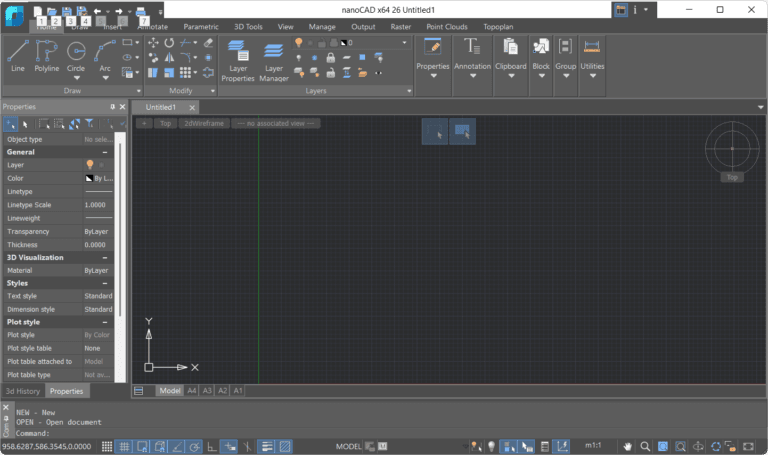
The program includes fundamental tools for drafting, layer management, text insertion, measurement, and object control in drawings, with 3D support on the same platform. A key feature of version 26 is a streamlined workflow, such as partial opening of large documents, more detailed Object Snap settings, and an expanded text editing toolset. It can be applied to mechanical engineering, building engineering, civil engineering, surveying, and engineering documentation requiring precise drawing accuracy.
nanoCAD is also expandable with modules for specialized tasks such as 3D Solid Modeling, Mechanica, Construction, Raster, and Topoplan, allowing teams to choose a set of tools that aligns with the project's characteristics and budget. We started with a core platform for drafting and then added modules for specific tasks without needing to change the entire workspace. Those comparing CAD platforms in the same field can look at... Autodesk AutoCAD 2026 This allows them to consider the workflow and tools that are best suited to their own project.
Key Features
- Supports opening, editing, and saving standard DWG file formats.
- It offers 2D drafting tools and the ability to work with 3D models on the same platform.
- You can use commands via the command line and dynamic input.
- Supports Command Aliases for French, Spanish, German, and Portuguese in version 26.
- Open a large document partially based on the selected View and Layer.
- The command window and status bar have been updated to be more modern and easier to read.
- Added modes and options for creating rectangles and polygons.
- You can now more precisely configure Object Snap behavior, highlighting, and object capture timing.
- Add text alignment tools, create text masks, reset MText formatting, and convert text to MText.
- Manage layers using groups, filters, and layer states for complex control.
- Expand capabilities with 3D Solid Modeling, Mechanica, Construction, Raster, and Topoplan modules.
What type of work is it suitable for?
This program is ideal for mechanical drafting, building and architectural drawings, civil engineering, site surveying, topography, and preparing documentation for production or construction. Teams exchanging DWG files with multiple parties can use layer management, drawing referencing, and detail verification tools to maintain data consistency throughout the project. Specialized modules can be added to align with the design process without changing the main platform.
What's new?
- Added localized Command Aliases for French, Spanish, German, and Portuguese.
- The status bar and the Options, Profiles, and Text Decoding windows have been updated to be more consistent in appearance.
- Added create modes and settings for the Rectangle and Polygon tools.
- The Object Snap system has been improved to allow for more flexible highlighting and action timing settings.
- Added tools for Text Align, Text Mask/Unmask, MText Formatting Reset, Auto Numbering, and Text-to-MText.
- Enhance layer management with Groups, Filters, and Layer States.
System Requirements
- Operating System (OS): Windows 10, 11, or 8.1 (64-bit only)
- Central Processing Unit (CPU):
- Minimum: 2.0 GHz
- Recommended: 3.0 GHz or higher.
- Memory (RAM):
- Minimum: 4 GB
- Recommended: 16 GB or more
- Graphics Processing Unit (GPU)
- Minimum: 1 GB VRAM
- Recommended: 4 GB or more of VRAM (must support OpenGL 2.1 or DirectX 11)
- Supported languages: English, German, French, Korean, and Spanish.
File Information
- Operating System: Windows 11 / 10 / 8.1 (64-bit)
- Risk Level: 🟡 Low Risk
- Developer: Nanosoft AS
- Language: English
- Copyright Type: Commercial
- File type: RAR
- File size: 1.49 GB
- Installation Method: Available
- Updated on: 10/8/2026
- Required Reading: Download Guide