Download IDM UltraFinder 26 (x64) free permanent full version, a file and text search program within files. Search by name, content, or Regular Expression, supports PDF and Word documents, finds duplicate files, with installation guide.
Get to know IDM UltraFinder
IDM UltraFinder is a file and text search program developed by IDM Computer Solutions, the same developer behind UltraEdit and UltraCompare. This program is created to help people who work with a large number of files, whether they are developers, technical writers, or system administrators who need to find where a specific word appears on their machine. Instead of opening files one by one to read through them, UltraFinder scans entire folders or drives and displays a list of matching files all at once.
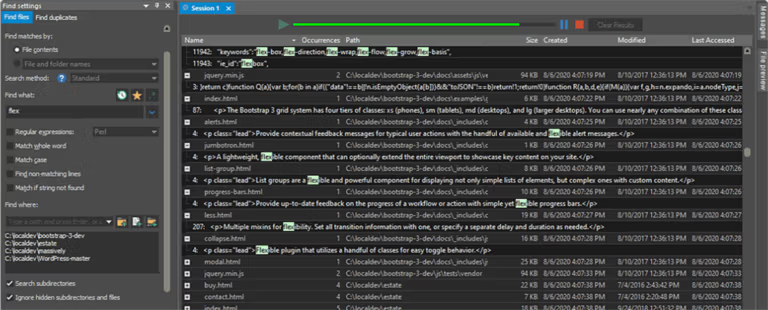
The core of the program lies in searching for text inside files. Users can type the desired search term, select the destination folder, specify the desired file types, and the program will read the contents inside to find that word. It supports exact case-sensitive searches, case-insensitive searches, searches using special character patterns like Regular Expressions, and wildcard searches, which are ideal for tasks requiring words with similar spellings.
In addition to text search, UltraFinder can also search by file name, which is useful when you only remember part of the file name, or just the extension and the date range when the file was created or modified. Users can set detailed criteria such as file size, creation date, or last modified date, and the program will filter the results to show only files that match all criteria. The results are displayed in a table clearly showing the file name, location, size, and date. Clicking on any result allows you to instantly preview the content or open that file. Those who want to search for file names across the entire computer faster can try Everything which specifically searches by file name.
Another feature that sets UltraFinder apart from the Windows search bar is its flexibility in working with results. The program saves search history to recall for later use, saves frequently used criteria as presets, and exports results for further use. Search results can be sent directly to UltraEdit to edit text within that file.
Therefore, UltraFinder is suitable for tasks that regularly require managing a large number of files, such as searching for old code in projects, checking which documents contain text that needs editing, and tracking down files that have been moved or renamed. It is not a file editor, but a search tool that helps you find the files you need faster and get a clearer overview of the data on your machine.
Who is this program suitable for?
UltraFinder is ideal for developers who need to search for old code in projects, system administrators who need to track down configuration files or log files across the machine, and people who work with numerous documents and cannot remember which file contains important text. These tasks require searching inside thousands of files, which a normal search bar does poorly or cannot do at all. For those who just need to occasionally open music or image files, the Windows search bar is sufficient.
What makes IDM UltraFinder interesting?
File search
- Search via Master File Table. Search via the disk's MFT table for extremely fast results.
- Search from content or file name. Search by partial or full name.
- Search with Regular Expression. Supports Perl, Unix, and UltraEdit formats.
- Search on network or FTP server. Search for files on network drives and FTP/SFTP.
- Highly detailed targeting. Select specific folders, entire drives, or specific files as search targets.
- Filter out unwanted items. Filter out unwanted subfolders, file names, and file extensions from the search.
- Search by full or partial words. Choose whether to match whole words or only parts of words.
- Case-sensitive search. Enable case-sensitive mode when exact character matching is required.
- Reverse search. Find files that do not match the specified terms.
- Search for text in PDF files. Read the content inside PDF files and search for desired words.
- Search for text in Word documents. Search for text in .doc and .docx files.
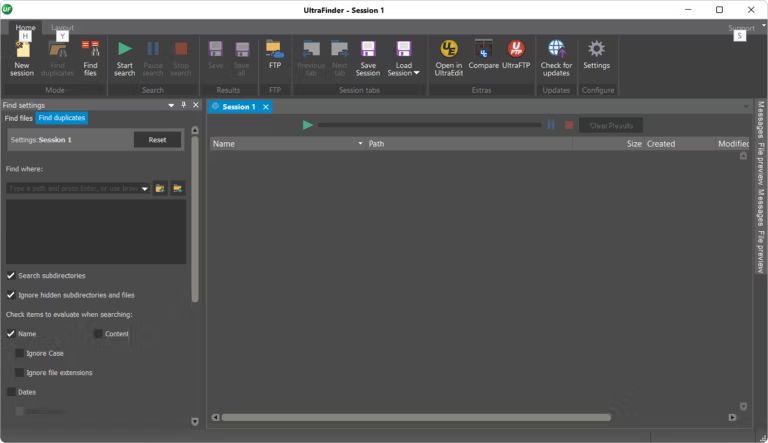
Find duplicate files.
- Find duplicate files within folders or across entire drives. Scan for duplicate files in selected folders or across entire drives.
- Multiple ways to compare duplicate files. Compare by content, file name, date, and size.
- Highly customizable conditions. Set date, file size, and other conditions for duplicate file searches.
- Skip special files. Exclude 0-byte files, system files, hidden files, and files in the Recycle Bin.
- Inclusion and exclusion filters. Configure which files and folders are included in the search.
- Search with Regular Expression. Support for Perl, Unix, or UltraEdit formats.
- Manage found duplicate files directly. Rename, delete, move, or preview duplicate files right within the program.
Work with other programs
- Open results in UltraEdit. Send search results to be edited in UltraEdit instantly.
- Compare files with UltraCompare. Open two files for side-by-side comparison to confirm they are exact duplicates before deletion.
What's new
Version 26.0.0.9 – 2026-10-29
- Save search sessions. Save search sessions to a file and reload them later. The program automatically restores active sessions every time it restarts.
- Office document security. Open Word and Excel documents in restricted mode, disable macros and auto-run, block known attack vectors before opening files, and cleanly terminate background Office processes.
- Cloud storage as an option. Requires specifying rclone.exe manually. Administrators can disable this feature, resulting in a smaller installer with fewer external components.
- Select the FTP component. Choose to use either the current or old FTP per account, making connection troubleshooting easier.
- Enable via script. Support license activation via command line with the /lic,e parameter.
- Built-in update checker. The installer comes with IDM's update checking tool.
- More accurate searching. The Date Modified Between filter returns only files within the specified date range, fixes folder Date Created data in OneDrive, and correctly counts Cloud Storage results when performing mixed searches between FTP and Cloud Storage.
- more stable. Fixed crashes when searching for content in PDF files and when searching for unopenable files, and improved stability for long text searches across a large number of files.
file information
- Operating System: Windows 11 / Windows 10 (64-bit)
- Risk Level :🟡Low Risk (Low Risk)
- License: Commercial
- Developer: IDM Computer Solutions, Inc.
- Language: Multilingual
- Size: 44.52 MB
- File type : *.rar
- Password: mawto
- Installation method: Yes
- Updated on : 9/11/2026
- Need to read: Download Guide