Download Prism Download Manager for free. A high-speed file download manager to replace IDM, supporting video downloads from YouTube and various streaming sites as MP4 or MP3, with a built-in BitTorrent downloader.
What is Prism Download Manager?
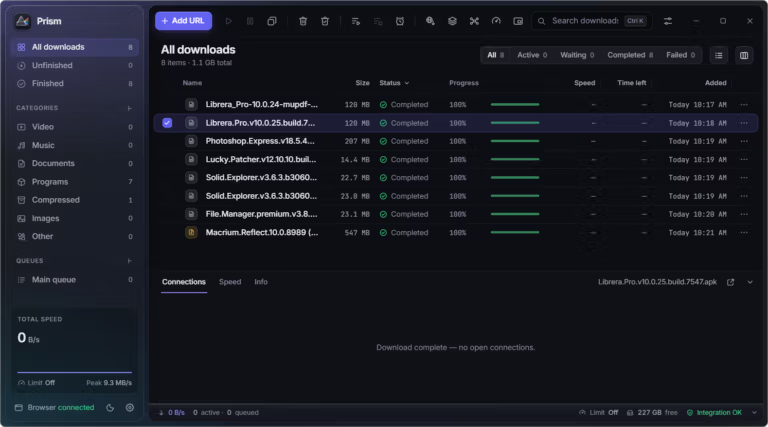
Prism Download Manager is a free and open-source download manager featuring all the capabilities of Internet Download Manager IDM. Instead of letting browsers download files one by one, Prism takes over to queue, control, and accelerate downloads for faster completion, consolidating all files into a single window. It works across Windows, macOS, and Linux.
At its core is a multi-segmented download technique that splits a single file into multiple parts and downloads them simultaneously using up to 32 connections. Unused connections automatically assist the largest remaining part, allowing large files to finish faster. If the connection drops or the system shuts down midway, the program can resume from where it left off by verifying with the server beforehand to ensure the file remains unchanged. It also supports downloads via FTP as well as HLS and DASH streams.
Prism integrates with browsers much like IDM, capturing download links from Chrome, Edge, Firefox, and Chromium-based browsers, automatically sending them to the app. A video download button pops up over video players on sites like YouTube via yt-dlp, allowing users to download MP4 videos up to 8K resolution or extract audio as MP3, complete with subtitles and sponsor skipping via SponsorBlock.
Prism natively supports Torrent files and Magnet links without requiring separate software, and can even download AI models from Hugging Face. Organization features are comprehensive, including categories, queued scheduling, speed limits, site grabbing, batch downloading, clipboard monitoring, and automatic system sleep or shutdown upon queue completion.
Thus, Prism combines the core experience of classic download managers like IDM into a single application—including multi-part segmenting, browser integration, video downloads, and torrent support. Although it is still in its early stages and may not be as feature-complete as the original, for users who regularly download large files, experience frequent disconnections, or want to save videos and torrents without switching applications, Prism is a very compelling alternative.
Key features
Speed and File Resuming
- Up to 32 connections. Splits a single file into multiple parts for concurrent downloading. Free connections continuously assist the part with the most remaining data, eliminating delays caused by slow individual segments.
- Always resumable. Downloads can be resumed after being paused, after system shutdowns, or connection drops, as it always verifies file size, ETag, and last-modified dates with the server beforehand.
- Direct file writing. Data is written directly to the target file without requiring a final assembly phase, and progress is saved only after data is written to disk.
- Server-aware connections. If a server limits the number of connections, Prism automatically reduces connections to match host limits and remembers the configuration for that host.
- Multiple protocols. Supports HTTP/1.1, HTTP/2, FTP, and FTPS, as well as HLS and DASH streams.
Browsers and Videos
- Browser integration. Clicking a link in the browser opens the Prism prompt displaying the file name, size, and resume support status. Holding the Alt key bypasses Prism and lets the browser handle the download.
- Capture rules. Configurable by file extension, MIME type, and file size. Includes a right-click context menu to download with Prism or capture all links, images, and videos on a webpage at once.
- Web video downloading. A download button appears over video players. Save videos as MP4 up to 8K HDR or extract audio as MP3, complete with subtitles, video chapters, and sponsor segment skipping.
- Extensive site support. Works with over 1,800 websites via yt-dlp, which Prism automatically installs, checks, and updates along with FFmpeg.
- Download specific segments. Select specific sections of a video directly from the video download dialog and save them as video or MP3.
- Preview ZIP contents before downloading. The download window displays the folders and files inside a ZIP archive in advance, allowing you to download specific individual files without fetching the entire archive.
- Site Grabber. The site grabber fetches files from webpages based on configured file type rules and crawl depth, allowing you to selectively grab desired files from everything found on the page.
Queues, Organization, and Torrents
- Categories and queues. Organize files into categories, schedule and limit speed for individual queues, and automatically shut down, sleep, or execute commands upon queue completion.
- Batch downloads. Supports batch downloads and clipboard monitoring. Copied links are automatically captured and prepared for download immediately.
- torrent and magnet. Open the Magnet link and the torrent file in its own window, select files, folders, categories and job queues, and view the free space before starting.
AI model and file converter
- Load the AI model from Hugging Face. Type the model name, paste a link, or search, and PRISM will select the necessary files for yourself. Load multiple connections and check with SHA-256. Models that require tokens are also supported.
- Convert built-in files. Convert photos, music and videos to MP3 WAV FLAC M4A JPG PNG WebP MP4 WebM or GIF for short clips Ready to squeeze multiple files into a zip at once
- Shorten the file to fit. shrink photos, music and videos to the limits of Discord, email, WhatsApp or custom sizes. Ready to show the size, resolution and quality before starting. and the original file remains the same
Appearance, language and privacy
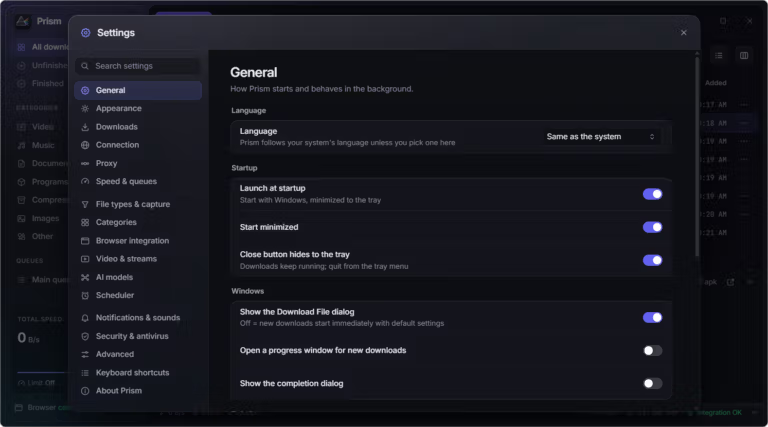
- Liquid glass looks. There are bright and dark modes, highlighting 6 colors, small windows. and a compact view for people who like open screens
- 10 languages. Can be used in English, Czech, German, Spanish, French, Italian, Indonesian, Turkish, Simplified Chinese and Arabic by the system language as default.
- It's free and doesn't store data. It is open source under MIT license, no ads, no need to apply for an account. and does not store usage data Browser add-ons only talk to apps on their machines.
- Update from in-app. PRISM detects the new version itself and alerts when ready. with a window saying what's new after the update and select the notification sound when the loading is complete
What's new
Version 1.2.4
- The windows on Linux don't freeze. The window will not stop updating again when the file is finished loading or failing. or when the job queue is over Because the notification sound will be played only once through the system's audio player instead.
- Check the free space before assembling the video. Before bringing the video and audio of the video together, Prism will check the free space first and tell how much it takes. If the space is not enough The downloaded stream is still complete. Press to try again after clearing the area without having to reload.
- FFmpeg of the system doesn't work, there is a backup. If FFmpeg installed in the system is missing or won't work, Prism will download its own FFmpeg before starting the video loading. The video does not stop at the end.
- The bottom corner of the loading list is already rounded. Adjust the bottom corner of the download list to be rounded like the rest of the window.
file information
- Operating System: Windows 10 / 11 (64-bit)
- License : Free (Open Source)
- Developer: FortoGraphy
- Language: English and 9 languages
- Size: 12.1 MB
- File type : .exe, .zip
- Updated on : 3 November 2026
- Need to read: Download Guide
==== Installed on the machine (x64) ====
==== Portable (x64) ====
See download options forOther operating systems >