
Download Foxit PDF Editor Pro 2026/14 for free. This full, permanent version is a comprehensive PDF editor, reader, converter, and manager. Includes installation instructions and file information.
What is Foxit PDF Editor Pro?
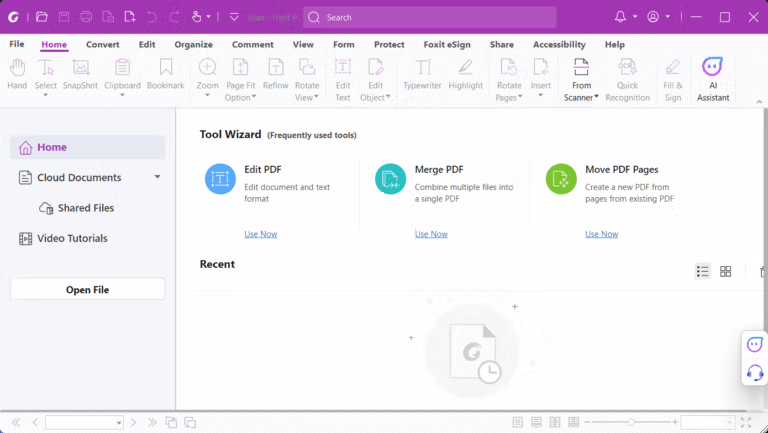
Foxit PDF Editor Pro It's an all-in-one program for reading, creating, editing, and managing PDFs. From editing text and images to merging, splitting, rotating, cropping, and rearranging pages, the menus are quite straightforward, similar to a document editor, making it quick to open and edit files. If you're comparing options in the same category, this is a good choice. PDF-XChange PRO Foxit is another PDF management toolset with similar editing and conversion capabilities. Foxit excels at integrating document, form, review, signature, and automation tools into a single window. Currently, there are two versions available: the 2026 version, which focuses on AI assistant and continuous new features, and version 14, which prioritizes stability for organizations requiring a long-term version.
Scanned documents use OCR to transform images and text into searchable and editable formats. They can then be exported as Word, Excel, PowerPoint, images, or HTML, depending on the task. For tasks requiring multiple reviewers, features like highlighting, sticky notes, drawings, stamps, and comparison tools for comparing two PDFs are available. For data entry files, text fields, checkboxes, radio buttons, and drop-down menus can be created, and data from multiple forms can be exported to Excel or CSV, eliminating the need to manually select values from each field. Technical tasks include tools for measuring distances, areas, and volumes on PDFs, along with creating page labels from bookmarks to organize large documents more easily.
Security features include passwords, permission settings for printing and editing, redaction for permanently deleting sensitive data, and digital signatures for document verification. Repetitive tasks can be prioritized in the Action Wizard and executed in batches, while the AI Assistant summarizes, answers questions, translates, and drafts text from document content when the account or service supports it. File compression and optimization functions reduce file size before emailing or saving to the document system, with the option to select image quality and elements to retain based on actual needs. For organizations, silent deployment is possible, configuration via Group Policy or the Foxit Customization Tool, and centralized license control is provided.
Key Features
Creating and converting files.
- Create a PDF: Create standard PDF files from Microsoft Office programs (Word, Excel, PowerPoint), image files, HTML, or almost any file type.
- Convert PDF: Export or convert PDF files to other file formats such as Microsoft Word, Excel, PowerPoint, images (JPEG, PNG), HTML, and text files.
- Scanning and OCR: Scan paper documents into PDFs and use OCR (Optical Character Recognition) technology to convert scanned images or documents into searchable and editable text.
High-level document editing.
- Edit text and images: You can edit text just like in Word, adjusting font, size, color, and paragraph alignment, with the text automatically rearranging.
- Edit object: Add, remove, move, and resize images, shapes, and videos within a PDF file.
- Arrange the layout: The structure and layout of the document can be freely modified.
- Add links and attachments: Create hyperlinks to other websites or pages and attach the files to the PDF document.
Document page management
- Merge and split files: Combine multiple PDF files into a single file, or extract pages from an existing document to create a new file.
- Page arrangement: Add, remove, swap positions, rotate, crop, and drag any page out of a document.
- Include headers/footers and page numbers: Easily add headers, footers, page numbers, and watermarks.
Collaboration and review.
- Add a comment: Use a variety of tools to review documents, such as highlighting text, underlining, striking through, creating sticky notes, and drawing various shapes.
- seal: Use pre-made stamps such as "Approved" or "Confidential," or create your own stamp.
- Share Review: Share documents so that multiple people can comment on them simultaneously via the cloud.
electronic signature
- Sign the document: Create and sign a document with a digital signature or electronic signature (eSign).
- Submitted for approval: Send documents to others for signing and track the signing status in real-time.
Creating and managing forms.
- Create a form: Design a form with input fields such as text fields, checkboxes, selector buttons, and drop-down menus.
- Fill out and save the form: Fill out the PDF form and save the entered information.
- Retrieving data from the form: Export data entered from multiple forms to an Excel or CSV file.
Safety and protection
- Enter password: Protect documents from unauthorized access or modification by encrypting and setting a password.
- Restrictions apply: Define user permissions, such as allowing them to only view, print, or edit the document.
- Permanently delete data (Redaction): Permanently delete any text or images containing sensitive or confidential information from the document.
- Digital Signature: Verify the authenticity of documents and prevent alterations with digital signatures.
Advanced features and AI
- AI Assistant: An intelligent assistant that can summarize content, answer questions about documents, translate languages, and help write new content.
- Action Wizard: Create automated command sets to handle repetitive tasks with a single click.
- Compare the documents: Compare two versions of a PDF file to see all the differences.
- Reduce file size: Compress and reduce the size of PDF files to make them easier to share and store.
- Accessibility supported: Create a PDF document that is accessible to people with disabilities, in accordance with Section 508.
What are the differences between Foxit PDF Editor Pro 2026 and 14?
- Foxit 2026Its main selling point is its AI features. It can summarize content, answer document questions, translate languages, and assist in writing new content. It also integrates seamlessly with cloud services.
- Foxit 14This is a Perpetual Release, separate from the annual Subscription version. The permanent license does not include the AI Assistant.
What's new?
What's new in Foxit PDF Editor 14.0.8.33807? – Release Date: September 23, 2026
- Patch the security vulnerabilities. Several vulnerabilities, as outlined in the September 23, 2026 Security Bulletin, are addressed, covering the opening of abnormal U3D, PRC, AcroForm, and image files.
- Resolve stability issues. Improve the overall stability of the program.
Version 2026.2.1.39815 – Release Date: September 1, 2026
- Foxit Workspace. Combine documents and project topics, let AI help check sources, extract and organize information, draft content, and generate shareable results.
- AI Chat as an Agent. Works in cycles, maintains context, allows access to tools, and includes Edit PDF and Create Image modes.
- Local AI with BYOM. Choose your own AI model, process on-device, and document content is within our environment.
- Convert the formula to MathML/LaTeX. Convert selected formulas in a PDF using AI Chat.
- Document translation is more flexible. Select the page to translate. Translate images and text. Danish language supported.
- Read Aloud and Smart Podcast. The document reading feature is separated into two parts: reading selected text with highlights.
- Bookmarks from AI are more accurate. The results are more accurate, the process is faster, and the on-screen instructions are clearer.
- Microsoft Purview. Displays only sensitivity labels applied to the file. Supports Azure Government Cloud.
- Upgrade the OCR engine. Enhance the security of components and improve the reliability of recognition.
- Document comparison tool. More accurate text comparison across pages, displaying differences in a clearer format.
- Measuring tools and page labels. Added multiple measurement tools; created page labels from bookmarks.
- Patch the security vulnerabilities. Address vulnerabilities as outlined in the Security Bulletin of September 23, 2026, and resolve stability issues.
System Requirements
Windows 10
Windows 11
– Microsoft Office® 2010 or later version (required for some PDF creation features)
– Verified as Citrix Ready® with Citrix XenApp® 7.13
File Information
- Operating System: Windows 11 / 10
- Risk Level: 🟡 Low Risk
- Developer: Foxit
- License: Shareware
- Language: English
- Size: 2.08 GB / 2.15 GB
- File type: *.rar
- Password: mawto
- Installation Method: Available
- Updated: 26/9/2026
- Required Reading: Download Guide
==== Download v2026 (64-bit) ====
==== Download v2026 (32-bit) ====
==== Download Foxit PDF Editor Pro 14.0.8 (32 / 64-bit) ====