Download CPUID powerMAX 1.00.1, a program for testing CPU overclocking, CPU and GPU burn-in, and performing full load CPU tests | 10.79 MB
CPUID powerMAX 2019 This program is used to perform burn-in testing on CPUs and GPUs, testing the stability of the CPU and graphics card.
This program is ideal for CPU overclockers who want to test whether their cooling system is sufficient or if their PSU can handle the power supply the CPU as required. PowerMAX can be used to check operational stability, power consumption, and heat generated when the CPU is running at full load. Testing can be performed on both the CPU and GPU. For the CPU, there are two instruction set options: AVX and SSE. For the GPU, the testing intensity can be selected by adjusting the display resolution.
powerMAX has three main testing modes:
- CPU testing: Check the stability of the CPU (e.g., in the case of overclocking) and see if the CPU cooling system is working correctly.
- GPU testing: Similar, but for GPUs.
- Testing the CPU and GPU simultaneously will maximize system power consumption and ensure the PSU can handle the maximum power required by both the CPU and GPU at the same time.
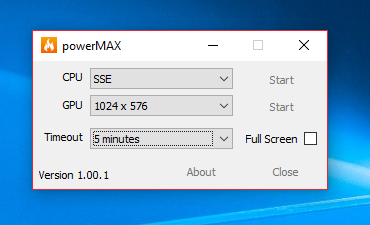
As you can see, the powerMAX test not only directly burns in the CPU and graphics cards, but also tests the performance of the power supply (PSU), as it draws more power from the power supply than usual during the burn-in test.
Note:
- powerMAX does not use benchmark programs, so there is no performance score or stability score available.
- When testing the CPU and GPU simultaneously, you might notice lower CPU power consumption and heat values compared to testing the CPU alone. This is because a portion of the CPU power is used to test the GPU, and the more powerful the CPU, the fewer side effects you will observe.
Warning:
This programThis could potentially damage the hardware. Especially if we test while using a poor cooling system. !! Please use powerMAX at your own risks !!
System Requirements
Hardware:
The CPU test requires a processor that supports at least the SSE instructions set (every CPU since the Intel Pentium III does). The GPU test requires a graphic card that supports Opengl GL 2.0 or more.
Software:
powerMAX requires Windows 7 or later.
Operating System: Windows 7 / 8 and 8.1 / Windows 10
Developer: CPUID
License: Freeware
Language: Multilingual
Size: 10.79 MB
File type: *.zip
Status: Tested
Installation method: No installation required.
Updated: 3/09/2019
Required Reading: Download Guide