
Download Autodesk 3ds Max 2026 (x64) for free. This software is for 3D modeling, animation, and graphic design in architecture, engineering, and graphic design.
About Autodesk 3ds Max 2026
Autodesk 3ds Max 3ds Max is a professional 3D modeling, animation, and rendering program widely used in the film, television, gaming, and architecture industries. It offers a comprehensive set of tools ranging from basic shape creation to intricate modeling, surface modeling, character animation, and realistic special effects, making it a top choice for designers seeking to create high-quality 3D work.
Beyond its modeling and animation capabilities, 3ds Max excels in rendering, supporting leading rendering engines like Arnold, V-Ray, and Corona Renderer. This allows users to create photorealistic images with precise control over lighting and materials. Furthermore, the software's capabilities can be extended through support for third-party plugins, making 3ds Max a flexible and customizable tool to meet the needs of individual users, enabling efficient workflows and limitless creative possibilities.
Features:
- 3D Modeling: It offers a comprehensive set of tools for modeling, starting from basic primitive shapes to intricate modeling using tools like Polygon Modeling and Mesh Editing. Additionally, there's Spline Modeling technique suitable for creating curved shapes or lines.
- Animation: This software isn't limited to modeling; it's also an excellent platform for animation, whether it's object movement, camera control, or even rigging characters using the Biped and CAT (Character Animation Toolkit) systems. Furthermore, it supports importing motion capture data to create realistic animations.
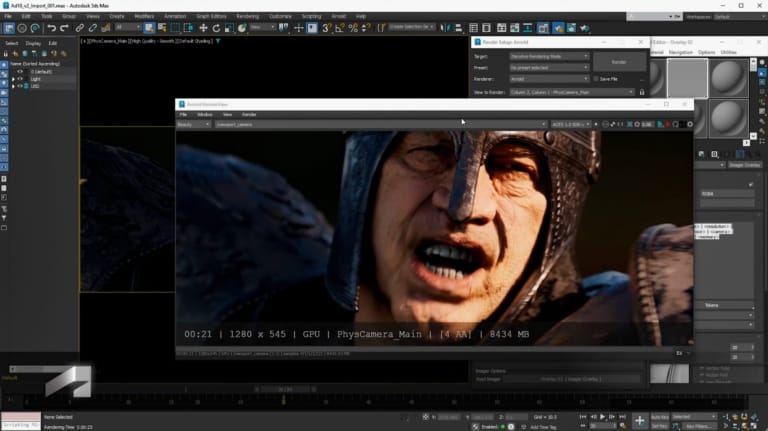
- Rendering: Models can be transformed into stunningly realistic images using leading rendering tools such as Arnold, which is included with the software, or popular plugins like V-Ray and Corona Renderer. Users can meticulously control lighting, materials, and environments to create photorealistic or atmospheric images.
- Special Effects: For projects requiring a spectacular effect, 3ds Max offers tools for creating fluid effects such as water, fire, and smoke, as well as a particle system for creating dust, rain, or explosions, making the work more visually appealing and realistic.
Industrial applications
- Film and television: It is a vital tool for creating 3D images and special effects in many films and series, helping to bring imaginative scenes and characters to life on screen.
- Game development: Game developers use 3ds Max to create character, scene, and item models, as well as perform animations specifically for games. Furthermore, the files can be seamlessly exported to popular game engines like Unity and Unreal Engine.
- Architectural and engineering design: This software is popular for architectural visualization, creating realistic simulations of buildings, interiors, and landscapes, allowing clients to clearly visualize a project before actual construction.
What's new in 3ds Max 2026?
- OpenPBR is the default material.
Using OpenPBR as the PBR material standard, it supports MaterialX and OpenUSD, increasing consistency with other software. - Vertex Weld supports splines.
You can directly merge and close vertices on a spline, making it easy to work with curves and logos. - Preserve Stack Position Toggle
Remember the location of the last enabled modifier for easy restoration. - Search Widget in Create Panel
Add a search bar to the Create tab to quickly find elements without scrolling through the menu. - Improve Modifier performance.
- Boolean (CARVE) is faster, up to 40%.
- The array is faster with 15%.
- Conform, Displace, Skin, and Fluids work faster depending on the scene type.
- Update CAT & Biped
Enhance the stability and flexibility in managing motion layers, cloning, footprint nodes, and integration with BIP name-matching. - Added new OSL Maps.
Examples include Perlage (circular patterns), Flow Map Transform (managing anisotropy), and the new Numbered File Name shader. - Create a 3-Point Rectangular Spline.
You can draw a rectangle freely, without being restricted by the Earth's axis. - Retopology Tools v1.6 & Flow Retopology
- The ReForm algorithm works faster.
- Flow Retopology can now handle up to 50 cloud-based tasks per month (increased from 30).
- Arnold & USD major update.
- Arnold 7.4 supports Global Light Sampling, GPU-based Cryptomatte, improved RenderView, and OpenPBR materials.
- The USD plugin is included, along with a Layer Editor, Light Linking, and BasisCurves in the viewport.
- The Substance Plugin has been updated to version 3.0.5.
Supports direct import of materials from Substance 3D Assets into Slate Material Editor.
Minimum requirements
- Operating system (OS)Microsoft Windows 10 or later (64-bit)
- Central Processing Unit (CPU)A 64-bit Intel® or AMD® multi-core processor supporting SSE4.2 instruction set.
- Memory (RAM)8 GB or more (16 GB recommended)
- Storage9 GB or more required for installation.
- Graphics Processing Unit (GPU)A graphics card that supports DirectX 12 and OpenGL 4.5 with 4 GB of memory (8 GB or more recommended).
- DisplayA resolution of 1920 x 1080 or higher with True Color (3840 x 2160 (4K) with HDR color settings is recommended).
File Information
- Operating System: Windows 11 / 10 (x64)
- Risk Level: Medium
- Developer: Autodesk
- Language: English
- Size: 5.4 GB
- File type: *rar
- Password: mawto
- Updated: 24/6/2025
- Required Reading: Download Guide
==== Main Download Link ====
==== Backup Link (Please help by downloading to prevent the link from breaking) ====