Download Sweet Home 3D (Microsoft Store version) (X86/X64) for free, permanent full body, interior design program. With the latest Thai language teaching guide, help draw a house plan and try to arrange a room before actually doing it.
About Sweet Home 3D
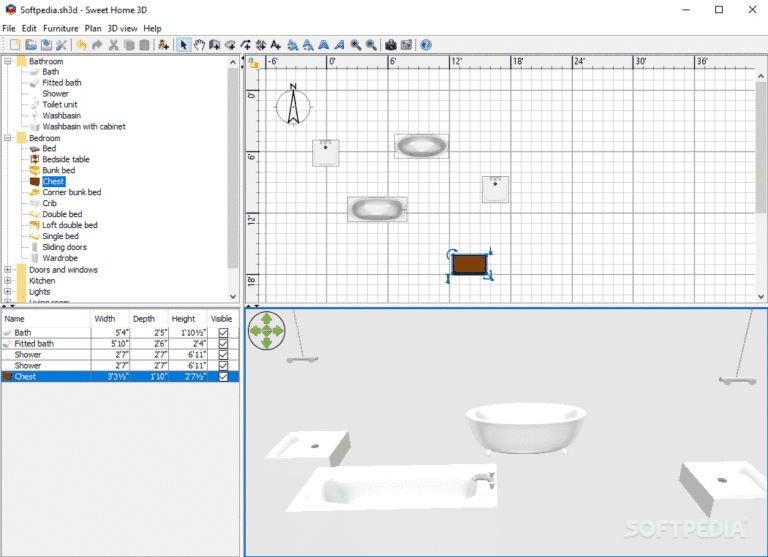
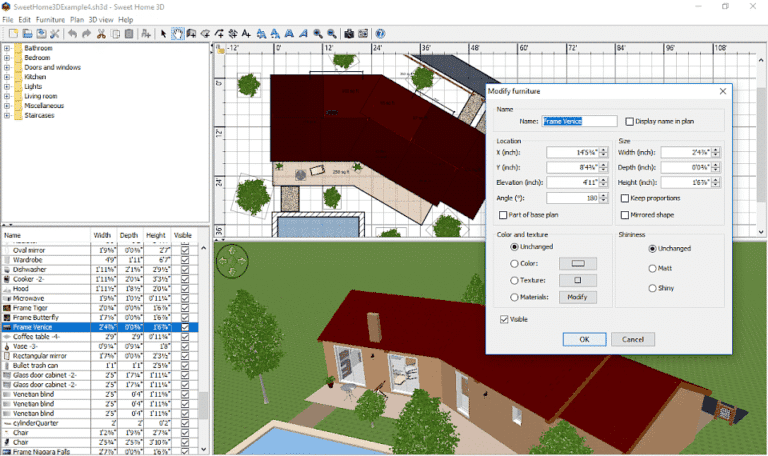
Sweet Home 3D is a free home and interior design program. Help anyone who wants to see a picture of their own house before actually doing it. can draw a room plan try to place furniture and can walk around the house in a three-dimensional view from a single computer You don't have to have knowledge of architecture or use an expensive design program before you can start. because the look of the program is easy to understand And everything drawn in a two-dimensional plan will immediately become a three-dimensional image.
Getting started is possible by drawing a wall on a plan, setting the length, thickness and height of each wall as needed. Then divide the space into rooms, insert doors, windows and stairs. The program will automatically create rooms and walls in a 3D view. Users can see both the plan and the real house image at the same time. You can adjust the size of the room, move the wall, or change the door position at any time without having to start drawing all over again. If you want a more detailed architectural style, try it. SketchUp Pro.
The point that makes Sweet Home 3D fun is a wide selection of furniture and decorations, including sofas, tables, chairs, beds, wardrobes, desks, kitchen appliances, bathrooms, to plants and lamps. Just drag the items you like from the list and place them in the room and adjust the size, rotate the corners or change the color and material to match the wall and floor as you like. If the existing items are not enough Users can also import 3D models from outside and install them.
Users can carefully define the color of the walls, tile patterns, wooden floors, wallpaper and materials of each piece of furniture. Adjust the sunlight according to the time of the day. Turn on the lights in the room at night Then order the rendering of the image to come out close to the real photo to send to the technicians and people in the house to help decide. They also create a video to take a look at the room one by one. It's like walking in a real house. causing problems such as the corridors are too narrow window covering furniture or the room looks dark
Sweet Home 3D is suitable for homeowners who are about to renovate or build a new home. Interior designers who want to draft a design for customers to see quickly. design student Including those who want to try to arrange a new room without lifting the real thing to be tired. Because it is an open source program that works on Windows, Mac and Linux for free. and save the work as a file to come back to edit or print the plan to continue to use whenever you want
Features:
- Paint the walls and rooms of your house from scratch or according to existing plans, on one level or more.
- Change the color or texture of walls, floors, and ceilings. Import your own image formats if desired.
- Drag and drop doors, windows, and furniture onto the floor plan from a catalog of 1,400 items organized by category. You can also import 3D models you've created or downloaded from the web.
- Customize the size, orientation, elevation, color, and texture of each piece of furniture.
- View changes in the plan simultaneously in a 3D perspective, where you can navigate from an aerial view or from the perspective of a virtual visitor.
- Create a realistic image of your setup based on the time of day and the light sources placed according to your plan.
- Create videos from virtual routes in 3D perspective
- Print house floor plans and 3D perspectives, or export as files in standard formats such as PDF, PNG, JPEG, SVG, or OBJ to reuse your designed house in other software.
- Give an explanation on the plan, including the name of the room, the room area, the size line, the text and north with a compass.
- Extend the capabilities of the program with a plugin written in Java.
How to Use Sweet Home 3D in Thai
For a guide on how to build a house in Thai, please see: http://www.sweethome3d.com/th/userGuide.jsp
file information
- Operating System: Windows 11 / Windows 10 / 8.1
- Risk Level :🟡Low Risk (Low Risk)
- Developer: Space Mushrooms
- License : Full
- Language: Multilingual
- Size : 408.91 MB
- File type : *.rar
- Password : mawto
- Installation method: Yes
- Updated on : 1/11/2026
- Need to read: Download Guide
==== Sweet Home 3D Latest Version ====
==== Sweet Home 3D 7.6.6 (x86/x64) ====