
Download the full version of Proteus Design Suite 9 Professional for free. This software is used for electronic circuit design, simulation, and professional-grade PCB layout. It is the latest version and includes installation instructions.
What is Proteus Pro?
Proteus Pro This is an integrated electronic circuit design software suite that combines schematic capture and simulation systems with PCB layout design in a single program. It is a standard tool widely used by engineers. Technicians and general students. It consists of main modules that work together in an integrated manner, including ISIS (Intelligent Schematic Input System), which is used for drawing circuit diagrams and simulating the operation of electrical circuits in Mixed-Mode, supporting both digital and analog signals simultaneously. Including ARES (Advanced Routing and Editing Software), which is used for PCB design. It supports both manual component placement and highly accurate automatic routing, allowing engineers and designers to work from the initial stages to the final steps of circuit design in a single software without switching between multiple programs.
The standout feature that makes Proteus distinct and clearly differentiates it from other circuit design software on the market is its ability to directly simulate the operation of a microcontroller within a virtual environment, known as VSM (Virtual System Modelling). This VSM technology enables designers to write programs for a wide range of popular microcontroller families, such as Arduino, PIC, AVR, ARM Cortex, and 8051. MSP430 and many more, allowing you to immediately test the integration between software and hardware without the need to assemble actual circuits on a test board. Additionally, the program features a comprehensive library of electronic components exceeding 40,000. The list includes Simulation Models that are accurate according to the manufacturer's specifications, ensuring that the simulation results closely resemble the actual circuit at a very high level. Proteus Pro also features various signal analysis tools, such as a virtual oscilloscope, logic analyzer, voltmeter, ammeter, and other embedded signal measurement tools. These tools enable convenient and comprehensive circuit debugging and analysis without the need for physical measurement equipment.
In terms of usage, Proteus Pro is widely popular in both industrial and educational sectors. In the industrial field, electronic engineers use it throughout the product development process, from design and prototyping to actual production. This is because the program can export standard files such as Gerber Files, which are directly supported by PCB manufacturing facilities worldwide. In the field of education, this program is used as a teaching tool in electrical engineering and electronic engineering curricula. Computer science and mechatronics are being taught at leading universities and technical institutions worldwide, including in Thailand. This is because they significantly reduce the costs associated with procuring laboratory equipment. Additionally, they enable students to safely design and test complex circuits without risking damage to actual equipment.
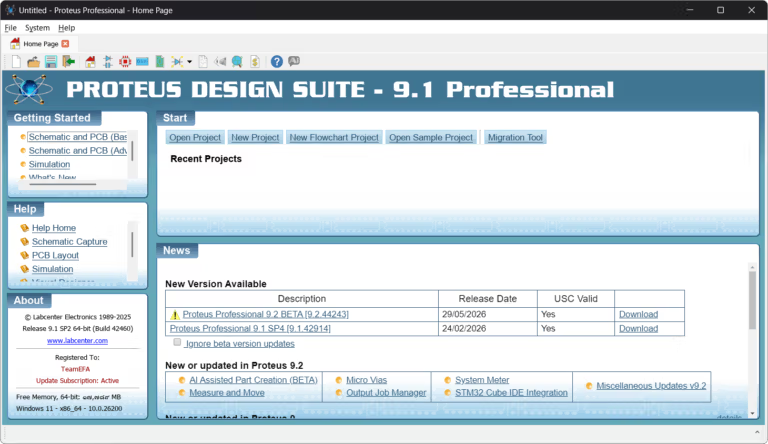
Core Competencies
- Design a circuit diagram. : Design electronic circuits with a library of over 40,000 components
- Simulate the operation of the circuit. : Test circuits in real-time without the need for actual hardware, supporting analog, digital, and mixed-mode.
- Simulate a microcontroller Run code on Arduino, PIC, AVR, ARM, and more in a virtual environment instantly.
- Debug code and circuits simultaneously. : Simultaneously verify the operation of the code and hardware step by step.
- Virtual Signal Measurement Tool : Built-in oscilloscope, logic analyzer, signal generator, and more.
- PCB Design Place components and route copper wiring using both manual and autorouter modes, supporting multi-layer.
- Automatic Error Checking (ERC / DRC) Detect circuit and PCB errors before production.
- Display 3D PCB View a 3D model of the circuit board before production.
- Export Gerber File Export standard files directly for PCB manufacturing.
- Create a Bill of Materials (BOM) : A summary of all project components in an Excel or CSV file
New Features in Proteus Design Suite 9.1
EDAi, the Intelligent AI Assistant
EDAi is an AI assistant for design, divided into two versions: ProPilot (for commercial use) and ProTutor (for educational use).
- AI-Assisted Circuit Design
- Understand the context of Schematic and assist in analyzing both analog and digital circuits.
- Assistance with Signal Integrity, Power Management, Timing Margins, and Component Derating
- Circuit analysis using calculation formulas and recommendations in accordance with IPC standards.
- Coding Assistant
- Understand which peripherals are used and how they are connected, including specific pin assignments.
- Automatically generate code to configure Peripherals such as Timer, I2C, SPI, ADC
- Help refactor the code, add Doxygen documentation, and improve code readability.
- Help Assistant
- Search for information from all Proteus documentation via the Retrieval-Augmented Interface.
- Answer questions specifically according to the context of the current project, such as setting up Differential Pair Routing or Design Rules.
PCB Design
- Integrated Repository Support (Git / SVN)
- Supports Git and Subversion version control directly within Proteus, no need to use external programs
- Update, commit, and refresh the library immediately within Proteus.
- Display the status of each component in the Library Manager with an overlay, such as Versioned, Changed, or Pending Add.
- Silkscreen Design Rules (New DRC)
- Silk–Silk Rule detects text overlaps on the same layer to prevent illegible Reference Designators Labcenter
- Silk–Resist Rule: Verifies the Silkscreen and Solder Mask openings to prevent ink from printing on exposed pads, which can cause rejects at the factory.
VSM Simulation
- Visual Designer for MicroPython
- Supports flowchart programming in conjunction with MicroPython scripting within the same environment.
- Create an IoT Dashboard with Drag-and-Drop for Controlling IoT Systems
- Supports Robot Turtle Simulation for classrooms, including Line Following, Obstacle Avoidance, Maze Escape, and Collect-and-Deposit Challenges.
File Information
- Operating System: Windows 11 / 10 / 8.1 (x64)
- Risk Level: Medium
- Developer: labcenter
- Language: English
- Size: 834.77 MB
- File type: *rar
- Password: mawto
- Updated: 10/8/2026
- Required Reading: Download Guide