Download Adobe Bridge 2026 (Full) for free. This is the latest version of Adobe's file management, searching, previewing, and organization program. A single file with easy installation instructions.
What is Adobe Bridge?
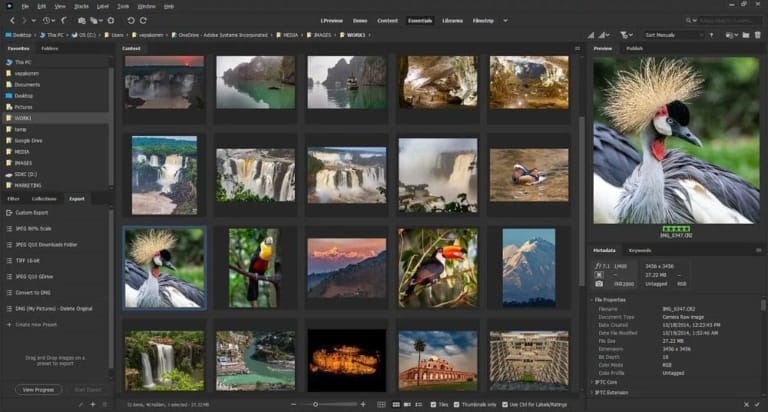
Adobe Bridge 2026 This is Adobe's central hub for managing and previewing all types of digital media files. Designed to bring together all file formats in a single window, whether high-resolution photos, vector files, or large video footage, the program allows you to instantly preview thumbnails and full-size samples without having to wait for the main editor to open. It supports file categorization by star rating, color tagging, and the addition of metadata and keywords to image files, making file organization in the media library easy and quick to find.
Integration with other creative software is key. We can select RAW image files from the camera and immediately open them for color adjustment in the Camera Raw module, or drag and drop files for further processing. Adobe Photoshop It also integrates seamlessly with After Effects. Furthermore, it includes a Batch Rename command for renaming entire folders simultaneously using a sequence of numbers or dates. It can also create Contact Sheets in PDF format or export them as JPEG files, allowing you to define multiple sizes and color profiles in a single step.
File searching within the program is highly accurate by filtering based on EXIF and IPTC information, such as camera model, lens, or shutter speed. It also supports multi-monitor operation, allowing for a separate, large-scale image preview area, enabling systematic sorting of images from large projects containing thousands of files without modifying or overwriting the original files.
Core Competencies
- Manage and organize media files. View and categorize image, video, or document files from a single window without opening other programs.
- Display a high-resolution preview image. Check the full-size preview and adjust the view to a grid or list format. Supports Photoshop, Illustrator, and Camera Raw files.
- Edit metadata. Embed keywords, copyright information, and creator details into image files for use in searching and categorizing.
- Rename files in batches using Batch Rename. Rename the files in a series according to the specified format, including sequential numbering and the date the photos were taken.
- Sort files using the Label and Rating system. Assign stars and color bars to indicate the importance or selection status of files.
- Filter and search files accurately. Search for files by EXIF data, shooting date, file type, or camera type.
- Connect directly to Camera Raw. Open RAW digital image files to adjust color tones or export them directly to Photoshop.
- Group files using Collections. Collect files from multiple folders into a single group without moving the actual file locations on the machine.
- Export files in various formats. Convert files to JPEG or create a Contact Sheet in PDF format, specifying image sizes.
- Sync data via Creative Cloud Libraries. Share files and color palettes with other applications in the Adobe family.
- Supports multi-monitor setup. Separate the preview panel and metadata window to display on separate monitors.
- Preview audio and video files. You can instantly check video clips and audio tracks without needing to open external editing software.
What's new in Adobe Bridge 2026?
Improvements in version 16.0.7
- Update with the latest security patch. Close security vulnerabilities and enhance system stability.
- Fixed the display of HEIC/HEIF file previews. It displays thumbnails and previews correctly even if the filename contains special characters.
- Fix errors when exporting JPEG files. Improved the issue of inverted vertical image size and aspect ratio when using the Export function.
- Update the Media Cache Preferences window. Modify the button labels and cache settings options to reflect their functionality.
- AVX2 instruction set specifications The program version 16.x requires a processor that supports AVX2 (Intel Gen 6 or AMD Ryzen 1000 or higher).
File Information
- Operating System: Windows 11 (64 bit)
- Risk Level: Medium
- Developer: Adobe
- License: Shareware
- Size: 2.84 GB / 2.56 GB
- File type: *.rar
- Password: mawto
- Installation Method: Available
- Updated: 17/9/2026
- Required Reading: Download Guide
==== Pre-activated (m0nkrus)🟡====
==== Installer + GenP Patch🟠====