Download ACDSee Photo Studio Ultimate 2026 v19.1.0.4501 (x64) Full version for free. This is the latest version of the image management, viewing, and editing software using AI.
About ACDSee Ultimate 2026
ACDSee Photo Studio Ultimate It's an all-in-one program for photographers and photo professionals who need both file management and professional image editing in a single program, without the hassle of opening multiple programs.
The first thing I like is how fast it is to handle image files, especially when opening folders with thousands of pictures. ACDSee can display a preview almost instantly, and it allows you to add tags, ratings, descriptions, and even filter images by camera/lens in great detail, just like Lightroom, but much lighter.
Another thing I feel is superior to the Pro or Home versions is the Edit mode, which has a full layer system. This allows for serious retouching, including removing blemishes, adjusting tones, merging multiple layers, adding effects, or even using masks to separate different parts of an image, just like Photoshop, but much easier to use.
In addition, there are new AI tools such as:
- AI Face Edit / AI Select Subject It helps you select objects or faces very accurately.
- AI Denoise Reduce noise in high ISO images without losing detail.
- And AI Sky Replacement To make the sky in your photos look realistic in just a few clicks.
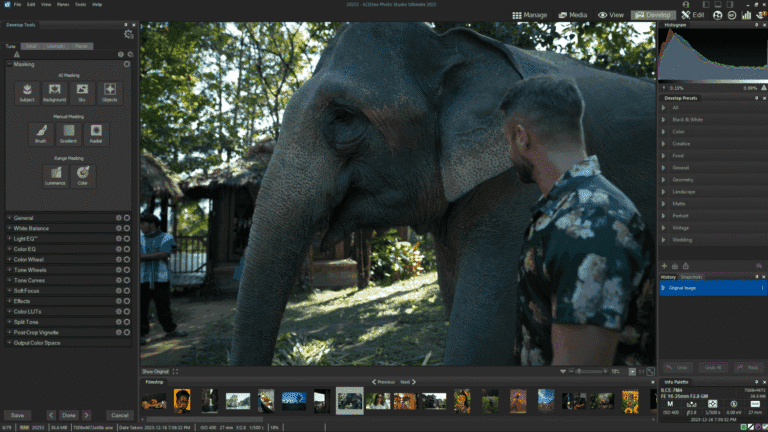
Another feature that I find very convenient in practical use is the Develop Mode, which is non-destructive. You can fully edit RAW images and revert to the previous point whenever you want, and you can also save your editing presets for reuse.
To put it simply, ACDSee Ultimate 2026 combines the strengths of Lightroom and Photoshop into a single program, but with improved accessibility and faster workflow. It's suitable for serious photographers who shoot RAW daily and casual users who want to edit photos beautifully without learning complex tools. It's truly an all-in-one tool for viewing, managing, and editing images.
Key features in ACDSee Ultimate 2026
- AI DenoiseThis AI-powered automatic image noise reduction tool supports batch processing of multiple images, making it ideal for photos taken in low light or at high ISO settings.
- AI Hair MaskingWith one click, you can select a specific hair strand and edit that area, such as changing the hair color or adjusting the lighting, without affecting other parts of the image.
- AI Develop PresetsThe smart feature of presets is that they automatically adjust values for each image, instead of using fixed values for all images. This makes editing multiple images in the same batch yields more optimal results.
- New homepage & multi-threaded Activity Manager.The home page has been redesigned for faster access to folders, searching, and filters. The Activity Manager now supports background operations such as importing, exporting, resizing, and using presets, while simultaneously running other tasks.
- Improved People Mode / AI Face DetectionVersion 2026 improves face detection accuracy, especially in group photos, making it easier to categorize individuals.
- Supports new formats such as JPEG XL (JXL) and video metadata structures.If you work with multiple image or video file formats, you'll benefit from support for more formats and metadata.
File Information
- Operating System: Windows 11 (x64)
- Risk Level: 🟢 Safe
- License: Full
- Language: English
- Size: 579 MB
- File type: *.rar
- Password: mawto
- Installation Method: Available
- Updated on: 17/4/2026
- Required Reading: Download Guide