
Download Light Image Resizer 2026 (Full) - Free, Permanent Version. This program offers comprehensive image resizing, scaling, file conversion, image organization, format conversion, and watermarking capabilities. This is the latest version.
What is Light Image Resizer?
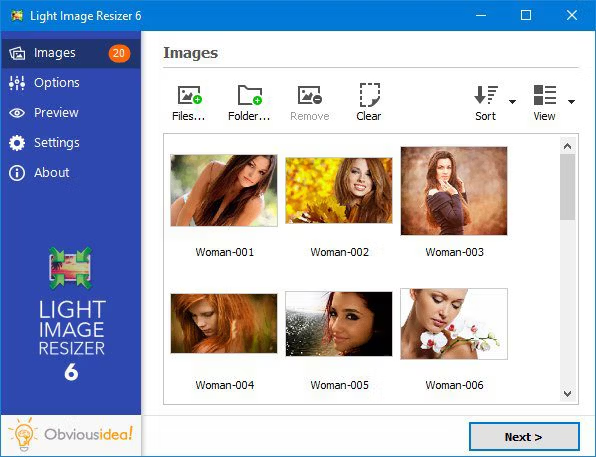
Light Image Resizer This is a batch image resizing and management program developed to save time when working with large numbers of images. It can handle resizing, adjusting DPI, changing file extensions, and compressing image files for easier emailing or website uploading. Its key feature is its processing speed, allowing it to manage entire folders simultaneously without the need to open and edit each image individually.
The program comes with a wide range of flexible functions. We can choose to resize images by pixel, percentage, or define the width and height as needed, with a system that locks and maintains the original aspect ratio to prevent distortion or warping of photos. In addition, it supports adding watermarks, both text and logo files, to prevent copyright infringement of photographs. It also supports adding frames, color effects, and converting popular file formats such as JPEG, PNG, BMP, GIF, TIFF, WebP, and even RAW files from leading digital cameras. Anyone who frequently edits or views images can use it in conjunction with... FastStone Image Viewer To arrange and select images before processing them effectively.
The latest version of Light Image Resizer has been continuously enhanced with improved image compression using Oxipng, resulting in more compact image files while maintaining maximum sharpness. It also integrates with AI Vision to analyze composition and manage photos more accurately. The program's interface is designed for ease of use; simply right-click on an image in Windows Explorer and select the appropriate command to start the program. It's ideal for photographers, content creators, web designers, and general users who want to manage image files professionally.
Key Features
- You can zoom in, zoom out, and resize an entire folder of images simultaneously in an instant.
- Adjust the DPI resolution of the image file to suit printing or screen display.
- Supports conversion of various image file formats, such as JPEG, PNG, WebP, GIF, BMP, TIFF, and RAW.
- Add a transparent watermark of text or a logo to photos to prevent copyright infringement.
- Integrating AI Vision models helps to intelligently analyze and detect objects in photographs.
- Upgrading your image compression engine with Oxipng helps reduce file sizes while maintaining full image quality.
- It has an automatic image file renaming system that follows a specified format and supports numerical sorting.
- Linking to the right-click menu in Windows Explorer allows for quick image resizing.
- Supports preserving or deleting EXIF, IPTC, and metadata of the original image file.
- Customize the color tone, adjust brightness and contrast, and add color filters or frames as desired.
What's new?
Light Image Resizer 7.6.6.178 – 2026-09-09 - NEW: add Gemini 3.7 Flash and 3.8 Flash models for AI Vision - add OpenAI GPT-6 Astra, GPT-5.6 Sol, Terra, Luna models for AI Vision - IMPROVED: replace OptiPNG with Oxipng for faster processing and better optimization - backup folder is appended with process ID to avoid concurrency issues with multiple instances
File Information
- Operating System: Windows 10 / Windows 7 / Windows 8 and 8.1
- Risk Level: 🟡 Low Risk
- Developer: ObviousIdea.
- License: Shareware
- Language: Multilingual
- Size: 66.89 MB
- File type: *.rar
- Password: mawto
- Updated: 15/9/2026
- Required Reading: Download Guide