
ดาวน์โหลด ACDSee Photo Studio Professional 2027 ฟรีตัวเต็มถาวร โปรแกรมจัดการและแต่งภาพที่ดูไฟล์ RAW คัดรูป ปรับแสงสี และรีทัชได้ในที่เดียว พร้อมเครื่องมือ AI สำหรับสร้างภาพ เติมรายละเอียด และจัดกลุ่มภาพคล้ายกัน
ACDSee Photo Studio Professional คืออะไร
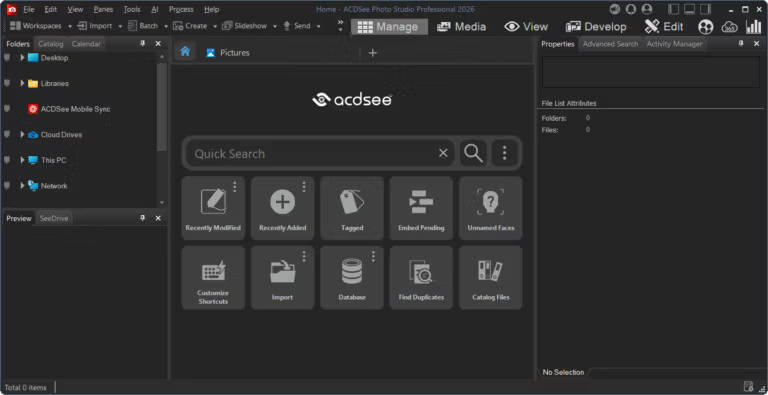
ACDSee Photo Studio Professional คือโปรแกรมจัดการและแต่งภาพที่พาเราตั้งแต่เปิดโฟลเดอร์ไปจนถึงปรับไฟล์ RAW และเก็บงานพร้อมส่งออก จุดเริ่มอยู่ที่ Manage ซึ่งแสดงภาพจากหลายโฟลเดอร์ให้คัดด้วยดาว สี ป้าย หรือข้อมูลกำกับ แล้วค้นย้อนกลับได้ตามชื่อ คำสำคัญ และเงื่อนไขที่เลือกไว้ พอเจอภาพที่ใช่ก็เปิด View เพื่อเทียบภาพและเช็กความคมชัด ก่อนเข้า Develop ปรับแสง สี และโทนแบบไม่เขียนทับต้นฉบับ หรือไป Edit เมื่อต้องรีทัชและใช้เครื่องมือแต่งภาพเฉพาะจุด
งานถ่ายหลายร้อยหรือหลายพันรูปต่อรอบก็จัดการต่อได้ด้วย Batch tools เช่น เปลี่ยนชื่อ ปรับขนาด ครอป และใส่ลายน้ำให้หลายไฟล์ พร้อมข้อมูล EXIF และ metadata, เรตติ้ง, หมวดหมู่, คำสำคัญ และป้ายสี ช่วยจัดชุดให้ค้นเจอทีหลัง ส่วนการแต่งภาพมีทั้งการแก้สี แสง สมดุลสีขาว, Lens Correction, AI Denoise และ AI Super-Resolution รวมถึง Masking ที่แยกวัตถุ ท้องฟ้า หรือฉากหลังเพื่อแต่งเฉพาะบริเวณได้ โดยยังย้อนกลับไปแก้ค่าหรือเปลี่ยนใจภายหลังได้
เครื่องมือรุ่นใหม่นี้สร้างภาพจาก prompt และภาพอ้างอิงได้ พร้อม Generative Edit, Generative Fill และ AI Remove สำหรับปรับภาพ เติมบริเวณที่ขาด หรือลบวัตถุที่รบกวน อีกด้านหนึ่ง Auto-Stack กับ AI Image Similarity ช่วยรวบภาพชุดเดียวกันและค้นจากหน้าตาของภาพเอง ไม่ต้องตั้งชื่อไฟล์เป๊ะทุกครั้ง ถ้าต้องแต่งภาพแบบแยกเลเยอร์ สามารถไปต่อที่ ACDSee Ultimate 2026 ซึ่งมีเครื่องมือจัดเลเยอร์สำหรับงานแต่งภาพครับ
Key Features
- Manage จัดหมวดหมู่ภาพด้วยเรตติ้ง แท็ก หมวดหมู่ ป้ายสี และ metadata ที่บันทึกไว้กับภาพ
- AI Keywords วิเคราะห์เนื้อหาในภาพให้ค้นด้วยคำสำคัญได้ โดยไม่ต้องไล่ติด keyword เองทีละไฟล์
- Face Detection และ Facial Recognition หาใบหน้า จดจำชื่อ และใช้ชื่อเหล่านั้นค้นภาพบุคคลในชุดใหญ่ได้
- Develop Mode ปรับไฟล์ RAW แบบไม่ทำลายต้นฉบับ เพราะบันทึกเป็นค่าปรับแต่งที่กลับมาแก้หรือลบได้
- AI Masking เลือกตัวแบบ ท้องฟ้า ฉากหลัง หรือวัตถุ แล้วปรับเฉพาะบริเวณโดยไม่กระทบส่วนอื่น
- AI Denoise ลด noise ในภาพ ISO สูงและประมวลผลเป็นชุด โดยพยายามรักษารายละเอียดสำคัญไว้
- AI Super-Resolution ขยายภาพพร้อมลดความเบลอและ noise และยังเก็บรายละเอียดของภาพไว้
- Batch tools เปลี่ยนชื่อ ปรับขนาด ครอป และใส่ลายน้ำให้ภาพหลายไฟล์ในรอบเดียว
- Light EQ ปรับบริเวณมืดและสว่างของภาพแยกกันได้ โดยไม่ต้องไล่แก้ทุกส่วนพร้อมกัน
- Color EQ และ Color LUTs ปรับสีทั้งภาพหรือเลือกเฉพาะโทน พร้อมใช้ LUT เพื่อเกรดสีแบบไม่ทำลายต้นฉบับ
- Color และ Luminance Range สร้างมาสก์เลือกตามสีหรือระดับความสว่าง เพื่อแต่งเฉพาะโทนที่ต้องการ
- Photomerge รวมภาพเป็น Panorama, HDR หรือ Focus Stack เพื่อเก็บมุมกว้าง รายละเอียดแสง และระยะชัดลึก
- เครื่องมือ Heal, Clone และ Smart Erase ซ่อมตำหนิหรือลบสิ่งรบกวนในภาพ
- รองรับไฟล์ RAW จากกล้องมากกว่า 750 รุ่น และเพิ่มรุ่นที่รองรับต่อเนื่อง
- เปิดครั้งแรกจะนำเข้าการตั้งค่าบางส่วน เช่น Search History และ Presets ที่รองรับจาก ACDSee Professional รุ่น 2022 ขึ้นไป
What's new?
ACDSee Photo Studio Professional 2027 เพิ่มเครื่องมือสร้างและปรับภาพด้วย Generative AI พร้อมวิธีจัดกลุ่มและค้นภาพที่อาศัยความคล้ายของภาพ
- AI Image Generation สร้างภาพจากข้อความ เลือกเอฟเฟกต์สำเร็จรูป หรือใช้ภาพอ้างอิงช่วยกำหนดตัวละคร สไตล์ และองค์ประกอบ
- Generative Edit รับคำบรรยายหรือภาพอ้างอิงเพื่อเปลี่ยนส่วนที่ต้องการ ส่วน Generative Fill เติมรายละเอียดที่ขาด และ AI Remove ลบวัตถุที่ไม่ต้องการ
- Auto-Stack จัดภาพเป็นกลุ่มตามพิกัด GPS เวลาในการถ่าย หรือความคล้ายกันได้อัตโนมัติ ส่วน Custom Stacking ให้จัดกลุ่มตามวิธีที่เลือกเอง
- AI Reverse Image Search ค้นภาพอื่นที่มีลักษณะใกล้เคียงจากภาพตัวอย่าง และ Group By AI Image Similarity จัดภาพคล้ายกันให้อยู่กลุ่มเดียวกัน
- Reject Tag ใช้ทำเครื่องหมายภาพหลุดโฟกัส ภาพเบลอ หรือภาพที่ไม่ต้องการระหว่างคัดรูป ส่วน Edit Mode แสดงตัวอย่าง Preset หรือ Blending Mode เมื่อชี้เมาส์
- เพิ่มการรองรับ RAW สำหรับ Canon EOS R6 V, LEICA SL3-P, Panasonic LUMIX DC-L10 และ DC-ZS300, Sony a7R VI และ Sony Cyber-shot RX10 V
- เพิ่มหมวด Develop Presets ได้แก่ Architecture, Bright & Airy, Cinematic และ Dark & Moody พร้อมรองรับ JPEG XL compression ในไฟล์ DNG
- เพิ่มหรือปรับข้อมูลกล้องและเลนส์กว่า 130 รุ่นใน Lens Correction และเพิ่ม AI Image Similarity ใน Activity Manager
System Requirements
- ระบบปฏิบัติการ : Windows 10 (64 บิต) หรือ Windows 11
- หน่วยประมวลผล : Intel หรือ AMD แบบ 64 บิต; แนะนำ Intel i5 ขึ้นไป
- หน่วยความจำ : RAM 8 GB; แนะนำ 16 GB ขึ้นไป
- กราฟิก : การ์ดจอ DirectX 12 ระดับ Feature Level 12_0 ขึ้นไป, VRAM 2 GB; แนะนำ 4 GB
- พื้นที่ว่าง : 5 GB
- เพิ่มเติม : แนะนำจอความละเอียด 1920 × 1080 ขึ้นไป; ต้องมีอินเทอร์เน็ตและอีเมลสำหรับเปิดใช้บริการ, Microsoft Edge, DirectX 12 และ Windows Media Player 9.0
File Information
- Operating System: Windows 11 / 10 (x64)
- Risk Level: 🟢 Safe
- Developer: ACD Systems
- License: Full
- Language: English
- ขนาด : 777.95 MB
- File type: *.rar
- Updated: 23/9/2026
- Required Reading: Download Guide