

Download the free YouTube Music PC (Desktop) program in Thai. Listen to YouTube music from YouTube with unlimited, ad-free Premium access. This is the full, permanent version, the latest version, and it's easy to install.
What is YouTube Music PC?
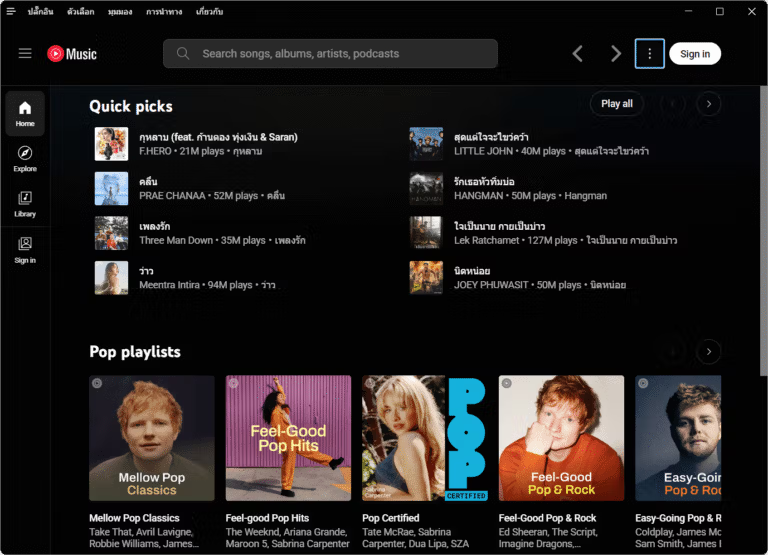
YouTube Music PC (Desktop) YouTube Music is a music player application developed with Electron for PCs, designed to enhance the user experience on Windows, macOS, and Linux. It retains the original design of YouTube Music while adding features missing from the web version, such as ad blocking, skipping silent periods, and taskbar controls. Furthermore, it includes a plugin system that allows users to customize the display and add new functionalities as needed.
With its support for a wide variety of plugins, it allows for the addition of features such as an equalizer, MP3 downloads, lyric sync, picture-in-picture mode, and Discord Rich Presence controls. It also includes special features like SponsorBlock for skipping non-musical sections and Playback Speed for adjusting playback speed, making this app an excellent choice for those who want more features than the regular web version.
This YouTube Music Desktop (Unofficial Client), developed with Electron, is an open-source project on GitHub, making it safe and reliable to download and use. Those who wish to install it directly from GitHub can find instructions and more information at: https://github.com/pear-devs/pear-desktop
Key Features
- Original design – Maintain the same interface design as the web version.
- Plugin support – Customize the style, content, and features.
- Blocking ads and tracking. - No annoying advertisements.
- Download music - Supports downloading MP3 and Opus files using youtube-dl.
- Skip automatic silent period. – Don't listen to the silent parts of the song.
- Skip age verification. - Access to age-restricted content.
- Turn off automatic “Continue Watching?” notifications. – No need to press to continue playing.
Available plugins
- Ad Blocker - Blocks all types of ads and prevents tracking.
- Album Actions – Added Like, Dislike, Undislike, and Unlike buttons for entire albums or playlists.
- Album Color Theme - Automatically uses the album cover's theme color.
- Ambient Mode – A lighting effect that extends the colors from the video to the background.
- Audio Compressor – Adjust the volume to a balanced level.
- Bypass Age Restrictions – Skip YouTube's age verification.
- Captions Selector – Enable subtitles for songs.
- Crossfade - Enables crossfade transitions between tracks (no audio interruptions).
- Discord Rich Presence - Displays the song you're currently listening to in Discord.
- Downloader – Download songs as MP3s using youtube-dl.
- Equalizer – Adjust the bass and treble or use a frequency filter.
- Exponential Volume - More precise volume adjustment.
- In-App Menu - Customize the app's menu with a modern design.
- Scrobbler - Supports Last.fm and ListenBrainz for recording listening history.
- Lumia Stream – Supports connection with Lumia Stream.
- Lyrics Genius – Displays lyrics from various sources.
- Music Together – Share playlists and play music simultaneously with others.
- No Google Login – Remove buttons and links related to Google Login.
- Notifications – Displays a notification when music starts playing (supports interactive notifications on Windows).
- Picture-in-Picture – Play videos in Picture-in-Picture (PiP) mode.
- Playback Speed – Adjust the music speed.
- Precise Volume - Precisely control the volume using the mouse and hotkeys.
- Shortcuts & MPRIS – Set up shortcut keys to control music playback.
- Skip Disliked Song – Skip songs that have been disliked.
- Skip Silences – Skip the silent sections in the song.
- SponsorBlock – Skip the parts in the music video where there is no actual song.
- Synced Lyrics - Supports lyrics synced to the rhythm of the music.
- Taskbar Media Control - Control music from the Windows taskbar.
- TouchBar (MacOS) – Customize music controls on your Mac's TouchBar.
- Tuna OBS – Supports the Tuna plugin for OBS.
- Video Quality Changer – Change video quality via the overlay button.
- Video Toggle – Switch between music and video modes.
- Visualizer – Added various visualizer styles.
File Information
- Operating System: Windows 11 / 10 / 8.1 / 7
- Risk Level: 🟡 Low Risk
- Developer: github.com/pear-devs/pear-desktop
- Language: English
- Size: 274 MB
- File type: .exe
- Password: mawto
- Updated: 12/9/2026
- Required Reading: Download Guide
==== Online Installer =====
==== Ready to use, no installation required =====





