Download Topaz Mask AI 2021 (x64), a program for creating transparent backgrounds and removing backgrounds from images easily and quickly | 1.8 GB
What is Topaz Mask AI?
Topaz Mask AI is a background removal program that lets you cut out unwanted backgrounds and keep the parts you're interested in. This allows you to further utilize the resulting image, such as changing the sky or background of personal photos, group photos, or other images. Topaz Mask AI uses Machine Learning to process images and decide which areas should be removed and which should remain. This is extremely beneficial for professionals working with images and editing, significantly reducing work time while delivering higher quality results.
Features:
- Masking (removing the background) is now easier and more accurate for all types of photos, requiring no further adjustments.
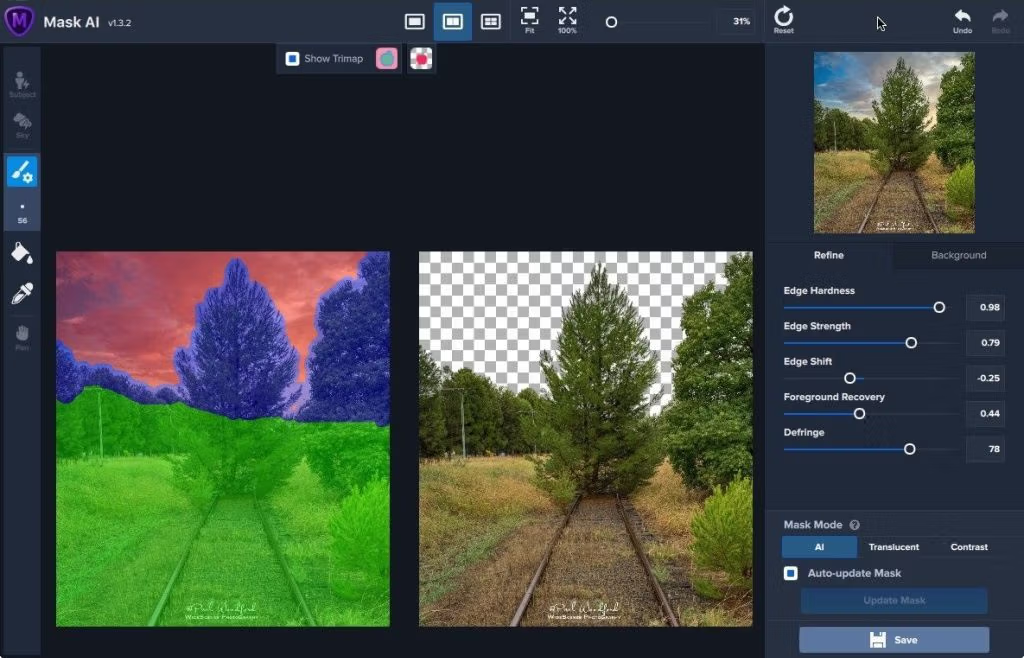
- Mask AI's user-friendly Trimap color coding system reduces the process to four simple steps: Capture, Trim, Calculate, and Replace.
- The smart brush (Cut, Keep, and Compute) helps you perform clean and precise adjustments.
- The slider can be used to quickly perfect the mask after processing, including adjusting the sharpness, softness of the edges, and more.
- Replace the background to finish. Becoming a great photographer requires a multitude of techniques and tools at your disposal. You plan and execute with military-grade precision to capture the perfect shot. But when nature gives you the perfect sky or an undesirable background, Mask AI's background replacement lets you take control of your task.
- For me, masking trees and plants always involves complex and rather difficult masking tasks. But with Tricky Masks, Mask AI's machine learning technology makes your job incredibly easy.
How to use Topaz Mask AI
- Apply with a brush.greenIn the section that needs to be kept.
- Use a brush.blueApply it to areas where objects overlap, such as areas with both leaves and the sky.
- Use a brush.redApply to the area you wish to remove or make transparent.
- Then press Compute Mask.
You can try tapping the Subject icon to have the AI find an object and automatically paint it for you.
What's new?
File Information
Operating System: Windows 7, 8, 10 (64-bit only) Developer:
Topaz
License: Full Language: Multilingual Size: 1.8 GB File type: *.rar Password: mawto Status: Tested Installation instructions: Included Link updated: 5/2/2021
Required Reading: Download Guide
Download link