Download Rhinoceros 3D 9 (or Rhino 9, Rhino 3D 9) permanent full version, the latest version of the engineering-grade precise NURBS-based 3D modeling software used for architectural creation, product design, and jewelry design
What is Rhinoceros 3D
Rhinoceros 3D 9 is a 3D design and modeling software, or simply known as Rhino, focusing primarily on the precision of curves and free-form surfaces. Developed by Robert McNeel & Associates, it is popular in industrial design, architecture, jewelry design, automotive design, and product design that requires complex shapes. The key highlight of Rhino is its NURBS (Non-Uniform Rational B-Splines) modeling system, which is the mathematics of curves and surfaces that allows users to create smooth, flowing shapes, control curve control points in detail, and maintain dimensional accuracy even after multiple shape modifications, unlike polygon models which often lose smoothness when high detail is required.
Inside the program, there is a complete set of tools for drawing curves, surfaces, and solids. Users can start from simple 2D lines and gradually build 3D surfaces, cutting, drilling, joining, and customizing shapes freely. It supports importing and exporting various file formats such as STEP, IGES, DWG, DXF, OBJ, and STL, making it compatible with other CAD, CAM, and rendering software Blender 3D seamlessly. It is suitable for both prototyping work that needs to be forwarded to manufacturing plants and presentation work that requires realistic images.
Another part that makes Rhino 3D 9 stand out is Grasshopper, a plugin for parametric design. Users create algorithms from interconnected nodes to define shape relationships, such as changing a single number to instantly adjust the size of the entire piece, allowing for rapid experimentation with different styles without having to rebuild everything from scratch. Architectural designers use it to design buildings with repetitive patterns, curved roofs, or structures calculated from real data, while jewelry designers use it to create intricate patterns that require millimeter-level precision.
Rhino 9 also supports rendering, material simulation, and file preparation for 3D printing, allowing users to visualize work before actual production, reducing errors and saving time during the prototyping phase. With a user interface that is easy to learn compared to large CAD software and a more accessible price point than many industrial-grade programs, Rhino is the tool chosen by architects, product designers, engineers, and design students to turn ideas into 3D models that can be actually measured and are ready for production.
Who is this program suitable for?
Architects who need to sculpt curved shapes and extract floor plans from the same set of models, product and jewelry designers who need millimeter-smooth surfaces, engineers who need to forward files to manufacturing plants, and design students who want professional-grade CAD tools at an affordable price. For work that focuses primarily on 2D drafting or shaping solely from sketches, lighter tools may be used.
Key Features
Creating 3D models
- NURBS. Create free-form curves, surfaces, and solids using NURBS mathematics with detailed control over control points, ensuring dimensions do not distort even after multiple shape modifications.
- Patch. Create trimmed, untrimmed, and multiblend surfaces that connect to neighboring surfaces up to curvature continuity level in just a few clicks.
- SubD. Sculpt organic shapes with SubD, featuring the MatchSubD command that snaps SubD edges to NURBS surface edges precisely according to manufacturing constraints.
- InflateCrv. Turn closed planar curves into inflated mesh or SubD shapes in just a few clicks.
- Curve and surface drawing tools. Start from 2D lines and build into 3D surfaces using Loft, Sweep, Revolve, Extrude, and Blend.
Shape editing.
- Gumball. Edit curve and surface control points directly in the viewport along the U, V, or N axes with a Rotate-Extend mode that rotates cross-sections and stretches adjacent faces along the original direction.
- SoftTransform. Adjust a large number of control points simultaneously using falloff curves, allowing shapes to change smoothly without becoming rigid or angular.
- Setback fillets. The FilletEdge and BlendEdge commands support setback corners, resulting in smoother and more continuous surface transitions.
- Rebuild. The new adaptive rebuild technology captures the geometry of original curves more accurately than before.
- ArrayCrv. Array objects along any curve with real-time preview and parameter adjustments before confirming.
- ScaleEach. Scale multiple objects simultaneously from their individual origins, and apply random or gradient scaling to create diverse patterns.
Grasshopper and RhinoAI
- Grasshopper 2. Completely rewritten system, runs components in parallel across all cores, supports cancellable commands, and includes looping and metadata attached to every value.
- Grasshopper 1. Fully compatible while introducing new tools; create materials and texture surfaces natively, and use hatches, clipping planes, and sections directly within Grasshopper.
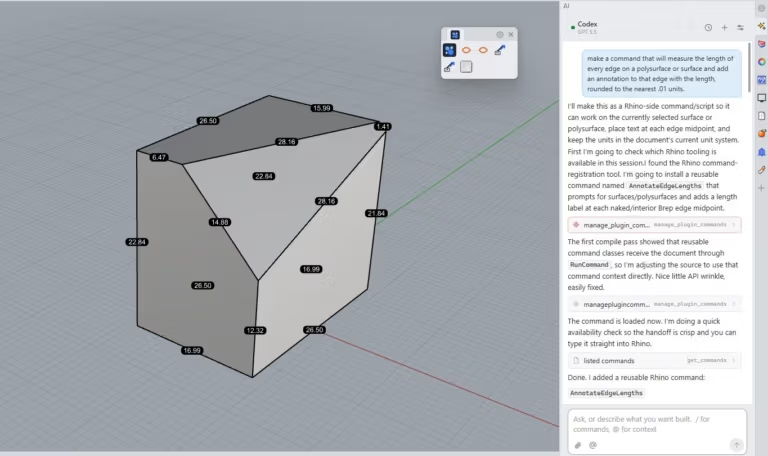
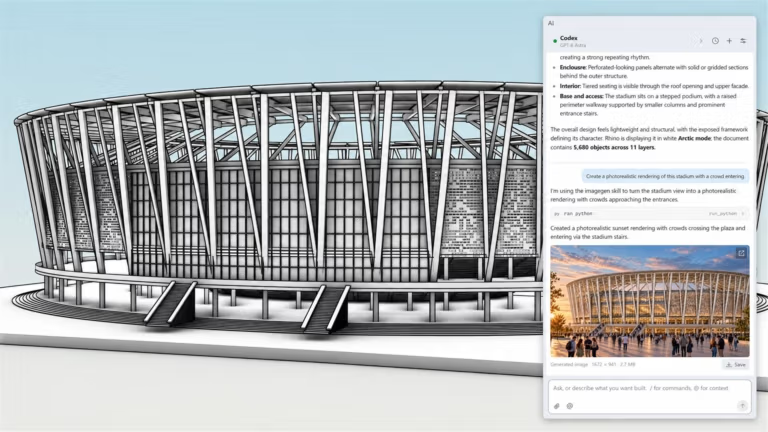
- RhinoAI. Connect AI assistants to open Rhino and Grasshopper documents, and issue commands via the chat panel alongside the model.
- MCP. Connect external AI agents to Rhino via the Model Context Protocol.
2D Drafting
- Non-rectangular details. Transform detail view frames in layouts from rectangles into closed curves of any shape.
- Section styles. Create and manage section styles systematically, with section and clipping drawings updating dynamically as the model changes.
- GD&T. Add Geometric Dimensioning and Tolerancing (GD&T) symbols to engineering drawings to ensure manufacturing to exact specifications.
- Hatch patterns. Includes 58 built-in new hatch patterns, and allows creating custom patterns from curves using the HatchPattern command without editing .pat files.
- Linetypes. Linetypes in Rhino 9 support custom shapes and text, allowing them to represent pipes, fences, or walls while remaining tied to the original curves.
- Drafting symbols. A library of standard 2D symbols such as doors, windows, and title blocks that can be dragged and dropped instantly from the Library panel.
- ExportLayout. Export selected layouts directly to 3DM, DWG, DXF, and other formats.
Rendering and Presentation
- Rhino Render. Render images with ray-traced lighting, materials, and shadows, complete with real-time preview before final rendering.
- Caustics and dispersion. More realistic refraction and dispersion for transparent and reflective materials, ideal for jewelry and consumer product design.
- Decals. Decals have become a full-featured material, allowing logos or patterns to be seamlessly applied to curved surfaces.
- Concept display mode. A new display mode for early-stage conceptual presentations, making massing models look clean and ready to present without rendering.
- Markups. Scribble notes and redline markups directly onto models or drawings to communicate with teams and clients without altering the actual geometry.
- Direct3D. Renders using Direct3D 11 by default on Windows for improved stability, with support for ARM devices and running in virtual machines.
User interface and large projects.
- One UI. The same look and toolsets across both Windows and Mac—learn once and use on both systems.
- Command line. A new, compact command line positioned at the top of the screen featuring clickable buttons and menus, while seasoned users can still type commands just like before.
- Toolbars. The toolbar system and RUI files have been rewritten for greater stability, making it easier to customize and share toolsets.
- Instant aliases. Assign shortcuts to execute commands instantly without needing to press Enter.
- Block Editor. Edit blocks more conveniently, with support for non-uniformly scaled instances and nested blocks.
- Layout Groups. Organize layouts of complex drawing sets more flexibly and intuitively.
- Audit 3dm files. A tool to display the file size of individual objects in a 3dm file, helping visually track down the source of bloated files.
Meshes, files, and analysis.
- QuadRemesh. Quickly generate quad meshes from surfaces, solids, meshes, or SubDs, ideal for rendering, animation, and analysis.
- Knife. Split SubD or mesh faces along polylines drawn in the viewport to add topology.
- MeshSelfSplit. Split meshes into separate pieces at self-intersection points.
- SplitPointCloud. Slice point clouds into multiple sections by drawing cutting lines, supporting large scan files and LiDAR data.
- GlobalEdgeContinuity. Check G0, G1, and G2 continuity across multiple pairs of surface edges simultaneously with visual feedback in the viewport.
- Overlap. Find duplicate points and overlapping curves, then select or delete them with a single command.
- Support for multiple file formats. Native import and export of STEP, IGES, DWG, DXF, OBJ, STL, SketchUp, glTF, FBX, and USD.
- Developer tools. Create plugins with RhinoCommon, Rhino.Python, and C++ SDK available for both Windows and Mac on .NET 10.
What's new in Rhinoceros 3D 9
Version 9.1.26314.09001 – 10/11/2026
- Fixed an issue with the Rebuild command. Fixed crashes when rebuilding curves.
- Dynamic Help panel. Fixed an issue where the panel crashed after opening a new document.
- Rebuild preserves all properties. Rebuilt curves retain all properties of the original objects.
- Viewport preview colors. Fixed an issue where preview colors did not match the layers.
- CreateTextOutlines. Fixed an issue with the lowercase to uppercase text conversion command.
System Requirements
- Operating System : Windows 11 64-bit
- Processor : 64-bit Intel, AMD, or ARM
- Memory : 8 GB or more (recommended)
- Disk Space : 600 MB
- Additional : Direct3D 11 capable graphics card with 4 GB VRAM (recommended)
file information
- Operating system: Windows 11
- Risk Level: Medium
- License: Commercial
- Developer: Robert McNeel & Associates
- English
- Size : 812.63 MB
- File type: RAR
- Password: mawto
- Installation method: Yes
- Updated on : 15 November 2026
- Need to read: Download Guide
==== Rhinoceros 3D 9.1 ====