
Download GstarCAD 2027 (X64) for free. This full, permanent license is a 2D/3D CAD design and drafting program supporting DWG/DXF files. It's compatible with AutoCAD, has a nearly identical interface and commands, and includes all the latest functions. Installation instructions are included.
What is GstarCAD 2027?
GstarCAD 2027 GstarCAD is a Computer-Aided Design (CAD) program for 2D and 3D design and drafting, developed by Gstarsoft, a company with over 20 years of experience in the design software industry. Its key feature that has made it very popular is its full compatibility with AutoCAD DWG/DXF files, eliminating the need for file conversion. Furthermore, the program's interface, commands, and user interface are very similar to AutoCAD, allowing users familiar with AutoCAD to switch to GstarCAD seamlessly with minimal relearning. Existing plugins previously written in LISP, VBA, or .NET can also be used with GstarCAD.
In version 2027, Gstarsoft focused on improving the speed and intelligence of the program under the concept of "Faster by Core, Smarter by AI." A complete restructuring of the memory management system resulted in frequently used commands such as Zoom, Pan, Move, Copy, and Undo/Redo performing 10% faster in complex files, and closing files was up to 8 times faster. Rendering under hardware acceleration was also faster, ranging from 30-80%, and in some cases up to 90%, making working with large planning or complex mechanical files significantly smoother.
Overall, GstarCAD 2027 is suitable for engineers, architects, and designers who need a high-performance CAD program at a more affordable price than AutoCAD, while maintaining the same file compatibility and usage patterns. Therefore, it's ideal for both individual users and organizations looking to reduce license costs without disrupting their existing workflow.
Features:
- Full support for DWG/DXF files: Open, edit, and save files directly from AutoCAD without needing to convert them before use.
- Redesigned Command Line: Adjust window width/height, conveniently select command options via mouse or keyboard, and find temporary suggestion messages above the command bar.
- Basic 3D Modeling Tools: Create solid objects (Box, Cylinder, Sphere), including the Extrude, Sweep, and Loft commands for mechanical design work.
- Supports a variety of APIs: Compatible with LISP, VBA, .NET, and ZRX to run plugins or scripts previously used with AutoCAD immediately.
- Batch Plotting & Sheet Set: It makes managing large numbers of print jobs simultaneously easier and reduces repetitive tasks.
- Switch interfaces freely: Choose between the modern Ribbon interface or the classic Toolbar/Menu style, whichever you prefer.
- Dynamic Block Parametric Conditions: Create smart blocks that automatically resize and reshape based on specified conditions and aspect ratios, reducing repetitive block editing tasks.
- Centerlines & Center Marks: A tool for quickly creating centerlines and center points of circles/arches/polygons, ideal for mechanical drafting.
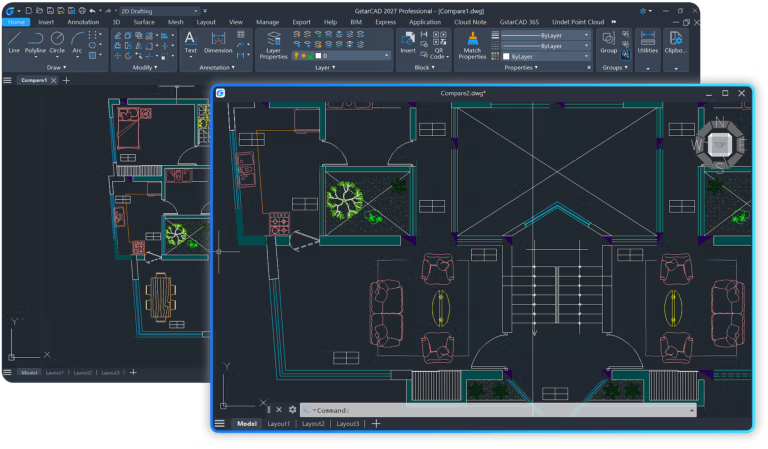
- Supports floating windows: Dragging file tabs into separate windows allows you to compare multiple files side-by-side.
- Smart Hatch: Added a “Apply to Current Drawing” option to search for boundaries outside the current viewport. Supports geometry that is not yet closed.
- Plot Preview has been restructured: A modular control panel allows for drag-and-drop, pinning, or floating elements as needed, reducing workflow steps and errors.
- Multi-platform support: It is compatible with Windows, macOS (specifically supporting Apple Silicon chips), and Linux (Ubuntu, Debian, Astra Linux).
File Information
- Operating System Windows 11 / 10 / 8.1 / 7
- Risk Level 🟠 Medium Risk
- License Trial
- Developer Gstarsoft Co., Ltd.
- Language English
- Size 519 MB
- File type *rar
- Password : mawto
- Updated on : 1/7/2026
- Required Reading: Download Guide