Download the latest full version of Lucky Patcher 2026 for Android. This app helps remove ads, uninstall unwanted system apps, fix access permissions, and easily bypass license checks for apps and games, all in one place.
What is Lucky Patcher?
Lucky Patcher is a utility app for Android users who want to manage apps on their device beyond standard settings. The app consolidates multiple functions into one place, including app file modification, ad management, data backup, and permission management, allowing those familiar with the Android system to customize app behavior to their needs without installing multiple separate apps.
Lucky Patcher's most well-known function is app patching. Users can select installed apps and instruct them to remove in-app ads, modify certain permission checks, and even edit installation files to create customized APK versions for later reinstallation. This functionality is frequently used by those who prefer a simple interface without intrusive pop-ups or banners.
The app features several system management tools beyond patching, such as backing up apps with their internal data, uninstalling pre-installed system apps that are normally unremovable, moving apps to the memory card, converting regular apps into system apps, and modifying data access permissions for individual apps. These tools help manage storage space, remove unwanted apps, and provide finer control over what each app can access on the phone.
Some advanced functions require rooting the device because modifying system files requires administrator privileges. Without rooting, users can only use basic functions such as backing up APK files or managing common apps, but they won't be able to fully utilize deep patching capabilities. Therefore, those interested should understand rooting and its security implications before making a decision.
Another important thing to know is that Lucky Patcher is not available for download on the Google Play Store; the installation file must be downloaded directly from the developer's website. Always verify the source before installing, as this type of app has deep system access, and downloading from untrusted sources carries malware risks. Additionally, modifying apps developed by others may violate their terms of service, so users should proceed with caution. For those who simply want to clean up regular junk files, we recommend using CCleaner Pro APK instead
Key features
- Remove the ad. Remove annoying ads from apps and games with just a few taps.
- Remove the license verification process. Remove license checks for paid apps and games using automatic mode.
- Fix app permissions. View and remove unwanted access permissions from installed apps.
- Delete system apps. You can delete pre-installed apps that you don't use.
- Move the app to the SD card. Move apps and games to the memory card to free up device space.
- Backup and restore data. Back up your app's files and data before making any changes, and restore them when needed.
- Convert to a system app. Convert general apps into system apps, or convert them back as needed.
- Create a modified APK. Create an APK file with the patch included, ready for installation.
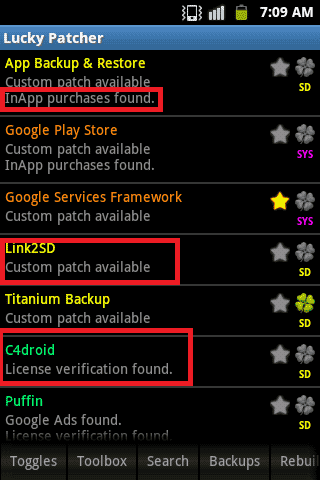
- Lightweight and easy to use. The interface is simple and displays the status of each app using colors, making it easy to select patches.
Instructions for use can be found here. Click here
What's new
What's new in version 12.10.10
- Updated new custom patches for popular applications.
- Improved stability and bug fixes for the latest Android versions.
file information
- Operating system: Android 4.0+
- Developer: ChelpuS
- Language: Multilingual
- Size: 15 MB
- File type: apk
- Version: 12.10.10
- Updated on : 5/11/2026
- Need to read: Download Guide
==== Lucky Patcher v12.10.10 ====