Download iToolab UnlockGo (Android) 7 Full Free, permanent version. This Android phone unlocking program removes screen lock codes, bypasses Google account/FRP locks. Latest version, easy installation.
What is iToolab UnlockGo (Android)?
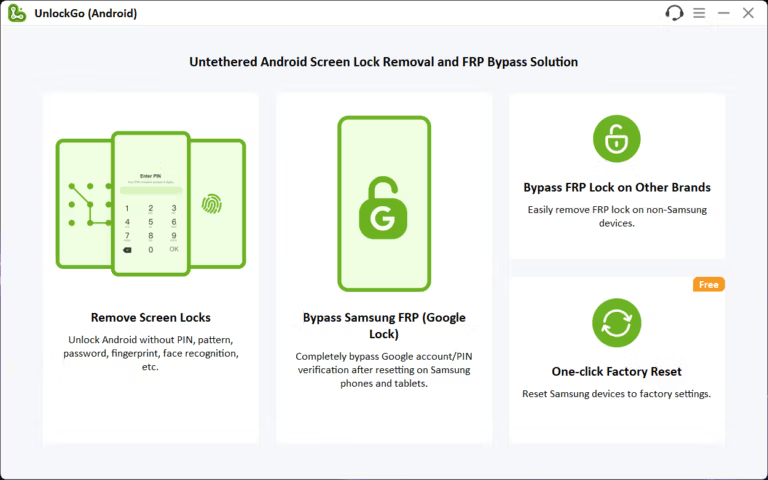
iToolab UnlockGo (Android) This is a lifesaver for forgetful people or those who have trouble accessing their phones. Simply put, it's a computer program that unlocks all types of Android phone screens, whether it's a PIN code, pattern, fingerprint, or facial recognition. If you forget your code or your phone screen is cracked and you can't enter the code, this program will help clear the lock and allow you to access your phone again.
Another great feature is its ability to solve Google account lock issues, also known as FRP Lock. Have you ever had a factory reset and then, upon restarting, it asked for your old Gmail account password that you couldn't remember? This program can bypass this step and supports popular brands like Samsung, Xiaomi, Vivo, OPPO, and others, allowing you to use your device immediately without needing a repair shop.
Using this program isn't complicated at all, unlike programmer-grade software. The interface is designed for everyday use. Simply connect your phone to your computer via USB cable, select the desired mode, and follow the on-screen instructions. It's quick and easy, perfect for those who want to avoid technical complexities and find simple solutions at home.
Ability
- Unlock your screen using any method: No matter what type of lock you have set—4-6 digit PIN, pattern, alphanumeric password, fingerprint scan, or facial recognition—it can all be removed. Supports over 15 phone brands (over 6,000 models in total).
- Resolving Google Lock Issues (FRP Bypass): The best part about this feature is that it allows you to bypass the Google account verification page after a factory reset. It supports many popular brands, including Samsung (Android 5-15), Xiaomi/Redmi, vivo, OPPO, Realme, Motorola, OnePlus, and others.
- Unlock older Samsung models without losing data: It's important to note that this only works on older Samsung models (S7 and earlier) where unlocking preserves all data. Newer models will lose all data, just like a regular factory reset.
- Wipe your Samsung device in one click: Samsung users have a free feature that allows them to perform a factory reset, completely wiping their device in a single click—much faster than navigating through the menus on the device itself.
File Information
- Operating System: Windows 11 / Windows 10 / 8.1
- Risk Level: 🟡 Low Risk
- Developer: iToolab
- License: Full
- Language: Multilingual
- Size: 130 MB
- File type: *.rar
- Password: mawto
- Installation Method: Available
- Updated: 7/12/2025
- Required Reading: Download Guide