
Download Topaz Gigapixel Pro full version. This AI-powered image scaling program ensures images are enlarged without pixelation. It's the best image scaling program, featuring Core/Generative Models, Batch Processing, Photoshop Plugin, and Cloud Rendering.
What is Topaz Gigapixel?
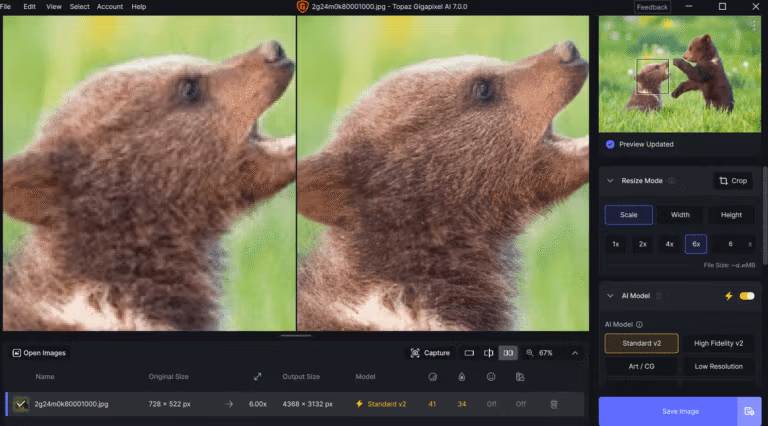
Topaz Gigapixel This is an AI-powered image upscaling program that focuses on increasing image size while creating sharper details than simple pixel stretching. It supports photographs, graphics, and low-resolution images, allowing users to select the appropriate Core Model or Generative Model for their original. Basic upscaling can be achieved multiple times, and width/height can be adjusted according to print or display requirements. It also includes Face Recovery for images of people with small faces or lost detail in the original.
In a real workflow, multiple files can be dragged into a batch server, and the model, scale, and output can be defined for sequential processing. The Photoshop plugin helps send images from Photoshop to Gigapixel and then retrieve the results for further work without having to manually adjust files every time. This is useful if your project requires noise reduction, sharpening, face recovery, and multiple image adjustments within a single program. Topaz Photo Pro Gigapixel offers more versatility, while its primary focus is on image enlargement, detail restoration, and preparing large files.
The current version offers both Standard and High Fidelity options for general images, as well as generative models like Wonder or Redefine for tasks requiring greater detail. Some models can be rendered on-premises when GPU and VRAM capabilities are sufficient, or via cloud rendering to reduce hardware load. The Preview window allows for comparing multiple models before exporting and includes features such as cropping, face recovery, grain control, and detail management based on the selected model. This is suitable for older files, low-resolution camera images, large-format prints, and images that need to be enlarged significantly beyond their original size.
Key Features
- AI can upscale images many times over, creating detail instead of simply stretching pixels like in the traditional method.
- There are Core Models for photography, graphic design, and different quality originals.
- Generative models like Wonder and Redefine are used to create additional detail in images where the original data is insufficient.
- Face Recovery helps restore details of small or blurred faces from their original state.
- Batch processing allows you to process multiple images consecutively using the same set of settings.
- Preview is used to compare the model and the level of adjustments before exporting the final file.
- Supports cropping and setting output size according to scale, pixels, or the final project size.
- There are specific grain and control details based on the selected AI model.
- The Photoshop plugin can be used to send images to Gigapixel from Adobe's workflow.
- Cloud rendering is used to process models that are too demanding for some types of local hardware.
- Supports multiple image files in a queue and allows separate export for each task.
- It uses GPU acceleration and supports NVIDIA, AMD, and Intel Arc according to current generation specifications.
What's new?
Topaz Gigapixel 1.3.6 — August 31, 2026 - Fixed Photoshop plugin not opening due to library conflicts on macOS - Fixed some JPG files displaying grayscale - Fixed passing Face Recovery settings to the processing engine - Fixed grain not working during slider scrolling - Fixed License files not respecting custom installation folders on Windows - Fixed incomplete Wonder 3.5 extraction on macOS - Added protection against Neuroserver running on Apple Silicon with less than 16 GB of RAM - Improved text in the Subscription Information window and updated the EULA.
System Requirements
- Operating system: The latest version of Windows 10 or Windows 11.
- CPU: Intel/AMD with AVX support, released after 2016.
- RAM: 16 GB minimum; large upscale projects should have 24 GB or more.
- GPU: NVIDIA / AMD / Intel Arc with a minimum of 6 GB of VRAM; Generative models should have 8 GB.
- Free space on drive C:: 55 GB
- Internet: Used for installation, activation, updates, and cloud rendering.
File Information
- Operating System: Windows 11 / 10 (64-bit)
- Risk Level: Medium
- Developer: Topaz Labs
- License: Full
- Language: English
- Size: 412.64 MB
- File type: *.rar
- Password: mawto
- Installation Method: Available
- Updated: 13/9/2026
- Required Reading: Download Guide
==== Download Topaz Gigapixel 1.3.6 ====
==== Download Gigapixel AI Pro 8.4.4 ====