
Download FxSound Pro 2026 (formerly Fxsound Enhancer) Full Version, a free speaker booster program that increases bass, enhances volume, and automatically improves sound quality. It includes ready-to-use presets. This is the latest version.
What is FxSound Pro?
FxSound Pro is an audio enhancement program for Windows computers that makes the sound from your speakers or headphones louder, clearer, and more immersive. It's a successor to DFX Audio Enhancer, which was previously a paid program. In 2022, the development team made it freely available without restrictions, and later fully open-sourced it, allowing anyone to inspect and review its code.
Once installed, FxSound creates a virtual audio device that acts as an intermediary between your apps and your speakers or headphones. All audio from your computer—whether watching YouTube, listening to Spotify, playing games, or attending online meetings—is optimized in real-time before being sent to your physical device. This eliminates the need to configure audio for each app individually; simply turning on FxSound improves system-wide audio.
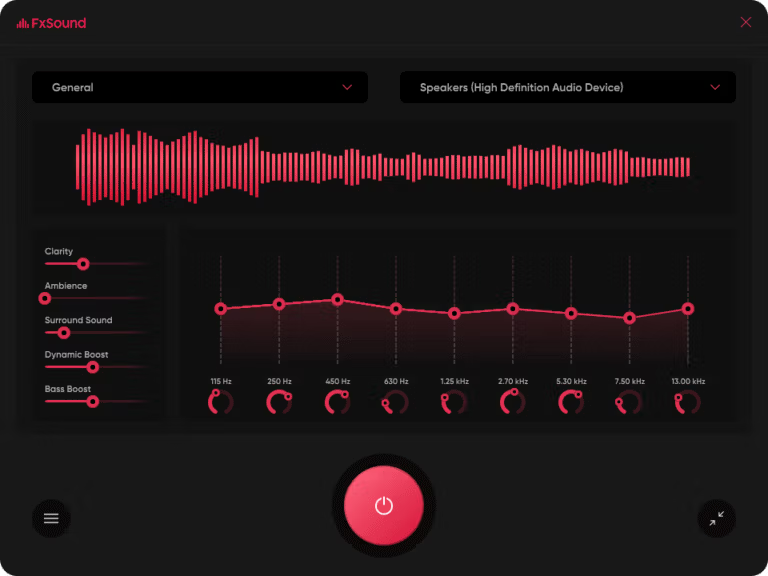
FxSound comes with a 9-band equalizer, allowing you to customize frequency ranges from deep bass to clear, crisp treble. For those who don't want to adjust it themselves, the program offers presets categorized by genre, movies, and games—a single selection instantly changes the sound. Additionally, there are customizable effects including Clarity to enhance sound detail, Ambience to add atmosphere and life, Surround Sound to expand the soundstage like in a movie theater, Dynamic Boost to increase volume without distortion, and Bass Boost for those who prefer powerful bass. Serious audio editing, such as recording and mixing, is handled by... Adobe Audition Different software programs that work well together.
Another highlight is its simplicity. The interface is clean, with only a few sliders, and all settings can be viewed on a single screen. You don't need to be a professional audiophile to use it. The program is very lightweight, consumes minimal resources, and can be left running in the background without slowing down the computer. Therefore, it's ideal for laptop speakers with low or flat sound, inexpensive headphones, or anyone who wants to upgrade their sound without buying new equipment.
Importantly, FxSound is truly free. There's no Pro version, no license key, no trial period, and no ads, as the development team has stopped selling it and now accepts voluntary donations instead. Being open-source, the program is transparent, verifiable, and has a continuously supportive community. It's arguably the most cost-effective option for anyone wanting to improve their computer's audio without spending a single penny.
Key features of FxSound
The selling point of FxSound Pro lies in its precise yet easy-to-use sound adjustment capabilities. It starts with an equalizer that allows you to adjust the center frequency of each band individually. The bands are based on the ISO standard, with a selectable number of 5 to 31 bands. There are also controls for master gain, band width (filter Q), and balance to fine-tune the sound to your liking. Next are five slider-controlled effects: clarity to enhance sound clarity, ambience to create an immersive surround sound, dynamic boost to add dynamic range, and bass boost to add weight to the low frequencies. These two elements together are the heart of instantly improving the sound quality of your existing speakers or headphones.
Another outstanding feature is its ability to increase volume without distortion. A peak protection system prevents sound crackling when the volume is turned up, allowing for longer listening sessions with less ear fatigue, unlike typical audio boosters that cause distortion as the volume increases. Furthermore, the program compensates for the limitations of low-quality audio hardware by processing timbre, loudness, sound balance, and dynamics to produce clearer, louder, deeper, and more balanced sound, while delivering the highest possible bitrate achievable by the device.
Easy to use, save as a preset.
- There are preset options for various situations, including listening to music, playing games, watching movies or streaming, and transcription tasks, which can be switched instantly depending on the activity being performed.
- Save custom presets and bind them separately to each audio device. When you switch headphones or speakers, the sound changes without needing to reconfigure it.
Bonus items and tools for those who like deep adjustments.
- Visualizer creates real-time animations based on sound. Place it next to your phone while you enjoy listening to music.
- There's an MCP server that allows AI assistants like Claude to directly control FxSound. There are command-line options for configuration from the terminal, and customizable keyboard shortcuts.
- Free and open source. The source code is on GitHub (fxsound2/fxsound-app). Anyone can view and contribute to its development.
- Supports multiple languages, including the recently added Bulgarian language.
What's new
Version 1.2.16
- The sound level depends on the recording device. When switching audio devices, the volume level of the playback device will automatically be set according to the recording device.
- Added support for the Bulgarian language.
file information
- Operating System: Windows 7 / 8.1 / Windows 11 / 10
- Developer: FxSound
- License: Freeware
- Language: English
- Size: 74.4 MB
- File type: *.exe
- Updated: 12/10/2026
- Need to read: Download Guide