

How to delete junk files on your computer, delete Windows update files, delete update files, delete Windows 10 cache, thoroughly clean up junk files, delete registry files to make your PC faster and less sluggish. Junk file removal program.
Deleting junk files in Windows, whether it's Windows 10, Windows 8.1, or Windows 7, isn't difficult. However, deeply and completely deleting files such as cache files, Windows update files, error logs, memory dumps, and others, can be very time-consuming if done manually or using Windows Disk Cleanup to find and delete them.
Today, mawtoload provides a method for deleting junk files, which can remove normal temporary files, as well as cache files, Windows or Office update files, and registry files left over from uninstalling various programs, using a program... Wise Care 365 This is a reliable, highly efficient, and accurate program for finding and deleting junk files. Let's take a look!
[toggle title="Click to see how to completely delete junk files on your computer" state="close"]
- Go to the "General Cleaning" tab. On this page, if you want a complete clean delete, check all the boxes and click. Scan

2. The program will quickly find junk files, then press... clean
If you never delete junk files on your computer, you could remove several GB of junk.

3. Go to the Advanced Cleaning tab and press...Scan

4. Then press. clean
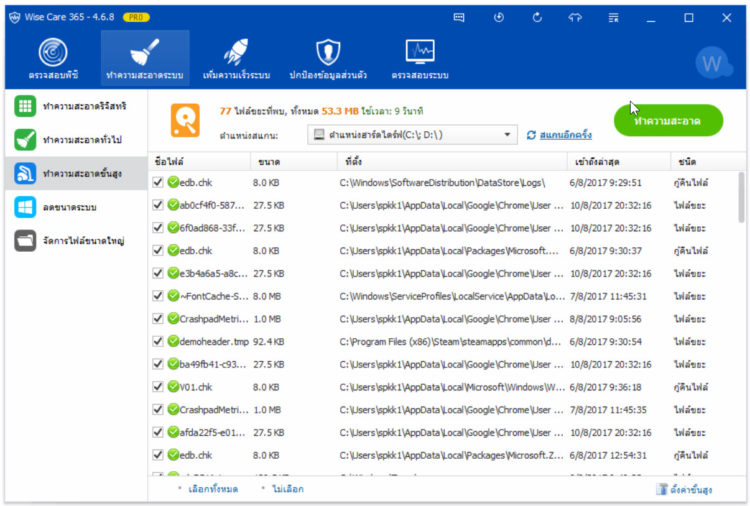
5. To remove Windows update files that we have installed, including Office installation files, go to the tab. Reduce the size of the system. Then press Reduce sizeSure thing.

6. After deleting all junk files, we will then delete leftover registry files that can slow down the system. Go to the tab... Clean the registry. PressScan, then press Clean. That's it.


If you found this article helpful, please don't forget to like, comment, and share it.
The full version of the program is available for download and use. Click here.
[/toggle]