
Download AnyBurn Pro 6 Full version, permanently, for free. This disc burning software allows you to burn CDs, DVDs, Blu-rays, and images, and also create and edit ISO image files. It's easy to use, lightweight, and the latest version.
What is AnyBurn?
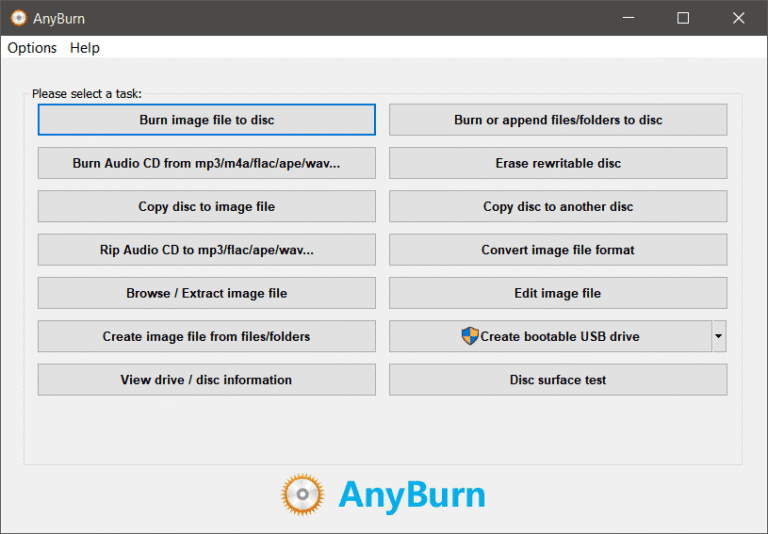
AnyBurn is a lightweight yet professional CD/DVD/Blu-ray burning software that everyone needs. It's a free and complete solution for burning and creating disc images. The program interface is quite convenient: the main window is a set of tabs that are selected depending on the specific task. You can burn ready-made images or individual files and folders to a disc, burn music CDs from available audio formats, erase rewritable discs, create images of discs or individual folders/files, copy discs, and perform other operations. This tool will be a great alternative to other CD/DVD/Blu-ray management software.
Key Features:
- Burn all CD/DVD/Blu-ray image files.
- Back up or add files and folders to a CD, DVD, or Blu-ray disc.
- Burn music CDs that can be played on most CD players, from files such as mp3, m4a, ape, flac, wma…
- Rip audio CDs into MP3, FLAC, APE, WMA, and WAV files.
- Copy disk using sectors by sector method.
- Create an image file from a hard disk or CD/DVD/BD disc.
- Convert disk image files between different formats.
- Create a bootable USB drive for Windows 7, 8, 10, 11, or Linux.
- Test disc sectors
What's new?
AnyBurn (Pro) 6.9 (July 28, 2026)
*) Some minor bug fixes and enhancements.
File Information
- Operating System: Windows 11 / 10 / 8.1 / Vista / XP
- Risk Level: 🟢 Safe
- Developer: Power Software Ltd
- License: Freeware
- Language: Multilingual
- Size: 5 MB
- File type: *.rar
- Password: mawto
- Installation Method: Available
- Updated: 1/8/2026
- Required Reading: Download Guide