This article is for informational purposes only.
About Lightroom Classic 2022
Adobe Photoshop Lightroom Classic 2022 This program is specifically designed for photography enthusiasts and image editors. It features powerful editing tools that allow you to transform your photos into professional-quality images with just a few clicks. Lightroom lets you edit RAW files, enhancing beauty, sharpness, lighting, shadows, white balance, color tones, and more, all according to your preferences. You can save these color settings for later use when editing other photos. You can also quickly apply filters to your images, such as black and white, sepia, or other effects. If you enjoy photography and photo editing, give this a try—I guarantee you won't be disappointed.
What's New in Lightroom Classic 2022
Experience advanced editing with Masking.
Use advanced masking tools that include Color and Luminance Range controls to edit specific areas as you imagine. Access Brush, Linear, and Radial Gradient tools in the floating Masking panel.
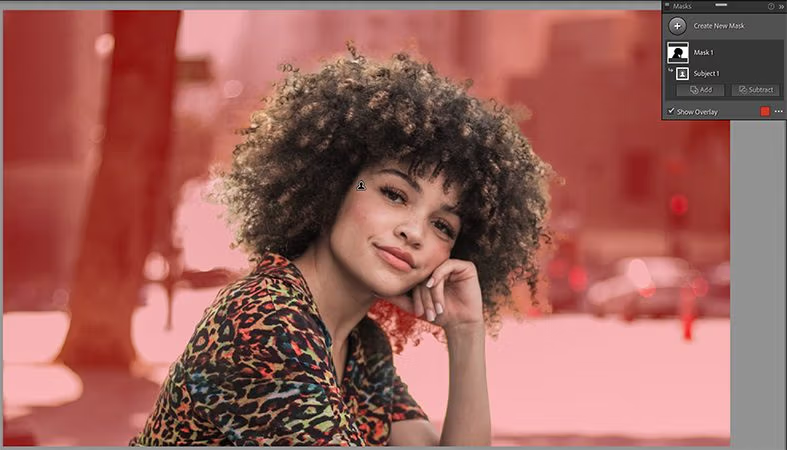
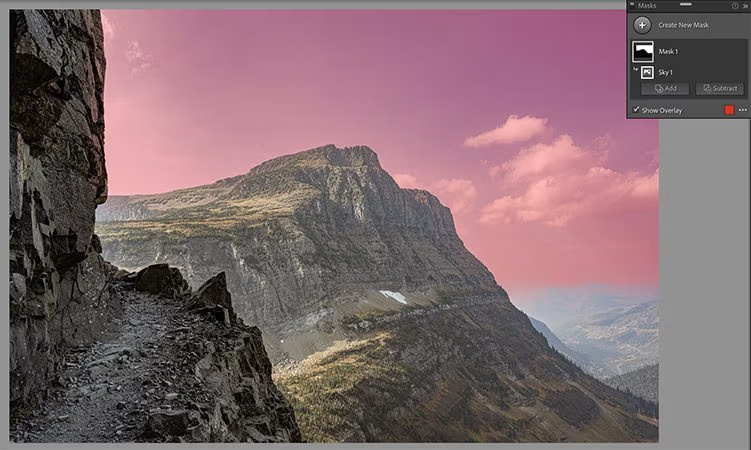
Automatically select an object or the sky in the image.
Now, you can automatically select objects or the sky in your image with just a single click. This selection allows you to define and refine the area for editing, truly bringing out what you want. Discover these advanced tools and more in the new Masking panel.
Improve the metadata workflow.
Gain more control over how you update and display your metadata. Customize and organize your metadata as desired in the Metadata Panel. The new edit-only mode speeds up batch metadata editing for multiple images.
Supports new cameras and lenses.
System Requirements
- Processor: Intel® or AMD processor with 64-bit support; 2 GHz or faster processor
- Operating system: Windows 10 (64-bit) 1909 or later
- RAM: 8 GB
- Hard disk space: 2 GB of available hard disk space
- Monitor resolution: 1024 x 768 display
- Graphics card: GPU with DirectX 12 support, 2 GB of VRAM
This article is for informational purposes only.